


- Home
- Lightroom ecosystem (Cloud-based)
- Discussions
- Lightroom CC 2018 Paste Edit Setting not working f...
- Lightroom CC 2018 Paste Edit Setting not working f...

Copy link to clipboard
Copied
Hi,
I can't find an appropriate answer to this anywhere.
In previous Lightroom versions you could copy and paste/sync edit settings across multiple images easily.
With Lightroom CC 2018, copy and paste flat out doesn't work when multiple images are highlighted.
It will paste the settings to the image in the window but not the others selected in the Filmstrip view.
Also, I have not seen the option to copy *all" settings - for example, crop does not paste over to any images - even if doing one at a time.
This seems like it should be a dramatically easy thing to do but I can't figure it out and can't find anywhere online where people are having the same problem.
Have a number of timelapses with 1000+ images just waiting to be edited because this seemingly simple feature hasn't been catered for in an easy-to-use way in Lightroom CC (it seems anyway).
Can anyone help?


 1 Correct answer


That's right, copy/paste to multiple photos isn't in the new Lightroom CC app. It's not an upgrade from previous versions - it's the first release of an entirely new app. Lightroom Classic, which is the next version on from previous Lightroom versions does still have the copy/paste you're looking for, and hopefully it'll be added to Lightroom CC before too long too.

 60
Replies
60
60
Replies
60


Copy link to clipboard
Copied
hell with lightroom 2018 I'm back to lightroom classic

Copy link to clipboard
Copied
Adobe are you f'ing kidding me? Not being able to apply settings in bulk is pointless. Guess I am uninstalling this pile of rubbish and going back to classic.

Copy link to clipboard
Copied
Money back. this is so useless! Who is in charge here?

Copy link to clipboard
Copied
If you call them on the phone directly they will switch you back to your old lightroom plan. I'm happy to be back on the working version.

Copy link to clipboard
Copied
The new Lightroom CC 2018 should be renamed to Lightroom Elements to follow the naming scheme of other watered down versions like Photoshop Elements and Premiere Elements. As it stands it's very difficult to even Google issues because there are two products named the same thing. This is Microsoft Onenote level foolishness.
The app is mostly great except for the lack of histogram and the inability to quickly apply presets to multiple photos. Both of those things seem like they'd be obvious even in a watered down version of the app.
It would also be nice if they used the same library so at least after you've done a bunch of work rating photos and realize Adobe CC is missing major features, you can go back to CC classic and finish up without having to start over.
Copy link to clipboard
Copied
johansebamuel wrote
The app is mostly great except for the lack of histogram and the inability to quickly apply presets to multiple photos. Both of those things seem like they'd be obvious even in a watered down version of the app.
It would also be nice if they used the same library so at least after you've done a bunch of work rating photos and realize Adobe CC is missing major features, you can go back to CC classic and finish up without having to start over.
We can cross two of those off:
Histogram is there. In an edit view, click the ... button down the right hand side and turn it on.
And if you turn on sync in Classic, it'll continue to pull down your changes from CC, as it always did from the mobile apps. There are some downsides to trying to use both together (like Classic doesn't sync keywords up/down) but if there's a specific feature you need, it could be a good compromise.
Victoria - The Lightroom Queen - Author of the Lightroom Missing FAQ & Edit on the Go books.

Copy link to clipboard
Copied
Can I just point out that if Lightroom CC is not being marketed as a direct upgrade / replacement for Lightroom CC then giving it the exact same name is just stupid. They had to rename Lightroom CC to Lightroom CC Classic (in this case Classic apparently means what, "better?"). Let's imagine that Audi released the 2018 version of the A4. Except, this new A4 is not actually a new A4, it is called an A4 but it's actually marketed at the Ford Fiesta market. Audi call the old A4 the A4 classic and would prefer that A4 drivers stick with the old car and....OK you see where I'm going. Makes no sense.
I'm sure Lightroom CC (the new one) will improve. I really like it. The connected nature of it is cool. It is clearly the future, fits with Adobe's Cloud-first path. Perhaps they should have called it Cloudroom?

Copy link to clipboard
Copied
This is clearly a case of woulda coulda shoulda, for sure. Many of us have wondered the same thing. I have indicated this a number of times, I might be wrong, and some may be tired of reading it. But as I understand it, the Lightroom CC interface is supposed to be consistent across all devices. If it works on the computer, it should work the same way on the phone and on the iPad, etc. It should look the same as well. So providing that consistency is one of the challenges involved in developing Lightroom CC (I think). IF that is the case, then that is perhaps why some of these things that some of us think have been "left out" are not there. They have not been left out because Lightroom CC is being developed from the ground up. It is brand-new, not an upgrade or replacement for the "old" Lightroom. The "old" Lightroom is not being replaced, but is still alive and being supported and updated as well. They are two different programs for two different types of users. The only problem is, the names of programs have really confused a lot of users. And that just isn't going to change.

Copy link to clipboard
Copied
This doesn't work in Classic CC either. Whats the deal??
Copy link to clipboard
Copied
heathh80945444 wrote
This doesn't work in Classic CC either. Whats the deal??
It should work in Classic so walk us through your steps and exactly what happens.
Victoria - The Lightroom Queen - Author of the Lightroom Missing FAQ & Edit on the Go books.
Copy link to clipboard
Copied
When setting up pictures for a time-lapse I edit the photo in the middle of say 360 photos. Then copy its attributes and paste to the other 359. Using shift to highlight the remainder it only pastes to the photo that was clicked on and not all that are highlighted. This worked fine in previous versions of "classic". The previous version works fine on my other mac.
Copy link to clipboard
Copied
heathh80945444 wrote
Using shift to highlight the remainder it only pastes to the photo that was clicked on and not all that are highlighted. This worked fine in previous versions of "classic".
If I'm following you correctly, that's working as designed.
If you're in Grid view, paste will apply to all selected photos. In any other view, it only applies to the "most selected" or active photo.
Sync, on the other hand, applies to all selected photos, or if you have Auto Sync enabled, it'll apply whatever you do (including paste) to all selected photos regardless of view mode.
Victoria - The Lightroom Queen - Author of the Lightroom Missing FAQ & Edit on the Go books.
Copy link to clipboard
Copied
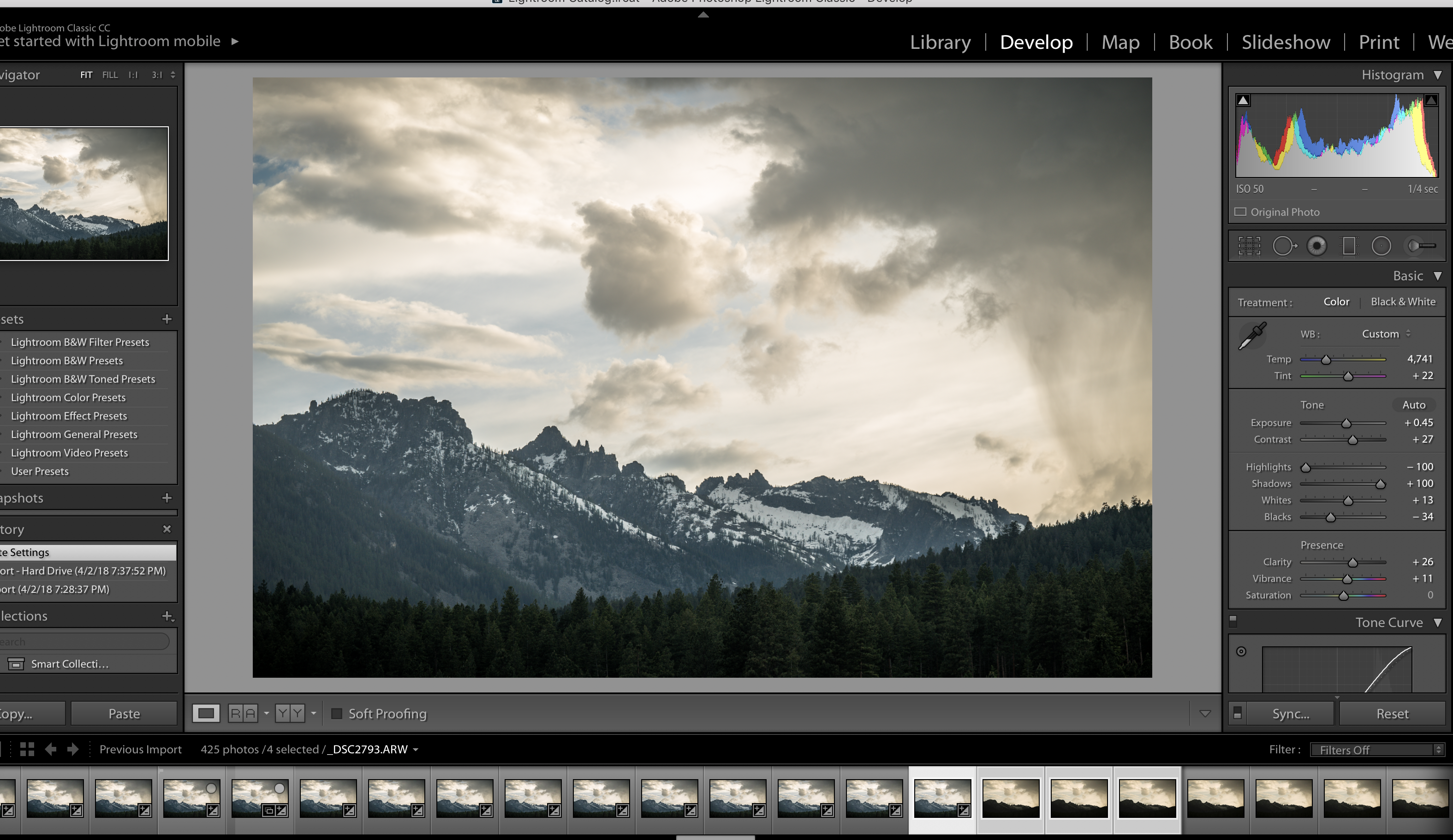
I'm in the Develop Mode. See the image below where I highlighted 4 of the images but only 1 pastes. I actually converted over to Version 7.0 and it still doesn't work. All previous version this function worked fine. Please help

Copy link to clipboard
Copied
Hi Heath,
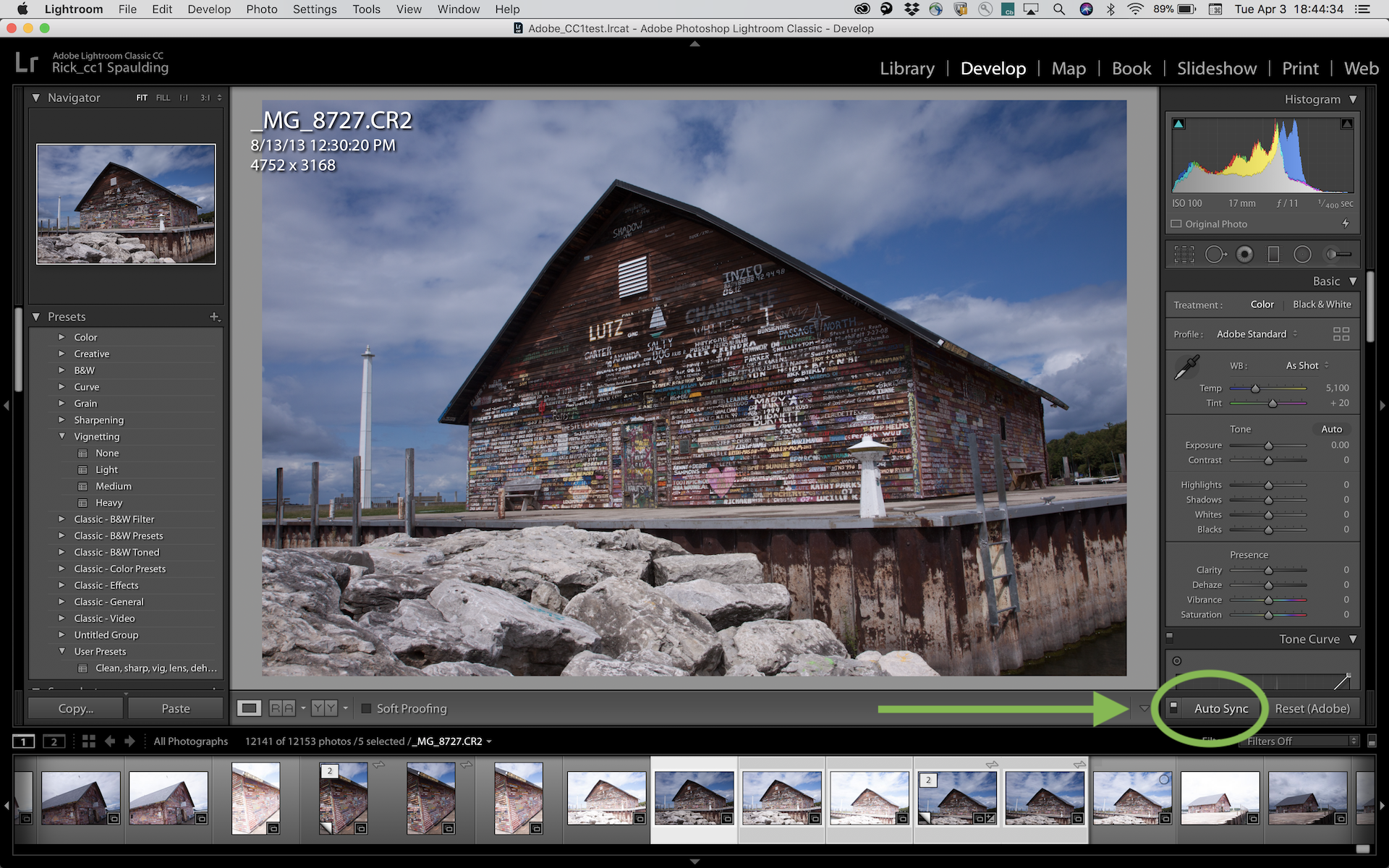
If you turn on Auto Sync it will work like you expect.
Copy link to clipboard
Copied
Hi Rick,
It sure does! Simple click I missed working on a new computer..thanks so much!

Copy link to clipboard
Copied
I am using CC Classic and it does not have the copy and paste for profiles. Just for your information.
Copy link to clipboard
Copied
MikeBoo wrote
I am using CC Classic and it does not have the copy and paste for profiles. Just for your information.
Copy/Paste profiles works for everyone else in Classic, so you might want to post in the Lightroom Classic forum (this is the Lightroom CC one) for help troubleshooting so we can get it working for you too.
Victoria - The Lightroom Queen - Author of the Lightroom Missing FAQ & Edit on the Go books.

Copy link to clipboard
Copied
Copy and paste sort of works in the online version. The issue is that it
copies all settings, so everything gets changed, Light, vertical
distortion, lens settings. Everything. You have to work out a work
sequence which stops the paste from overwriting your Individual changes.

Copy link to clipboard
Copied
Adobe Team,
I don't want to beat a dead horse but do you guys have a timeline or roadmap as to when the batch processing will occur in Lightroom CC 2018? In my humble opinion, stating Lightroom CC is NOT for professional photographers is load of crap. Casual and professionals alike used Lightroom Classic because that was the ONLY solution available. Adobe "Marketed" Lightroom CC 2018 as a tool for all photographers to view and edit photos irrespective of the device with an additional upcharge for cloud storage. I think we're asking you guys to own the mistake and correct it minus the excuses.
If Adobe can't or won't drive the features we need (from their monthly subscription users) in a timely manner we'll have to start moving to the competition. I LOVE the Adobe ecosystem but I'm not going back to Classic CC for a monthly subscription fee. I hate the thought of learning Capture One and Affinity Photo but Adobe leaving me with no choice.
Get it done.... Please!
Copy link to clipboard
Copied
First of all, I hear your frustration. Problem is, this is a user to user forum and I'm just another user like yourself, no connection whatsoever with Adobe. And that's what almost all participants are who contribute on this forum are. Secondly, IF the Adobe team did participate here, and IF they had an answer to your question, they wouldn't give it to you because they aren't allowed to. Adobe never announces updates in advance. But the best thing you can do is voice your opinion on a forum where the developers DO monitor very closely and consider opinions and needs. Whether or not your concern will sway their priorities is another question. Here is the link to the forum where you should post your concern:

Copy link to clipboard
Copied
Adobe has released updates today and it is now possible to copy & paste settings to multiple images. Launch Creative Cloud desktop and go to the Apps tab to install. I have outlined the main features here:
Copy link to clipboard
Copied
I have downloaded the update and can confirm that batch copy and paste with CMD-SHFT-V works on a number of selected photos simultaneously. Credit to Adobe for removing this irritating marketing restriction. However the paste function has changed in some fundamental ways which one should be aware of. Previously all settings for a picture were copied and then pasted with CMD-V. Now only the LIGHT settings are copied and pasted. I haven't tested it exhaustively, but OPTICS AND GEOMETRY are definitely ignored. This makes sense in a way, in that LR cannot know at a batch level whether the camera and lens were the same for all photos. A more granular batch editing approach is favourable and is how Picasa has always done it. It would be really useful if there was a CMD shortcut for Enable Lens Correction or some of the other features, so that one could do a separate batch edit for each of these elements. But this was a huge step forward in usability. Thanks Adobe, for listening to your users!
Copy link to clipboard
Copied
There are other differences in the copy/paste function which one should be aware of. If you do a batch change to either the star rating or the Pick/Reject Flag to a number of photos then, if one of them has been edited in Photoshop, the action will be applied to both the original and the new, edited version. This is not correct, as one only wants to choose the latest version of a file. Previously, I don't think this happened. One has to go to each edited picture and double click to display both pics in the bottom left of the screen. Then disable manually the flag and star settings. This is very time consuming and, because it takes some fiddling sometimes to get the "2" black box indicating edited duplicates to show up, quite irritating and unnecessary. Adobe, could you please fix this too?
While I'm on the subject, the edit in Photoshop function is a great function, but very slow. In Photoshop you can access the CC photos and edit them more quickly. This is ok if you're shooting and editing in JPeg, but if you're using Canon RAW, because Photoshop has no Canon RAW save mode, the only way to preserve the file is to take the snail route via Lightroom. So, if Adobe LR can save Canon RAW files from PS, why can't Adobe PS do it natively? Again, this would be a real help, Adobe.
Copy link to clipboard
Copied
It is possible to copy and paste the other settings like "enable lens corrections" as well. Open a picture and apply your corrections, press CMD-SHIFT-C. You will see a list of options that you can select or deselct that can be copied and then pasted with CMD-V to a number of other pictures. It works fine.

Copy link to clipboard
Copied
did they do something to cntr alt v? paste previous? Ca´t make it work now...


Find more inspiration, events, and resources on the new Adobe Community
Explore Now
 AdChoices