


- Home
- Lightroom ecosystem (Cloud-based)
- Discussions
- Lightroom Win Export Bad argument #1 to 'stringByA...
- Lightroom Win Export Bad argument #1 to 'stringByA...

Copy link to clipboard
Copied
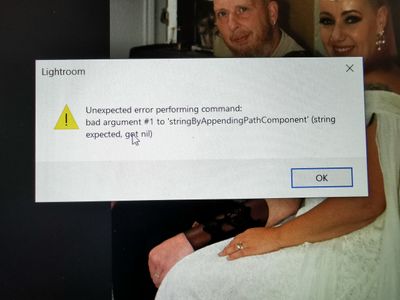
Hello
I am getting this error message on Photoshop Lightroom desktop edition (via Microsoft Store) when I go to export as 'large jpg'.
Nothing happens when I try to export to ...
Works fine on android app.
Can anybody help?
Much appreciated.
Jim
{Title edited by Moderator}


 1 Correct answer


Hi Jim,
Please provide a few details on this issue;
Could you please confirm the version of Lightroom & the exact version of the Windows you are working on? Where are you trying to export the images? Have you recently updated the operating system or the application?
Check the registry entries in the following location(might require IT authorization as this is on a work machine):
- Press Windows + R > type in 'Regedit' and press OK to open Registry Editor.
- Navigate to the following location in

 6
Replies
6
6
Replies
6

Copy link to clipboard
Copied
Hi Jim,
Please provide a few details on this issue;
Could you please confirm the version of Lightroom & the exact version of the Windows you are working on? Where are you trying to export the images? Have you recently updated the operating system or the application?
Check the registry entries in the following location(might require IT authorization as this is on a work machine):
- Press Windows + R > type in 'Regedit' and press OK to open Registry Editor.
- Navigate to the following location in Registry Editor: HKEY_CURRENT_USER\SOFTWARE\Microsoft\Windows\CurrentVersion\Explorer\User Shell Folders
- Check & ensure the data values for all the registries are as below on your computer.
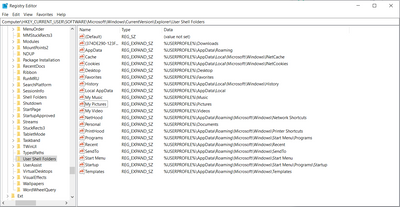
(For a closer look)
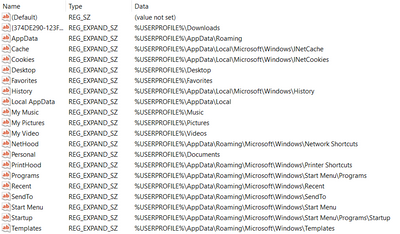
After applying these changes, please restart the computer and export from Lightroom.
Let us know how it goes.
Regards,
Ranjisha
Copy link to clipboard
Copied
Hi Ranjisha,
Fixed - The Pictures folder has been on an external drive for months. I don't know why it stopped working.
I moved it back and its all ok now.
THANK YOU so much.
Jim
Copy link to clipboard
Copied
Glad to know that it's resolved. Feel free to reach out whenever needed.

Copy link to clipboard
Copied
Hi Janjisha,
So I am having the same issue and I just downloaded Lightroom yesterday on my Windows 10 PC. I went through your reccomendation above and nothing changed. Any further assistance would be appreicated, thank you!
Copy link to clipboard
Copied
Which version of Lightroom are you using? What exact issue are you seeing? Which all steps have you tried so far?

Copy link to clipboard
Copied
Hi, I have the same problem but I can't seen to find the "user shell folder" in my laptop


Get ready! An upgraded Adobe Community experience is coming in January.
Learn more
 AdChoices