
Participant
August 7, 2023
Answered

Problem with exporting photos - Lightroom Mobile

  • August 7, 2023
  • 4 replies
  • 11759 views

Hi, 


I'm using Adobe Lightroom Mobile, on android device, for more than 1 year. Sometimes the application does not work as I thoight it would, but the biggets problems is exporting photos in Largest Available Dimensions, during last yera, it happened sometimes that the application was not able to export edited photos, and I thought that it's only bug, which'll desapear after next update. But ater latest update, this problem shows up more usualy then ever before, and I'm mad from it, I'm paying for aplication which doesn't work by the way it should. When I push the button for export, it only show loading animation, and that's all, few times I let it just rolling, for 2 - 4 hours, but nothing happened, no exported photo, no positive results. I know that maybe it need more resources than some cheap phone or tablet... but I'm using it on my Samsung Galaxy S8 ultra, and I don't think so that this is not enough powerfull to don't hold this app.
This topic has been closed for replies.
Correct answer Sameer K

Hey @Samuel Simonic. Welcome to the Lightroom Community. I'll help you figure this out.

What version of Lightroom & the Android OS are you working on? Does this happen with recently imported images, or do older photos not export as expected?

Please log on to Lightroom Web (https://lightroom.adobe.com) & ensure all the images are synced. How much free space do you have on the device right now?

Try this in Lightroom Mobile,

  • Create a test album in Lightroom.
  • In the Lightroom view, click on the album dropdown menu > Album Name > three dots on the album.
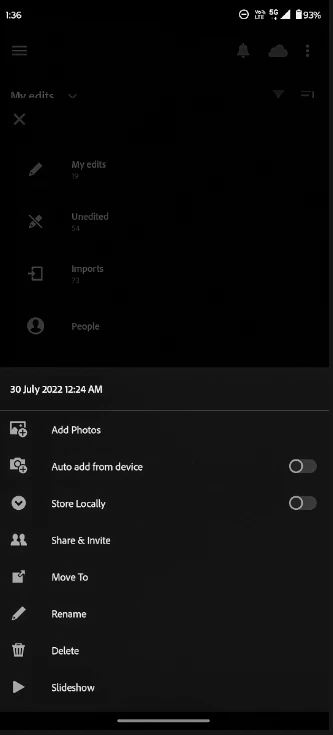
  • Select 'Store locally' (third option in the screenshot)


  • Export from this album.


Let us know how it goes. Thanks!
Sameer K.

4 replies

Participant
October 12, 2024

It is happening to me, it is painful. I am going to cancel my subscription. There are alternatives with which after editing you can easily export for different viewing.

Participating Frequently
August 19, 2024

Adobe es una vergüenza. Pagar mensualmente 40€ para tener un servicio horrible...

A mi me pasa que al buscar las fotos sin editar, cuando las guardo se queda la barra de descarga a la mitad y nunca se completa. Esto hace mucho que pasa y no lo arreglan.

Participant
November 21, 2023

Plis solve it

Sameer K
Community Manager
Sameer KCommunity ManagerCorrect answer
Community Manager
August 7, 2023

Hey @Samuel Simonic. Welcome to the Lightroom Community. I'll help you figure this out.

What version of Lightroom & the Android OS are you working on? Does this happen with recently imported images, or do older photos not export as expected?

Please log on to Lightroom Web (https://lightroom.adobe.com) & ensure all the images are synced. How much free space do you have on the device right now?

Try this in Lightroom Mobile,

  • Create a test album in Lightroom.
  • In the Lightroom view, click on the album dropdown menu > Album Name > three dots on the album.
  • Select 'Store locally' (third option in the screenshot)


  • Export from this album.


Let us know how it goes. Thanks!
Sameer K.

Participant
August 13, 2023

Hi Sameer K. ,

I'm sorry for late reply, I'm using Lightroom App v8.4.2 on Android 13. Free space on device is right now  79.3 GB - main storage. It looks that the option: "Store Localy" works, the exporting of photos works good, a tried it few times during last week, so for now I guess the problem is resolved.


Answers to other questions:

The problem with export happened on all kind of photos, older also newer, RAW format also JPEG or PNG format, but as I see right now, the problem only shows when I'm working with cloud sync. Hope it'll be fixed in nearly future.

Thanks for help.


--

Samuel S.

Sameer K
Community Manager
Community Manager
August 14, 2023

Thanks for the confirmation! Glad to know you have a workaround to continue working.


If you've already checked Lightroom Web & everything is synced to the cloud, you can try to uninstall & reinstall the app once & check if it works as expected again.


Thanks!
Sameer K