


- Home
- Lightroom ecosystem (Cloud-based)
- Discussions
- Syncing not working after upgrading plan
- Syncing not working after upgrading plan

Copy link to clipboard
Copied
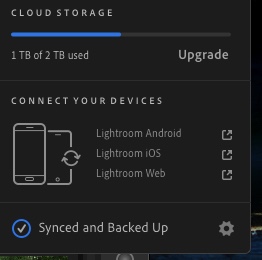
Several weeks ago I upgraded from the 1 GB plan to the 2 GB plan. Lightroom CC shows the correct plan in the cloud icon, but syncing has stopped at 1 GB and will not resume. I have photos from 3 trips stored locally and they will not sync. The status says "Synced and Backed Up".
At this point I am worried that my photos will be lost if they do not sync, besides the fact that I am paying for 2 GB and Lightroom refuses to use the space. Any ideas on how to fix this bug?


 1 Correct answer
Hi Benjamin,
I was able to resolve the issue by manually saving off all 5,000 Pending photos locally. I then made a backup of Lightroom Library.lrlibrary and deleted the existing one in the Pictures folder (on my Mac). Then I reopened Lightroom and imported the photos again.
I'm not sure why it happened, but I'm glad I figured it out before I somehow lost 4 months of photos. It would be nice if the software warned you if something was corrupted in the local database file.
Thanks,
Brian

 9
Replies
9
9
Replies
9


Copy link to clipboard
Copied
Hi BrianMorale,
That isn't a great user experience as Lightroom is not syncing images as expected, we're sorry to hear about this. Let us help make it right.
Could you please take a look at the steps mentioned in this article Known issues and workaround and let us know if that helps?
Thanks,
Akash
Copy link to clipboard
Copied
I've attempted these solutions and it didn't resolve the problem. When I try to filter by Sync Status I get a little error that says "No sync status available". Something is significantly broken. However, I can't reinstall or I'll lose over a thousand photos.

Copy link to clipboard
Copied
You can check if the recent originals are in the cloud by logging-in to your web app. It could be that everything is sync’d but the storage counter is not yet updated.
Copy link to clipboard
Copied
Unfortunately they are not. Everything worked until it hit the original 1 TB limit, then it stopped, even after upgrading. Nothing has synced to the cloud in over a month. I've confirmed on my iPhone.
Copy link to clipboard
Copied
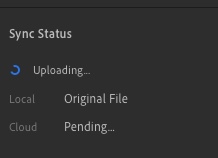
I've noticed that all of the photos I've added to Lightroom in the last month have a Cloud: Pending status. None have actually uploaded.
Copy link to clipboard
Copied
Brian I suggest making contact with Adobe directly. They should be able to check your account status. Click the link below and scroll to the bottom of the page. Under individual click sign-in to contact us. It should be possible to start an on-line chat with an Adobe agent.


Copy link to clipboard
Copied
Hi Brian,
I'm sorry to hear about the trouble! If possible, I'd like you to send me log files, which might help us identify the problem. I will message you privately with instructions for how to collect and send the log files.
Thanks,
Ben
Benjamin Warde
Lightroom Product Manager
Adobe
Copy link to clipboard
Copied
Hi Benjamin,
I was able to resolve the issue by manually saving off all 5,000 Pending photos locally. I then made a backup of Lightroom Library.lrlibrary and deleted the existing one in the Pictures folder (on my Mac). Then I reopened Lightroom and imported the photos again.
I'm not sure why it happened, but I'm glad I figured it out before I somehow lost 4 months of photos. It would be nice if the software warned you if something was corrupted in the local database file.
Thanks,
Brian
Copy link to clipboard
Copied
Hi Brian,
I'm glad you were able to resolve the issue! Sorry again for the trouble.
-Ben
Benjamin Warde
Lightroom Product Manager
Adobe


Get ready! An upgraded Adobe Community experience is coming in January.
Learn more
 AdChoices