Community Manager
October 22, 2017
In Development

P: Ability to create a Custom Crop Ratio preset

  • October 22, 2017
  • 174 replies
  • 7373 views

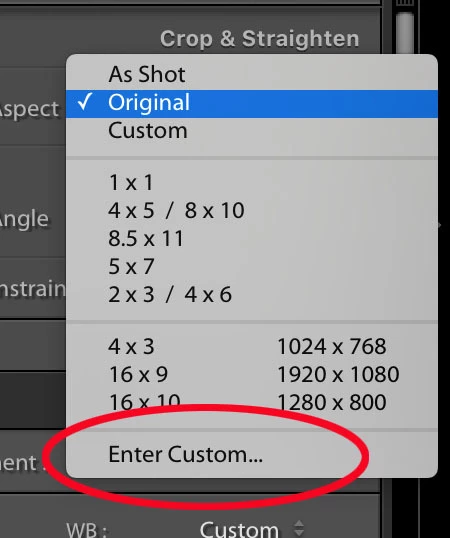
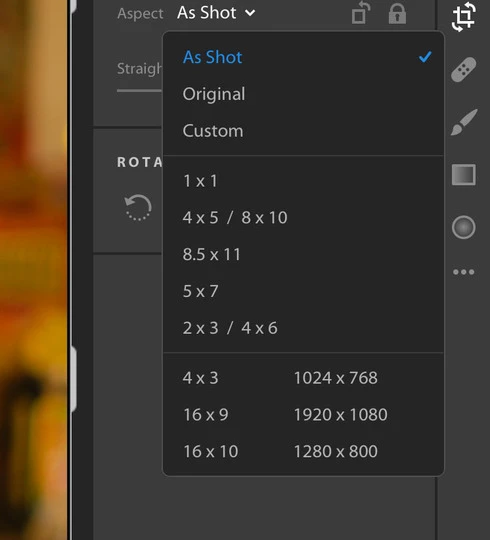
Where is the "Enter Custom..." option from the old Lightroom and how do we get it back (see attachments)? I like to make my photos 1080x1080 for Instagram and was able to do this in the LR Classic version.
 

174 replies

New Participant
June 30, 2025

This is NOT the correct answer to my question. I was talking about Lightroom Mobile, i.e. iPhone and iPad. 

Lightroom CC on my Macbook allows me to set the aspect ratio, but there is nothing on iPhone or iPad to do the same. It seems like a very simple thing to do, just a dialog to enter W and H. 

Digiplay
Known Participant
June 30, 2025

8 years and we can't edit aspect ratio how we want.  Absurdity at its finest. 

New Participant
June 5, 2025

With Lightroom CC on my Mac, I was able to define a 65 x 24 aspect ratio (X-Pan format) for cropping images. LR CC saved it as 6.5 x 2.4, but this works. 

I can't crop precisely to 65 x 24 on iPhone or iPad, and cannot preset that ratio either.

Would be nice to be able to.

Another possibility is that Adobe add 65 x 24 to the list of aspect ratio presets.

Known Participant
February 17, 2025

I agree we really need this in the mobile apps as well. Also, please show us the current cropped resolution when cropping.

New Participant
July 28, 2024

I need to change aspect ratio by enter custom values In lightroom mobile app. Currently we have set of aspect ratio and a custom freemform aspect ratio, but no custom by values option? Please add this simple feature to the app.

New Participant
July 22, 2024

Please let user input custom aspect ratio rather than just dragging the frame when cropping an image.

New Participant
April 9, 2024

Please add the ability to specify (and save!) a custom aspect ratio in the crop tool. 

New Participant
March 30, 2024

It would be great for the mobile Lightroom for iPad to have this feature. Just downsized my kit from a Mac book pro to an iPad and I miss the feature to set whatever specific aspect ratio I want (ie, 6x7, 25x64). Would be a great quality of life upgrade for those of us who switch from Classic desktop to the cloud-based system

psamathe_net
Known Participant
October 19, 2019

Lightroom Mobile iPadOS & iOS

Is there any way to add a custom aspect ratio to the crop tool. There are a number of aspect ratios in the drop down but I very frequently need a specific 3.2:1 (for a website featured image)?


I've previously used a dummy image of the correct aspect ratio with cooy/paste settings but LR mobile used to support copying crop aspect ratio but it's been removed (grrrrrr) and now only copy all crop settings which I've found works sometimes/in some versions and not in others.


(ps. I can't see how to tag the post with the platform as other posts seem to be tagged. Sorry)

Michael J. Hoffman
Community Expert
Community Expert
October 19, 2019

This isn't available in Lightroom currently. You can add your voice to the feature request page here:

https://feedback.photoshop.com/photoshop_family/topics/where-is-the-enter-custom-crop-number-in-the-new-lr-cc


Ilyès S.
New Participant
January 26, 2024

It would be great if we could type precisely which custom ratio to use when croping photos in lightroom mobile, for instance if I want to use a 3x1 crop for a panorama, instead of guessing approximately how that would look on the mobile version and refine it in the Cloud version. 


I'm editing photos on the go, and for now, there are a few things that I still need to do when I get back home. 

Participating Frequently
October 24, 2023

Why is it not possible to make a custom crop ratio? Like on the desktop version? Now I have to

do copy settings and only select crop from a previous edit, such a waste of time...