

P: Impossible to change capture date in Lightroom on iPadOS or iOS
Having to time-shift the EXIF capture date of photos is an extremely common use case when importing from SD cards used in nearly all non-timezone aware digital cameras manufactured for the past 20 years.
If you travel anywhere and start shooting before changing the timezone or date/time settings of your camera, you will have in your Lightroom library groups of shots captured from your timezone-aware devices (phone, tablets, etc.) grouped at the correct time while shots taken with your digital camera will be shifted to the wrong relative time because your digital camera uses a fixed time based on your home location, not the location you traveled to.
This feature was supported in Lightroom Classic and is currently only offered in the Desktop/Laptop version of Lightroom CC/Cloud/etc. but not in the iOS/iPadOS (and I assume Android) versions of the app for some intractable reason. Anyone who owns only mobile or tablet devices will be incapable to shift shots taken in the wrong timezone, which seems a bit absurd.
For reference this is what the feature looks like in Desktop Lightroom CC/Cloud:
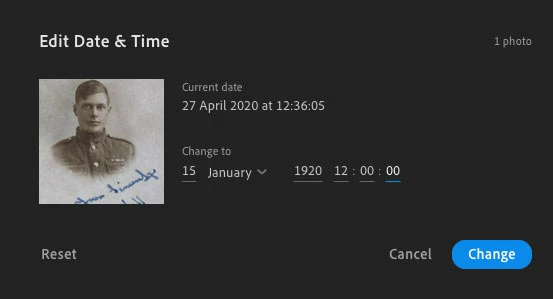
It's far from a crystal clear implementation of such a feature but at least it's generally functional. I listed this post as a bug because in my opinion Lightroom shipping as a single product with varying feature support across platforms is not a feature request (since the feature already exists), but a bug that needs to be addressed on certain platforms.
 AdChoices