Participant
Sep 25, 2023 7:14 AM UTC
Released

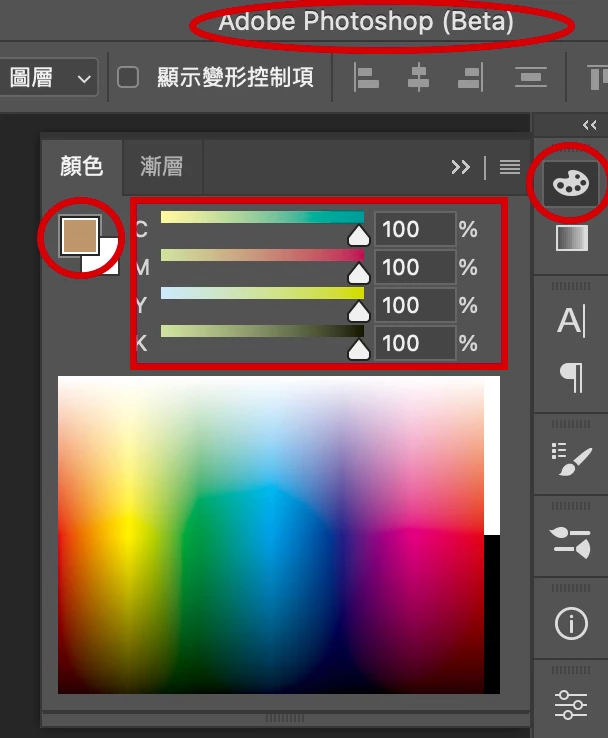
P: Photoshop(Beta) 25.1.0 color picker not updating

 

Photoshop(Beta) 25.1.0 , 顏色面板的數值不會變更!!

This topic is closed to new replies. Start a new post to keep the conversation going.

21 replies

CShubert
Community Manager
Community Manager
Nov 3, 2023 3:42 PM UTC

Hi all, this was fixed in the recent release today: Adobe Photoshop Version: 25.2.0 20231101.m.2385 38bb2d3 arm64


If you still have this issue after the update, please start a new thread for the team to look into.


Translate
Participant
Nov 3, 2023 3:40 PM UTC

In the 25.1.0 Release I am experiencing the same lack of functionality in the 'Color' Panel.
I reinstalled v 24.7.2 and the color panel behaves normally.

Translate
Participant
Nov 1, 2023 3:06 PM UTC

Unfortunately, the problem persists even in the final version 25.1. Unbelievable that a key function of the program is not working!

Translate
Participant
Oct 30, 2023 12:17 PM UTC

i have the same problem in 25.1 stable version, why? How can i fix it?

Translate
Ged_Traynor
Community Expert
Community Expert
Oct 28, 2023 7:04 AM UTC

@CShubert "we see this as well and will have the team look into it" if Adobe knew about this issue in the Beta version why have Adobe rolled out version 25.1 when the issue was clearly NOT fixed.

Why do Adobe constantly push out buggy updates without proper testing.

https://community.adobe.com/t5/photoshop-ecosystem-bugs/photoshop-2024-color-sliders-don-t-work/idc-p/14187632

Translate
Participant
Oct 27, 2023 5:27 PM UTC

i had to revert back to 25.0! 

Translate
CShubert
Community Manager
Community Manager
Oct 18, 2023 4:24 PM UTC

Thanks for your reply @art31419451edgz we see this as well and will have the team look into it.


Translate
Participant
Oct 18, 2023 7:04 AM UTC
quote


Photoshop(Beta) 25.1.0 , 顏色面板的數值不會變更!!


By @art31419451edgz
quote


Photoshop(Beta) 25.1.0 , 顏色面板的


By @art31419451edgz


Hi CoryShubert, 我嘗試了你的方法,但問題並沒有解決。仍然謝謝你!

Translate
AndersonAtlas
Participant
Oct 12, 2023 11:34 PM UTC

hello! This is a newish problem - I've just been dealing with it for the past three versions of Photoshop but now it's really bugging me. When I use the color picker, the color is updating and I can paint normally. But if I want to select a similar color or value in the color widget box, the color USED to update to the current color the eyedropper picked but now it does not. It just stays the same no matter what the eyedropper samples


Would anyone be able to help me figure out this bug? 


Translate
CShubert
Community Manager
Community Manager
Sep 25, 2023 1:26 PM UTC

Hi @art31419451edgz 

Try resetting Prefs for the Beta:

/Users/yourname/Library/Preferences/ Photoshop Beta Settings (Mac Ventura)

/Users/yourname/Library/Preferences/Adobe\ Photoshop\ \(Beta\)\ Settings (Mac)
C:\Users\user name\AppData\Roaming\Adobe\Adobe Photoshop (Beta)\Adobe Photoshop (Beta) Settings )Win)

Launch BETA Photoshop While Pressing The Keyboard Shortcut

With Photoshop closed, press and hold Shift+Ctrl+Alt (Win) / Shift+Command+Option (Mac) on your keyboard and then Launch Photoshop the way you normally would.

https://helpx.adobe.com/photoshop/using/preferences.html#Manually  


Do you see the same issue with Ps release version 25.0?


Translate