Answered

This topic has been closed for replies.
Hi Cristian. You've posted this in the beta forum, so the obvious question is does it also happen with the release version? It's unlikely to be a workflow problem with the amount of experience you'll have had doing your job.
To be clear, is it just the thumbnails that show the problem? Are the files opening OK?
If that's the case, how do the thumbs look in Bridge? The thing with bridge is we can purge the cache and rebuild the thumbnails.
Clutching at straws here, but I am thinking these are going to be tiny files.
Could compression and backward compatability be messing things up?
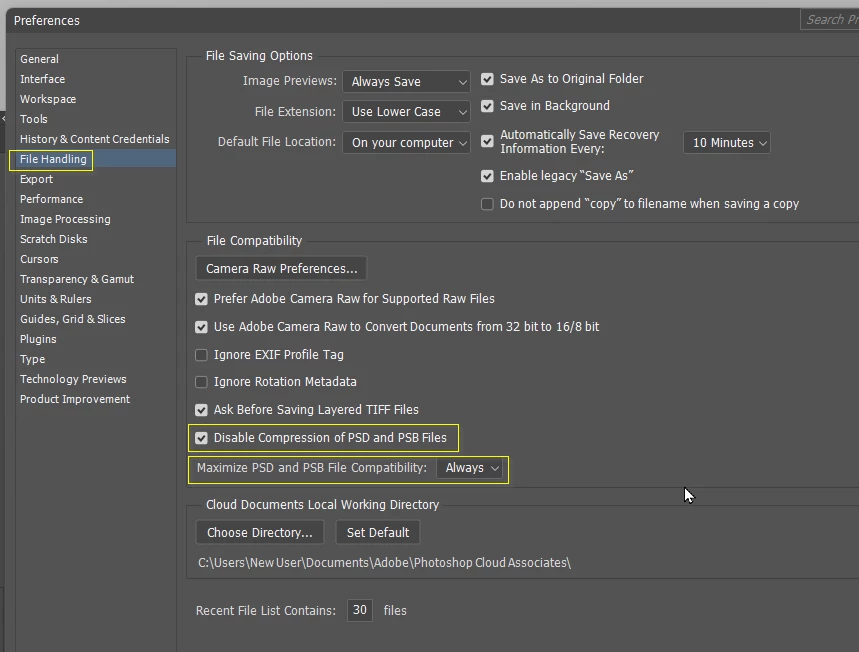
My final thoughts are that I can't remember seeing this before, and that this is (I assume) the beta version, so it could come down to resetting Preferences. The beta version is always going to be more flaky than thew release version.
Good luck.
Sign up
Already have an account? Login
To post, reply, or follow discussions, please sign in with your Adobe ID.
Sign inSign in to Adobe Community
To post, reply, or follow discussions, please sign in with your Adobe ID.
Sign inEnter your E-mail address. We'll send you an e-mail with instructions to reset your password.
 AdChoices