

Adobe Employee
March 17, 2023
Answered

Contextual Task Bars Now in Photoshop (Beta)

  • March 17, 2023
  • 70 replies
  • 102148 views

We’re excited to announce that new contextual task bars are now available in Photoshop Public Beta. We know that finding the right tool, at the right time, can sometimes slow down a great workflow. Our new contextually aware task bars aim to help by providing common tools, actions and next steps right on the canvas where you’re working. We are currently launching five bars for importing new documents, making selections and using the Type Tool. Learn more below: 


Open Image or File

  • This bar will appear when you open an image or file in Photoshop (i.e. not a new, empty document)

 

New Document Workflow

  • This bar will appear if you open a new, blank document from the Photoshop home screen

  • If you choose to select “import image”, your image will be placed in the document as a Smart Object and the Free Transform bar will appear to help finalize placement
 

Type Tool Workflow

  • This bar will appear when you select the Type tool from the tool bar and draw a text box on the canvas

 

Selections Workflow

  • Once a selection is made, a selection edit bar will appear with options to refine the selection or create a mask

 

Tips and Other Menu Functionality
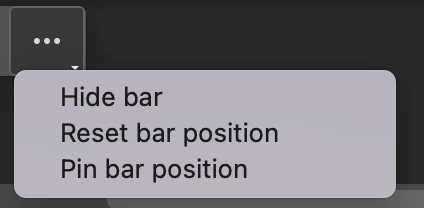
 

  • Pin bar position
    • You can pin and un-pin any bar from the “more menu”. Pinning will hold your bar (and all subsequent bars) where it was placed on the canvas until un-pinned from the “more menu” performed
  • Reset bar position
    • The context bar moves with you as you work on the canvas, keeping relevant tools at your finger tips. If you would like to reset the position, you can do so from the “more menu”
  • Hide bar
    • You can always hide the bar if you’d like to remove it completely, or temporarily, from the canvas. If you’d like to re-open the bar at any point, go to Window > Contextual Task Bar


We need your feedback!

Please let us know what you think and how we could improve the new Contextual Task Bar.

Correct answer danielm77292327

OMG just fixed it!! 


  • You can always hide the bar if you’d like to remove it completely, or temporarily, from the canvas. If you’d like to re-open the bar at any point, go to Window > Contextual Task Bar


And this is the link to where I found how to fix that:


https://community.adobe.com/t5/photoshop-beta-discussions/contextual-task-bars-now-in-photoshop-beta/td-p/13658736

70 replies

Participant
May 24, 2023

Are they supposed ot flash on and off constantly?

calm_determination0D44
Inspiring
May 24, 2023

I like the new contextual task bar in photoshop but it is always in my way and not where I want it. I will have one image open, move the task bar to where I want it, open another image and it's back right back to where I don't want it, in my way. Anyone know how to get the bar to stay in one location? If I can't keep it in one location that is out of my way, there really is no reason to even use the thing cause it becomes an annoyance instead of a benefit. Thanks!

kajsidogpilot
Inspiring
May 24, 2023

I'm thankful I'm not the only one and was going to make this thread if I hadn't found your post.
It's maddening it often wants to be in the middle of the image I'm trying to look at.

Participant
May 23, 2023

Please allow us to dock it as if it were a normal panel.

Participant
May 23, 2023

Looks a cool feature but my task bar keeps constantly blinking on and off, very distracting, so have had to hide it. Hopefully this will be fixed in an update

Skwirlijvieux
Known Participant
May 22, 2023

I have no use for this thing at this time.  I might learn to like it if I could make it vertical and tuck it into the left side of my screen along with my brushes, gradients, tool presets and tools panels.

Skwirlijvieux
Known Participant
May 22, 2023

 Make it dockable and vertical and let me stick it over here and I'll try it.  Right now it's just one more jimcrack I don't need.

Participant
May 7, 2023

I may be missing something but it does not appear to have the same properties as other windows - i.e. to be "dockable" with history/info/layers, etc etc.   When I want to make an operation, I automatically look over there - currently I use TK8 Combo which has most of the same selection options but I could imagine the contextural taskbar being a good replacement if it could be docked and still changed to provide the relevant context for whatever one was doing

Participant
May 2, 2023

So far I don't like it. Just gets in my way. I had to turn it off. 

Participant
April 27, 2023

So far i'm liking the Contextual Task Bar. I agree that customisation would be great.
The only frustration i have right now is likely a bug, but it is causing my screen to jump around a lot when i confirm transformations or when i select/deselect items.

ChaseHLU
Participating Frequently
April 25, 2023

While I do see the benefit of it, at first blush for me, I dont care for it right now.
Im a near 30 year vet of Photoshop, so my life in the app revolves around keyboard shortcuts that are faster, so imagine my surprise in the Beta when I went to use a brush and a context box popped up that gave me more mouse clicks instead of just  fast shortcut. Confused me and got in my way.
I do see the advantage of the Contextual Task Bar showing you more options you may not be aware of that said tool could do. That I do enjoy and I do enjoy the fact that I can park it in the top toolbar, where for my workflow, it fits. Still have to see if I actually benefit from one more step to an end result.

Participant
April 12, 2023

Looks amazing. I like it. This will definitely help my workflow. I think it would be nicer if it could be customized, too.

Pete.Green
Community Manager
Community Manager
April 12, 2023

Glad you're liking the tool so far for your workflows @suetep. Customization is on the team's list of future improvements to this. Thanks for the great feedback!

Known Participant
April 21, 2023

Pete, actually seeing this now in my release version of Photoshop ... as well as the beta. Can't see any notes about it on the ';whats new' page for Photoshop, nothing listed at all for April.