Exit
  • Global community
    • Language:
      • Deutsch
      • English
      • Español
      • Français
      • Português
  • 日本語コミュニティ
  • 한국 커뮤니티
2

Crashes on launch

New Here ,
May 21, 2024 May 21, 2024

Photoshop 25.7 runs fine. Beta 25.9/10 crash on launch and this dialog box pops up. Could it be my graphic card?  What ver of DirectX is needed? My card is Radeon RX580 DirectX 12  12_0.
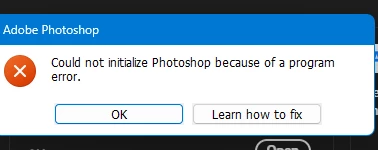
Screenshot 2024-05-21 143313.png

TOPICS
Desktop-Windows
172
Translate
Report
Community guidelines
Be kind and respectful, give credit to the original source of content, and search for duplicates before posting. Learn more
community guidelines
Community Expert ,
May 21, 2024 May 21, 2024

What have you tried?

Is this a new problem?  Have you just installed Photoshop?

Does it corrilate with a update or other changes you can think of?


Have you tried restarting your computer?

Is the graphics card driver up to date?


We often ask for a poster's Photoshop System Info, but if you can't open Photoshop, that is not going to happen.  What I can tell you is having Photoshop completely fail to start is very rare.  If still stuck, try a reinstall, and ultimately, try using the Cleaner tool before installing again

https://helpx.adobe.com/nz/creative-cloud/kb/cc-cleaner-tool-installation-problems.html


Good luck, and please let us know how you get on.

Translate
Report
Community guidelines
Be kind and respectful, give credit to the original source of content, and search for duplicates before posting. Learn more
community guidelines
New Here ,
May 22, 2024 May 22, 2024
LATEST

Working now for some unknown reason. Go figure.

Translate
Report
Community guidelines
Be kind and respectful, give credit to the original source of content, and search for duplicates before posting. Learn more
community guidelines
