
Participant
July 7, 2023
Answered

Crosshair when transforming object

  • July 7, 2023
  • 4 replies
  • 626 views

Before when we would transform an object there was a crosshair that we could move around and anchor. Now it is missing. You can only transform from center. Hopefully, you bring the crosshair back... Making the job a little bit more tedious without it. 
This topic has been closed for replies.
Correct answer Trevor.Dennis

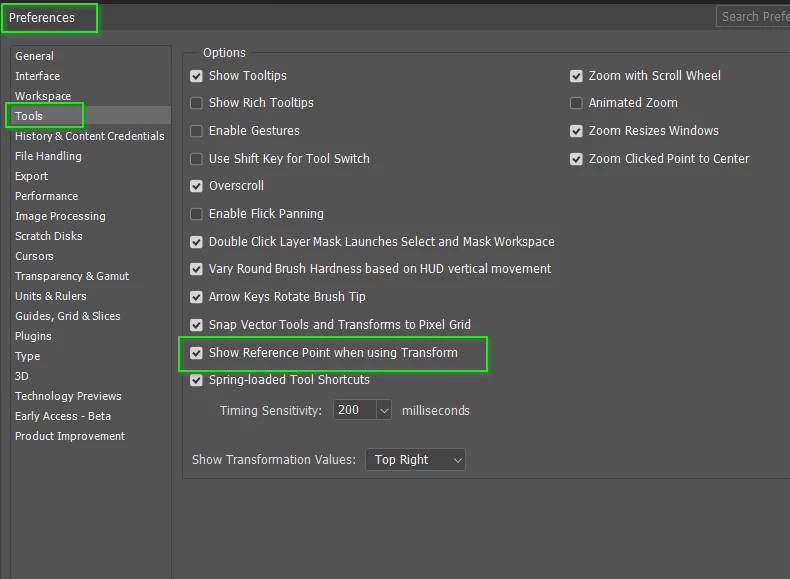
You might also like to enable this setting in Preferences.

4 replies

Trevor.Dennis
Community Expert
Trevor.DennisCommunity ExpertCorrect answer
Community Expert
July 19, 2023

You might also like to enable this setting in Preferences.

KarolinaWAuthor
Participant
September 27, 2023

Worked perfectly TYSM! 

CShubert
Community Manager
Community Manager
July 18, 2023

Hi @KarolinaW ah, we see what's up.

If you click in the square right next to the anchor selector, do you see the crosshairs now?

KarolinaWAuthor
Participant
July 18, 2023

I hit ctrl+t to transform. Next to the horiz / vert transform values, usually you can set the anchor to center or one of the corners so the object transforms based on the anchor. Now, there is no crosshair to move around or anchor. I screenshotted the transformed object close up so you can see there is no crosshair in the center like there used to be before the beta version 
No option to anchor in corners or center etc. 

No crosshair in object that is being transformed 

Hope that helps Cory! 

Regards, 
Karolina 

CShubert
Community Manager
Community Manager
July 7, 2023

Hi @KarolinaW could you share a screenshot of what you are seeing? Does this work as expected on Ps release version?


KarolinaWAuthor
Participant
October 2, 2023

The problem was in the settings. I had to enable Show Reference Point. It was disabled in the update