

Trevor.Dennis
Community Expert
Community Expert
July 14, 2023
Answered

Difficulty Unselecting Layers (beta only)

  • July 14, 2023
  • 2 replies
  • 189 views

Before I reset 24.7 beta Preferences _again_ I'll run it by the forum.  


I have a document with eight layers.  We can usually unselect all layers by clicking on the empty space below the layers, but this is no longer working.  The active layer remains selected.  In fact AFAICT it is impossible to unselect all layers. 


I have tried restarting 24.7, and creating a new document without change.

I switched to the full release version that works as usual.

My workaround so far is to select the backround layer.
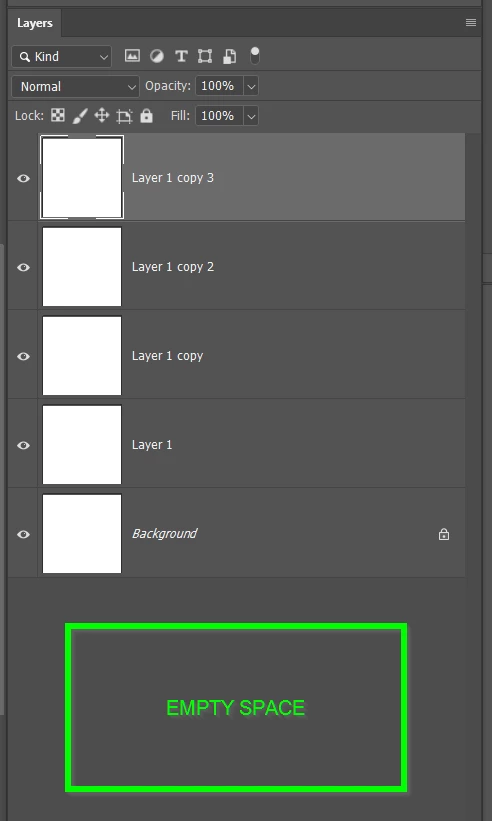
It's possible my beta installation has been doing this all along, but its pretty annoying so I am thinking probably not.  If someone wouldn't mind testing this and letting me know, so I can reset Preference AGAIN Grrrr... if it's going to fix this.


Thank you

This topic has been closed for replies.
Correct answer CShubert

Hi @Trevor.Dennis testing here and your workflow described is working as expected.  Please update to the latest Ps beta - Adobe Photoshop Version: 24.7.0 20230712.m.2239 0f0768a x64 and see if this works.


If not, clean and wipe your CCD and try again:

https://helpx.adobe.com/creative-cloud/kb/cc-cleaner-tool-installation-problems.html


2 replies

Trevor.Dennis
Community Expert
Community Expert
July 15, 2023

Thanks Cory.  It's working fine with the update.

CShubert
Community Manager
CShubertCommunity ManagerCorrect answer
Community Manager
July 14, 2023

Hi @Trevor.Dennis testing here and your workflow described is working as expected.  Please update to the latest Ps beta - Adobe Photoshop Version: 24.7.0 20230712.m.2239 0f0768a x64 and see if this works.


If not, clean and wipe your CCD and try again:

https://helpx.adobe.com/creative-cloud/kb/cc-cleaner-tool-installation-problems.html