Exit
  • Global community
    • Language:
      • Deutsch
      • English
      • Español
      • Français
      • Português
  • 日本語コミュニティ
  • 한국 커뮤니티
0

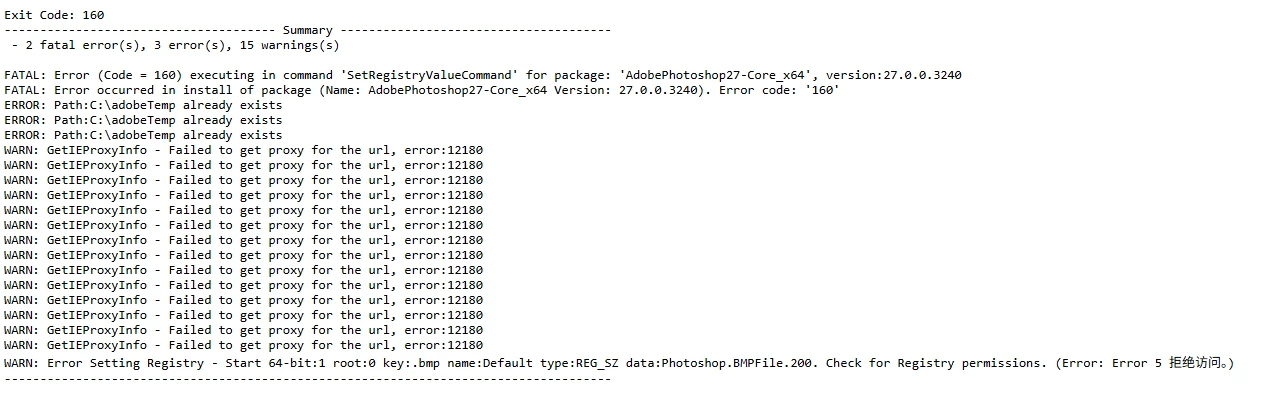
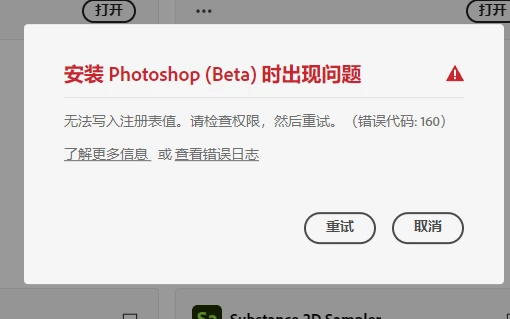
error 160 when installing PS beta

New Here ,
Oct 07, 2025 Oct 07, 2025

屏幕截图 2025-10-07 095250.png

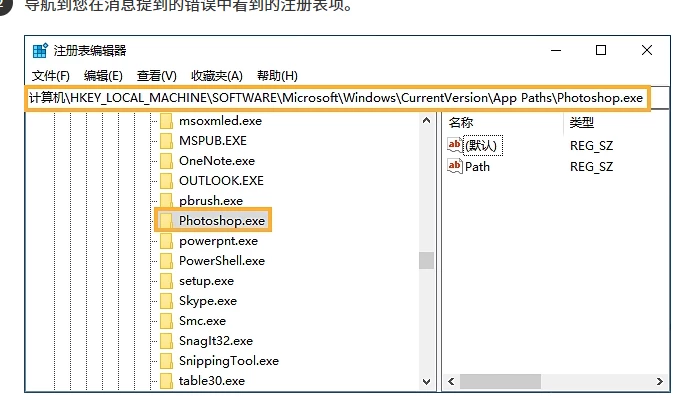
i dont have the Photoshop.exe folder

屏幕截图 2025-10-07 095618.png屏幕截图 2025-10-07 094707.png

TOPICS
Desktop-Windows
400
Translate
Report
Community guidelines
Be kind and respectful, give credit to the original source of content, and search for duplicates before posting. Learn more
community guidelines
New Here ,
Oct 07, 2025 Oct 07, 2025

please help, urgent, the customer service cant answer me lol. they ask me to inquire here

Translate
Report
Community guidelines
Be kind and respectful, give credit to the original source of content, and search for duplicates before posting. Learn more
community guidelines
Adobe Employee ,
Oct 13, 2025 Oct 13, 2025
LATEST

Hi @DragonMax001 it is possible your download file is corrupt or another issue:


"Error 106 during Photoshop installation typically indicates a problem with decompressing installer files, most often caused by insufficient disk space, RAM, or temporary file spaceTo fix it, ensure you have enough free disk space, then try clearing the temporary files, running the Creative Cloud Cleaner Tool, and checking for any conflicting background applications or permissions. "


Try to clean out your Ps Beta install and download the latest: Adobe Photoshop Version: 27.0.1 20251012.m.3255 d971f80 arm64 (beta, PublicBeta)
 

Thanks,

Cory - Photoshop Product Manager

Translate
Report
Community guidelines
Be kind and respectful, give credit to the original source of content, and search for duplicates before posting. Learn more
community guidelines