KaanAksoy
Participant
May 18, 2023
Answered

GPU feature level 11.0 available; feature level 12.0 required

  • May 18, 2023
  • 16 replies
  • 54809 views

I am using the latest version of Photoshop beta on my computer. Every time I open the programme, I get the warning "feature level 11.0 available; feature level 12.0 required". All updates of my graphics card and computer are complete. I still can't understand why I'm getting this warning. I would like you to help.
Correct answer rohave301720562yxh

@rohave301720562yxh  Hi. Exactly what did you do that solved the issue for you?


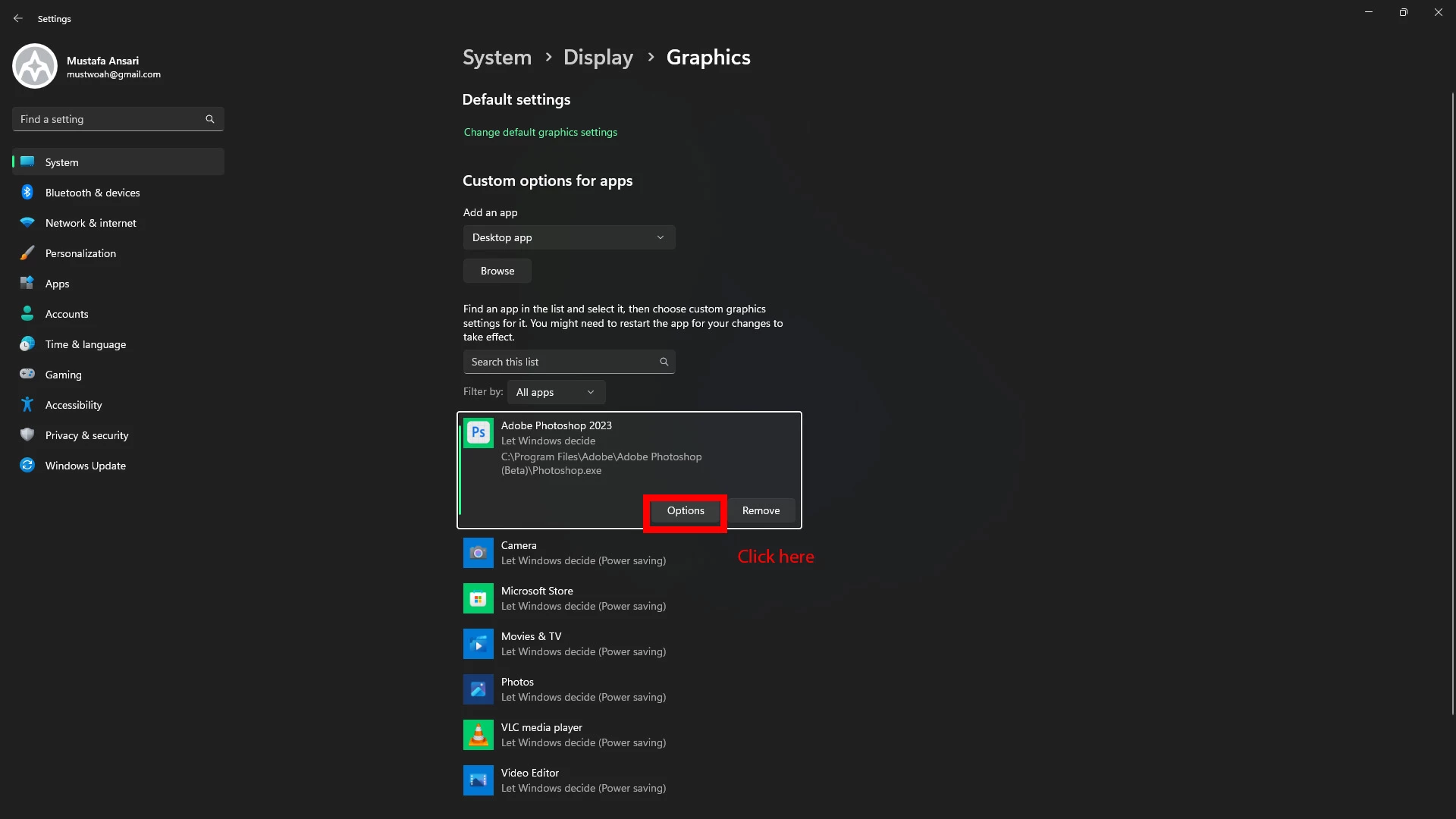
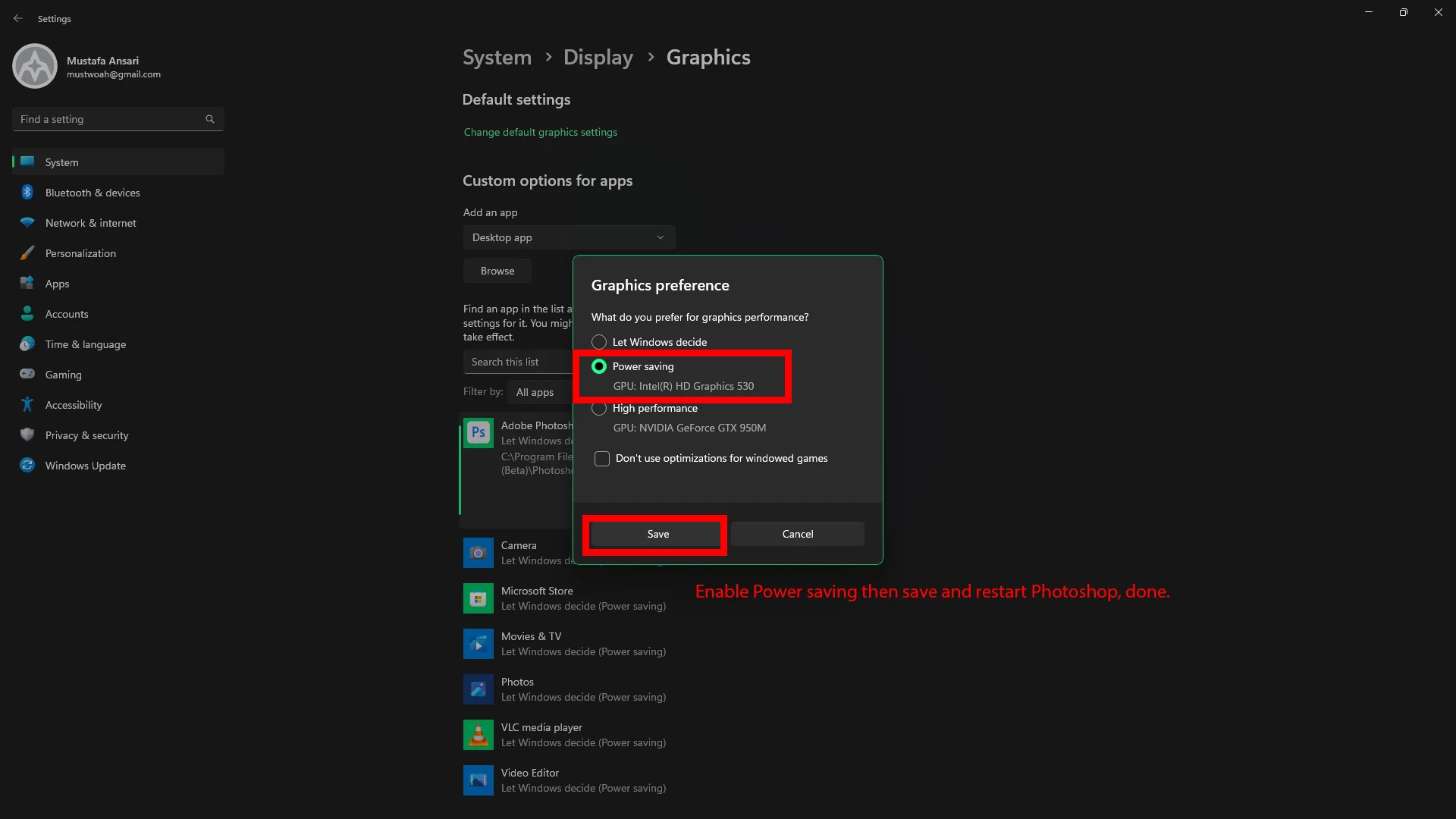
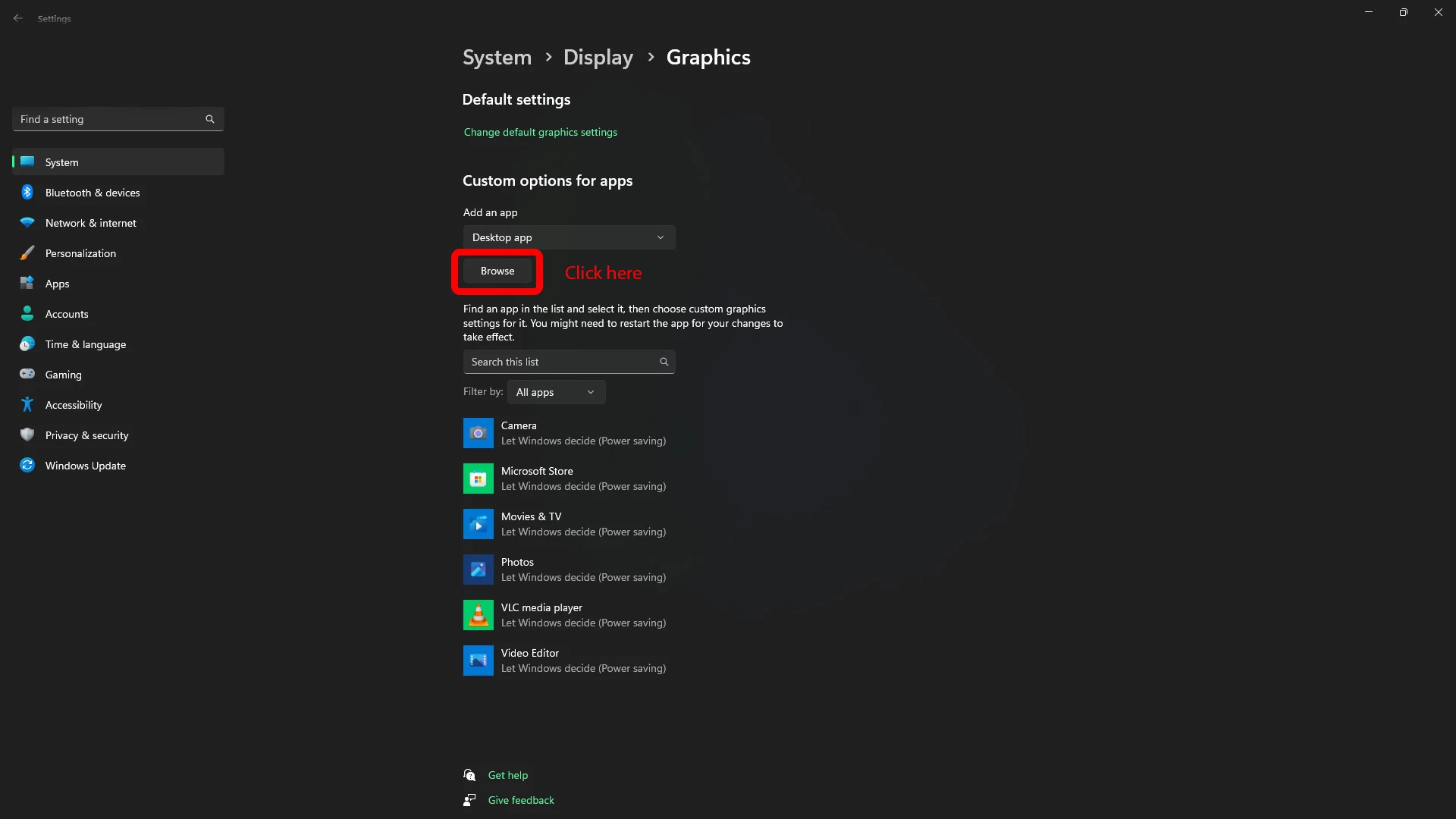
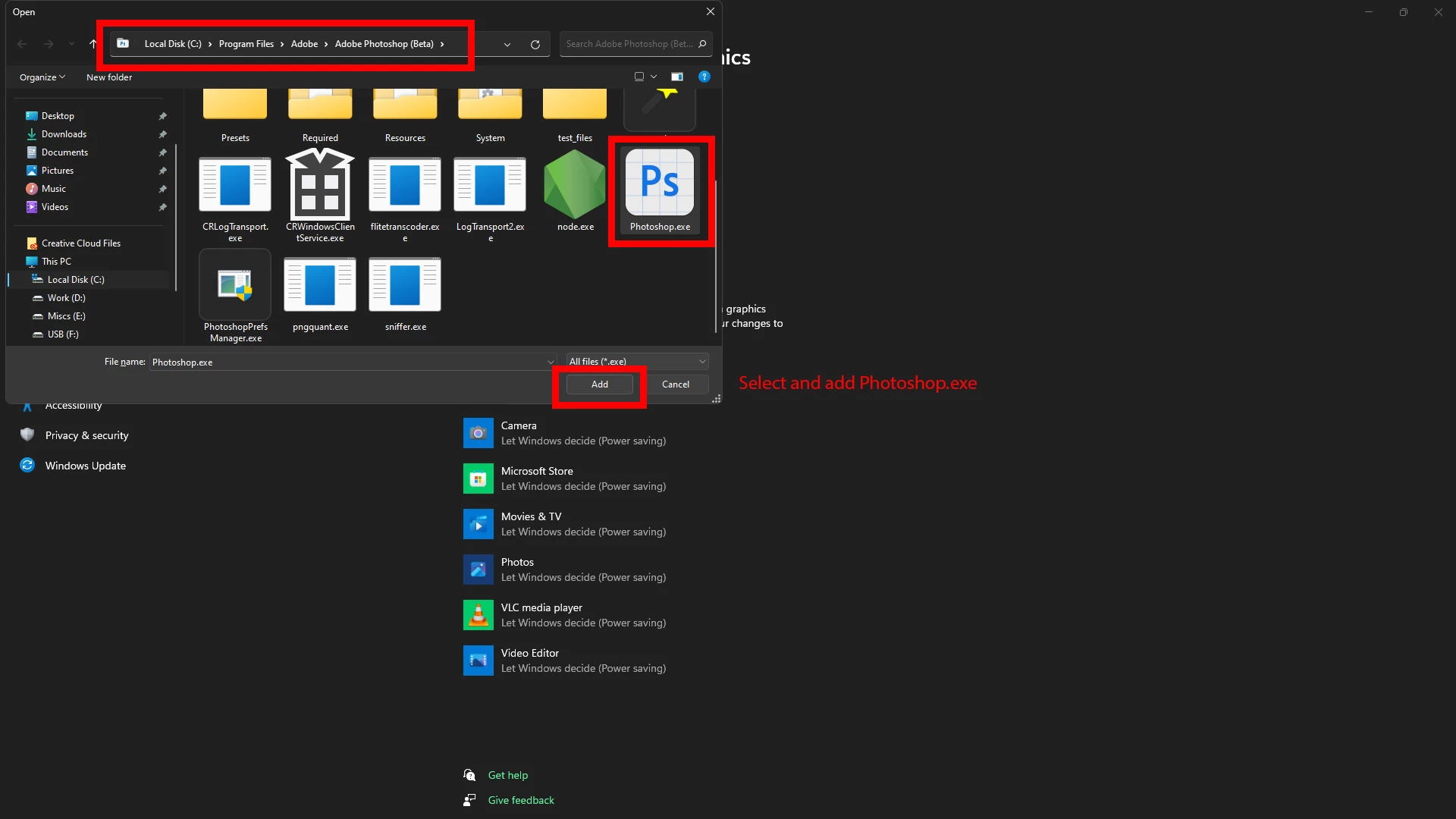
Hi, First open the windows start menu and search for "graphics settings" then follow the instruction in below:

16 replies

Participant
December 8, 2023

hai


Participant
July 28, 2023

Downloaded Adobe PS Lightroom Classic Desktop in June 2023. Since then it has responded very slowly making post processing a required. I contacts Dell Computer support to ensure that I have the latest updated system, drivers and that it's optimized. After over an hour they have done everything to meet and exceed recommended spec requirements. Direct 12 is installed. System is not as slow as it was, yet, not as it should be. And, the same error message is there upon start-up. See below for system info as you advised others, taken from PS 23 help.


Please advise. As a professional photog this is Very Frustrating.


Adobe Photoshop Version: 24.7.0 20230719.r.643 efe3886 x64
Number of Launches: 25
Operating System: Windows 10 64-bit
Version: 10 10.0.19045.3208
System architecture: Intel CPU Family:6, Model:14, Stepping:3 with MMX, SSE Integer, SSE FP, SSE2, SSE3, SSE4.1, SSE4.2, AVX, AVX2, HyperThreading
Physical processor count: 4
Logical processor count: 8
Processor speed: 2592 MHz
Built-in memory: 16245 MB
Free memory: 9660 MB
Memory available to Photoshop: 11972 MB
Memory used by Photoshop: 65 %
Crash Handler: Adobe
DCX Version: 7.1.5
SAM SDK Version: 4.1.4
ACP.local Status:
- SDK Version: 3.2.0.1
- Core Sync Status: Reachable and compatible
- Core Sync Running: 6.5.3.1
- Min Core Sync Required: 4.3.66.28
Live Edit Client SDK Version: 4.0.0
Content Credential Helper Version: Not Available
D3D12Warp renderer: Disabled.
Manta Canvas: Enabled.
Alias Layers: Disabled.
Highbeam: Enabled.
Image tile size: 1024K
Image cache levels: 4
Font Preview: Medium
HarfBuzz Version: 4.3.0
TextEngine: Unified Text Engine
======= GPU
Native API stable: True
OpenGL API stable: True
OpenCL API stable: True
GPUDeny: 0
GPUForce: 0
useGPU: 1
useOpenCL: 1
isGPUCapable: 1
GPUName: NVIDIA GeForce GTX 960M
GPUVendor: NVIDIA
IsNativeGPUCapable: 1
IsOpenGLGPUCapable: 1
IsOpenCLGPUCapable: 1
HasSufficientRAM: 1
GPU accessible RAM: 2,008 MB
Required GPU accessible RAM: 1,500 MB
UseGraphicsProcessorChecked: 1
UseOpenCLChecked: 1
Windows remote desktop: 0
Windows available feature level: 11.0
Windows required feature level: 12.0
Windows has required feature level: 0
Display: 1
Display Bounds: top=0, left=0, bottom=1080, right=1920
------- Sniffer output
[0 ms]
Launch GPUSnifferThread

[2 ms]
Start RunAllAPIs

[2 ms]
"C:\Program Files\Adobe\Adobe Photoshop 2023\sniffer.exe" -baseTimeMS=285940 -comment=Photoshop Version: Adobe Photoshop 24.7.0 20230719.r.643 efe3886 x64

[2822 ms]
Start GetSnifferResult

[2846 ms]
Start sniffer 2023-07-28 18:43:31
# Photoshop Version: Adobe Photoshop 24.7.0 20230719.r.643 efe3886 x64
C:\Program Files\Adobe\Adobe Photoshop 2023\sniffer.exe -baseTimeMS=285940 -comment=Photoshop Version: Adobe Photoshop 24.7.0 20230719.r.643 efe3886 x64

{136 ms}
Start platform native
# displays: 1
Display 0
Display: \\.\DISPLAY1
Main: TRUE
Built in: FALSE
Stereo: FALSE
Bounds: (0, 0) -> (1,536, 864)
Dimensions: (1,536 864)
Physical size: (0 0)
Pixel size: (0 0)
Dynamic range: (0 1)
Potential dynamic range: (0 1)
Reference dynamic range: (0 0)
Attached Device: (DeviceID name=NVIDIA GeForce GTX 960M index=0)

# devices: 2
Device 0
Name: NVIDIA GeForce GTX 960M
Preferred: TRUE
Power Envelope: UNKNOWN
Attachment: UNKNOWN
# attached displays: 1
\\.\DISPLAY1
GPU accessible RAM: 2,008 MB
VRAM: 2,008 MB
Dedicated System RAM: 0 MB
Shared System RAM: 8,517 MB
API version: 12.0 (12.0)
Device version: 12.0 (12.0)
Vendor name: NVIDIA
Driver date: 2023-07-12 000000.000000-000
Driver age: 0 months
Driver version: 31.0.15.3667
Supports UMA: UNSUPPORTED
D3D-ID: 5019

Device 1
Name: Intel(R) HD Graphics 530
Preferred: FALSE
Power Envelope: UNKNOWN
Attachment: UNKNOWN
# attached displays: 0
GPU accessible RAM: 8,645 MB
VRAM: 128 MB
Dedicated System RAM: 0 MB
Shared System RAM: 8,517 MB
API version: 12.0 (12.0)
Device version: 12.0 (12.0)
Vendor name: INTEL
Driver date: 2020-04-11 000000.000000-000
Driver age: 39 months
Driver version: 26.20.100.8142
Supports UMA: SUPPORTED
D3D-ID: 6427
End platform native
{1133 ms}

{1133 ms}
Start platform OpenGL
# displays: 1
Display 0
Display: \\.\DISPLAY1
Main: TRUE
Built in: FALSE
Stereo: FALSE
Bounds: (0, 0) -> (1,536, 864)
Dimensions: (1,536 864)
Physical size: (0 0)
Pixel size: (0 0)
Dynamic range: (0 1)
Potential dynamic range: (0 1)
Reference dynamic range: (0 0)
Attached Device: (DeviceID name=NVIDIA GeForce GTX 960M/PCIe/SSE2 index=0)

# devices: 1
Device 0
Name: NVIDIA GeForce GTX 960M/PCIe/SSE2
Preferred: TRUE
Power Envelope: INTEGRATED
Attachment: UNKNOWN
# attached displays: 1
\\.\DISPLAY1
GPU accessible RAM: 2,106 MB
VRAM: 2,106 MB
Dedicated System RAM: 0 MB
Shared System RAM: 8,517 MB
API version: 2.1 (2.1.2 NVIDIA 536.67)
Device version: 2.1 (2.1.2 NVIDIA 536.67)
Vendor name: NVIDIA
Driver date: 2023-07-12 000000.000000-000
Driver age: 0 months
Driver version: 31.0.15.3667
GLSL version: 1.20 (1.20 NVIDIA via Cg compiler)
End platform OpenGL
{1252 ms}

{1252 ms}
Start platform OpenCL
# displays: 0

# devices: 2
Device 0
Name: NVIDIA GeForce GTX 960M
Preferred: TRUE
Power Envelope: DISCRETE
Attachment: UNKNOWN
# attached displays: 0
GPU accessible RAM: 2,147 MB
VRAM: 2,147 MB
Dedicated System RAM: 0 MB
Shared System RAM: 0 MB
API version: 3.0 (OpenCL 3.0 CUDA)
Device version: 3.0 (OpenCL 3.0 CUDA)
Vendor name: NVIDIA
Driver date: UNKNOWN
Driver age: UNKNOWN
Driver version: UNKNOWN
Bandwidth: 68 GB / s
Compute score: 387.327
Device name string: NVIDIA GeForce GTX 960M
Device vendor string: NVIDIA Corporation
Platform name string: NVIDIA CUDA
Platform vendor string: NVIDIA Corporation

Device 1
Name: Intel(R) HD Graphics 530
Preferred: FALSE
Power Envelope: INTEGRATED
Attachment: UNKNOWN
# attached displays: 0
GPU accessible RAM: 6,813 MB
VRAM: 6,813 MB
Dedicated System RAM: 0 MB
Shared System RAM: 0 MB
API version: 2.1 (OpenCL 2.1 )
Device version: 2.1 (OpenCL 2.1 NEO )
Vendor name: INTEL
Driver date: UNKNOWN
Driver age: UNKNOWN
Driver version: UNKNOWN
Bandwidth: 20 GB / s
Compute score: 168.296
Device name string: Intel(R) HD Graphics 530
Device vendor string: Intel(R) Corporation
Platform name string: Intel(R) OpenCL HD Graphics
Platform vendor string: Intel(R) Corporation
End platform OpenCL
{2760 ms}

Exit code kExitNormal
End sniffer 2023-07-28 18:43:34
[kStatusNormal, kExitNormal]

[2848 ms]
Finish RunAllAPIs

[2852 ms]
Finish GetSnifferResult

------- Sniffer output
======= GPU
License Type: Subscription
Serial number: 96040939202845513230
GUIDBucket:
Composite Core GPU (comp_core_gpu): on
Composite Core Threads (MultithreadedCompositing): on
Composite Core UI (comp_core_ui): off
Composite Core Feature Prefs (CompCoreFeaturePrefs): off

Application folder: C:\Program Files\Adobe\Adobe Photoshop 2023\
Temporary file path: C:\Users\Phoenix\AppData\Local\Temp\
Photoshop scratch has async I/O enabled
Scratch volume(s):
Startup, 464.1G, 202.6G free
Required Plugins folder: C:\Program Files\Adobe\Adobe Photoshop 2023\Required\Plug-ins\
Primary Plugins folder: C:\Program Files\Adobe\Adobe Photoshop 2023\Plug-ins\

Installed components:
ACE.dll ACE 2023/04/13-10:44:44 79.e061fb0 79.e061fb0
act_tracing.dll Copyright (c) 2021 Adobe. All Rights Reserved 1.0.58
AdobeLinguistic.dll Adobe Linguisitc Library dfba77e
AdobeOwl.dll Adobe Owl 5.5.0
AdobePDFL.dll PDFL 2023/01/28-17:08:16 79.4c0bb7e 79.4c0bb7e
AdobePIP.dll Adobe Product Improvement Program 8.2.0.16
AdobeSVGAGM.dll AdobeSVGAGM 79.8567dec 79.8567dec
AdobeXMP.dll Adobe XMP Core 2023/03/23-08:56:37 79.a8d4753 79.a8d4753
AdobeXMPFiles.dll Adobe XMP Files 2023/03/23-08:56:37 79.a8d4753 79.a8d4753
AdobeXMPScript.dll Adobe XMP Script 2023/03/23-08:56:37 79.a8d4753 79.a8d4753
AGM.dll AGM 2023/04/13-10:44:44 79.e061fb0 79.e061fb0
AID.dll AID DLL 1.0.0.58
AIDE.dll AIDE 2023/04/04-19:10:45 79.8b163e2 79.8b163e2
aifm.dll AIFM 1.0 23.68434
AILib.dll Adobe Illustrator 2023 27.1.0
aiport.dll AIPort 1.0 23.68434
ARE.dll ARE 2023/04/13-10:44:44 79.e061fb0 79.e061fb0
AXE8SharedExpat.dll AXE8SharedExpat 2022/12/13-13:20:11 79.002995e 79.002995e
AXEDOMCore.dll AXEDOMCore 2022/12/13-13:20:11 79.002995e 79.002995e
BIB.dll BIB 2023/04/13-10:44:44 79.e061fb0 79.e061fb0
BIBUtils.dll BIBUtils 2023/04/13-10:44:44 79.e061fb0 79.e061fb0
boost_chrono.dll photoshopdva 22.0.0
boost_date_time.dll photoshopdva 22.0.0
boost_filesystem.dll photoshopdva 22.0.0
boost_regex.dll photoshopdva 22.0.0
boost_system.dll photoshopdva 22.0.0
boost_threads.dll photoshopdva 22.0.0
CoolType.dll CoolType 2023/04/13-10:44:44 79.e061fb0 79.e061fb0
CRClient.dll Adobe Crash Reporter Client DLL 12.3.0.202306131643_44f1cd7
DirectML.dll DirectML Redistributable Library 1.10.1+230125-1155.1.dml-1.10.177341d
dnssd.dll Bonjour 3,0,0,2
dvaaccelerate.dll photoshopdva 22.0.0
dvaappsupport.dll photoshopdva 22.0.0
dvaaudiodevice.dll photoshopdva 22.0.0
dvaaudiodsp.dll photoshopdva 22.0.0
dvacore.dll photoshopdva 22.0.0
dvacrashhandler.dll Adobe Audition CC 2017 10.0.0
dvamarshal.dll photoshopdva 22.0.0
dvamediatypes.dll photoshopdva 22.0.0
dvametadata.dll photoshopdva 22.0.0
dvametadataapi.dll photoshopdva 22.0.0
dvametadataUI.dll photoshopdva 22.0.0
dvanet.dll photoshopdva 22.0.0
dvaplayer.dll photoshopdva 22.0.0
dvascripting.dll photoshopdva 22.0.0
dvatransport.dll photoshopdva 22.0.0
dvaui.dll photoshopdva 22.0.0
dvavulcansupport.dll photoshopdva 22.0.0
dynamic-torqnative.dll Unified Extensibility Platform uxp-7.1.0-11-16f02e5
dynamiclink.dll photoshopdva 22.0.0
ExtendScript.dll ExtendScript 2022/08/18-12:50:45 82.4 82.4
filterport.dll FilterPort 1.1 O
icucnv71.dll International Components for Unicode Build 14.0.04ee3a5
icuin71.dll International Components for Unicode Build 14.0.04ee3a5
icuuc71.dll International Components for Unicode Build 14.0.04ee3a5
ippcc.dll ippCC. Intel(R) Integrated Performance Primitives. Color Conversion. 2021.6 (r0xbffe3c5b)
ippcck0.dll ippCC. Intel(R) Integrated Performance Primitives. Color Conversion. 2021.6 (r0xbffe3c5b)
ippccl9.dll ippCC. Intel(R) Integrated Performance Primitives. Color Conversion. 2021.6 (r0xbffe3c5b)
ippccy8.dll ippCC. Intel(R) Integrated Performance Primitives. Color Conversion. 2021.6 (r0xbffe3c5b)
ippcore.dll core. Intel(R) Integrated Performance Primitives. Core Library. 2021.6 (r0xbffe3c5b)
ippcv.dll ippCV. Intel(R) Integrated Performance Primitives. Computer Vision. 2021.6 (r0xbffe3c5b)
ippcvk0.dll ippCV. Intel(R) Integrated Performance Primitives. Computer Vision. 2021.6 (r0xbffe3c5b)
ippcvl9.dll ippCV. Intel(R) Integrated Performance Primitives. Computer Vision. 2021.6 (r0xbffe3c5b)
ippcvy8.dll ippCV. Intel(R) Integrated Performance Primitives. Computer Vision. 2021.6 (r0xbffe3c5b)
ippi.dll ippIP. Intel(R) Integrated Performance Primitives. Image Processing. 2021.6 (r0xbffe3c5b)
ippik0.dll ippIP. Intel(R) Integrated Performance Primitives. Image Processing. 2021.6 (r0xbffe3c5b)
ippil9.dll ippIP. Intel(R) Integrated Performance Primitives. Image Processing. 2021.6 (r0xbffe3c5b)
ippiy8.dll ippIP. Intel(R) Integrated Performance Primitives. Image Processing. 2021.6 (r0xbffe3c5b)
ipps.dll ippSP. Intel(R) Integrated Performance Primitives. Signal Processing. 2021.6 (r0xbffe3c5b)
ippsk0.dll ippSP. Intel(R) Integrated Performance Primitives. Signal Processing. 2021.6 (r0xbffe3c5b)
ippsl9.dll ippSP. Intel(R) Integrated Performance Primitives. Signal Processing. 2021.6 (r0xbffe3c5b)
ippsy8.dll ippSP. Intel(R) Integrated Performance Primitives. Signal Processing. 2021.6 (r0xbffe3c5b)
ippvm.dll ippVM. Intel(R) Integrated Performance Primitives. Vector Math. 2021.6 (r0xbffe3c5b)
ippvmk0.dll ippVM. Intel(R) Integrated Performance Primitives. Vector Math. 2021.6 (r0xbffe3c5b)
ippvml9.dll ippVM. Intel(R) Integrated Performance Primitives. Vector Math. 2021.6 (r0xbffe3c5b)
ippvmy8.dll ippVM. Intel(R) Integrated Performance Primitives. Vector Math. 2021.6 (r0xbffe3c5b)
JP2KLib.dll JP2KLib 2023/03/10-17:55:06 79.6dcde51 79.6dcde51
libeay32.dll The OpenSSL Toolkit 1.0.2zf
libifcoremd.dll Intel(r) Visual Fortran Compiler 10.0 (Update A)
libiomp5md.dll Intel(R) OpenMP* Runtime Library 5.0
libmmd.dll Intel(R) C/C++/Fortran Compiler Mainline
libzip.dll photoshopdva 22.0.0
LogSession.dll LogSession 8.2.0.16
mediacoreif.dll photoshopdva 22.0.0
Microsoft.AI.MachineLearning.dll Microsoft® Windows® Operating System 1.14.20230410.1.429e1e3
mkl_avx2.2.dll Intel(R) oneAPI Math Kernel Library 2022.1
mkl_avx512.2.dll Intel(R) oneAPI Math Kernel Library 2022.1
mkl_core.2.dll Intel(R) oneAPI Math Kernel Library 2022.1
mkl_def.2.dll Intel(R) oneAPI Math Kernel Library 2022.1
mkl_mc3.2.dll Intel(R) oneAPI Math Kernel Library 2022.1
mkl_sequential.2.dll Intel(R) oneAPI Math Kernel Library 2022.1
mkl_vml_avx2.2.dll Intel(R) oneAPI Math Kernel Library 2022.1
mkl_vml_avx512.2.dll Intel(R) oneAPI Math Kernel Library 2022.1
mkl_vml_def.2.dll Intel(R) oneAPI Math Kernel Library 2022.1
mkl_vml_mc3.2.dll Intel(R) oneAPI Math Kernel Library 2022.1
MPS.dll MPS 2023/03/30-19:06:20 79.fb3b9df 79.fb3b9df
onnxruntime.dll Microsoft® Windows® Operating System 1.14.20230410.1.429e1e3
opencv_world452.dll OpenCV library 4.5.2
pdfport.dll PDFPort 2020/11/19-11:34:27 79.625377 79.625377
Plugin.dll Adobe Photoshop 2023 24.7
PlugPlugExternalObject.dll Adobe(R) CEP PlugPlugExternalObject Standard Dll (64 bit) 11.5.2
PlugPlugOwl.dll Adobe(R) CSXS PlugPlugOwl Standard Dll (64 bit) 11.5.2.130
PSCloud.dll 1.0.0.1
PSRes.dll Adobe Photoshop 2023 24.7
PSViews.dll Adobe Photoshop 2023 24.7
ScCore.dll ScCore 2022/08/18-12:50:45 82.4 82.4
ssleay32.dll The OpenSSL Toolkit 1.0.2zf
SVGRE.dll SVGRE 79.e41acba 79.e41acba
svml_dispmd.dll Intel(R) C/C++/Fortran Compiler Mainline
VulcanControl.dll Vulcan Application Control Library 7.2.0.34
VulcanMessage5.dll Vulcan Message Library 7.2.0.34
WinRTSupport.dll Adobe Photoshop Windows RT Support 1.0.1.0
WRServices.dll WRServices Build 17.5.1.73e2151 17.5.1.73e2151
Unified Extensibility Platform uxp-7.1.0-11-16f02e5
UPIC 2.6.0


Required plugins:

Accented Edges 24.7 - from the file “Filter Gallery.8bf”
Adaptive Wide Angle 24.7 - from the file “Adaptive Wide Angle.8bf”
Analog Efex Pro 2 2.0.12.12 - from the file “Analog Efex Pro 2.8bf”
Angled Strokes 24.7 - from the file “Filter Gallery.8bf”
ApplyImageDataFilter NO VERSION - from the file “GigapixelAIApply.8bf”
Average 24.7 - from the file “Average.8bf”
BackgroundFilter 2.2.21.12 - from the file “Background.8bf”
Bas Relief 24.7 - from the file “Filter Gallery.8bf”
BMP 24.7 - from the file “Standard MultiPlugin.8bf”
Camera Raw 15.4.1 - from the file “Camera Raw.8bi”
Camera Raw Filter 15.4.1 - from the file “Camera Raw.8bi”
Chalk && Charcoal 24.7 - from the file “Filter Gallery.8bf”
Charcoal 24.7 - from the file “Filter Gallery.8bf”
Chrome 24.7 - from the file “Filter Gallery.8bf”
Cineon 24.7 - from the file “Cineon.8bi”
Clouds 24.7 - from the file “Clouds.8bf”
Color Efex Pro 4 4.3.24.12 - from the file “Color Efex Pro 4.8bf”
Color Halftone 24.7 - from the file “Standard MultiPlugin.8bf”
Colored Pencil 24.7 - from the file “Filter Gallery.8bf”
Conté Crayon 24.7 - from the file “Filter Gallery.8bf”
Craquelure 24.7 - from the file “Filter Gallery.8bf”
Crop and Straighten Photos 24.7 - from the file “CropPhotosAuto.8li”
Crop and Straighten Photos Filter 24.7 - from the file “Standard MultiPlugin.8bf”
Crosshatch 24.7 - from the file “Filter Gallery.8bf”
Crystallize 24.7 - from the file “Standard MultiPlugin.8bf”
Cutout 24.7 - from the file “Filter Gallery.8bf”
Dark Strokes 24.7 - from the file “Filter Gallery.8bf”
De-Interlace 24.7 - from the file “Standard MultiPlugin.8bf”
Dfine 2 2.2.21.12 - from the file “Dfine2.8bf”
Dicom 24.7 - from the file “Dicom.8bi”
Difference Clouds 24.7 - from the file “Clouds.8bf”
Diffuse Glow 24.7 - from the file “Filter Gallery.8bf”
Displace 24.7 - from the file “Standard MultiPlugin.8bf”
Dry Brush 24.7 - from the file “Filter Gallery.8bf”
Entropy 24.7 - from the file “statistics.8ba”
Export Color Lookup Tables 24.7 - from the file “Export3DLUT.8be”
Extrude 24.7 - from the file “Standard MultiPlugin.8bf”
FastCore Routines 24.7 - from the file “FastCore.8bx”
Fibers 24.7 - from the file “Standard MultiPlugin.8bf”
Film Grain 24.7 - from the file “Filter Gallery.8bf”
Filter Gallery 24.7 - from the file “Filter Gallery.8bf”
FineStructuresFilter 2.2.21.12 - from the file “FineStructures.8bf”
Fresco 24.7 - from the file “Filter Gallery.8bf”
GatherImageDataFilter NO VERSION - from the file “GigapixelAIGather.8bf”
Glass 24.7 - from the file “Filter Gallery.8bf”
Glowing Edges 24.7 - from the file “Filter Gallery.8bf”
Grain 24.7 - from the file “Filter Gallery.8bf”
Graphic Pen 24.7 - from the file “Filter Gallery.8bf”
Halftone Pattern 24.7 - from the file “Filter Gallery.8bf”
Halide Bottlenecks 24.7 - from the file “HalideBottlenecks.8bx”
HDR Efex Pro 2 2.2.24.12 - from the file “HDR Efex Pro 2.8bf”
HDRMergeUI 24.7 - from the file “HDRMergeUI.8bf”
HotPixelsFilter 2.2.21.12 - from the file “HotPixels.8bf”
HSB/HSL 24.7 - from the file “Standard MultiPlugin.8bf”
IFF Format 24.7 - from the file “Standard MultiPlugin.8bf”
Ink Outlines 24.7 - from the file “Filter Gallery.8bf”
JPEG 2000 24.7 - from the file “JPEG2000.8bi”
Kurtosis 24.7 - from the file “statistics.8ba”
Lens Blur 24.7 - from the file “Lens Blur.8bf”
Lens Correction 24.7 - from the file “Lens Correction.8bf”
Lens Flare 24.7 - from the file “Standard MultiPlugin.8bf”
Liquify 24.7 - from the file “Liquify.8bf”
Matlab Operation 24.7 - from the file “ChannelPort.8bf”
Maximum 24.7 - from the file “statistics.8ba”
Mean 24.7 - from the file “statistics.8ba”
Measurement Core 24.7 - from the file “MeasurementCore.8me”
Median 24.7 - from the file “statistics.8ba”
Merge to HDR Efex Pro 2 2.2.24.12 - from the file “HDR Efex Pro 2.8bf”
Mezzotint 24.7 - from the file “Standard MultiPlugin.8bf”
Minimum 24.7 - from the file “statistics.8ba”
MMXCore Routines 24.7 - from the file “MMXCore.8bx”
Mosaic Tiles 24.7 - from the file “Filter Gallery.8bf”
Multiprocessor Support 24.7 - from the file “MultiProcessor Support.8bx”
Neon Glow 24.7 - from the file “Filter Gallery.8bf”
Note Paper 24.7 - from the file “Filter Gallery.8bf”
NTSC Colors 24.7 - from the file “NTSC Colors.8bf”
Ocean Ripple 24.7 - from the file “Filter Gallery.8bf”
OpenEXR 24.7 - from the file “Standard MultiPlugin.8bf”
Paint Daubs 24.7 - from the file “Filter Gallery.8bf”
Palette Knife 24.7 - from the file “Filter Gallery.8bf”
Patchwork 24.7 - from the file “Filter Gallery.8bf”
Paths to Illustrator 24.7 - from the file “Standard MultiPlugin.8bf”
PCX 24.7 - from the file “PCX.8bi”
Photocopy 24.7 - from the file “Filter Gallery.8bf”
Picture Package Filter 24.7 - from the file “ChannelPort.8bf”
Pinch 24.7 - from the file “Standard MultiPlugin.8bf”
Pixar 24.7 - from the file “Pixar.8bi”
Plaster 24.7 - from the file “Filter Gallery.8bf”
Plastic Wrap 24.7 - from the file “Filter Gallery.8bf”
Pointillize 24.7 - from the file “Standard MultiPlugin.8bf”
Polar Coordinates 24.7 - from the file “Standard MultiPlugin.8bf”
Portable Bit Map 24.7 - from the file “PBM.8bi”
Poster Edges 24.7 - from the file “Filter Gallery.8bf”
Radial Blur 24.7 - from the file “Standard MultiPlugin.8bf”
Radiance 24.7 - from the file “Radiance.8bi”
Range 24.7 - from the file “statistics.8ba”
Render Color Lookup Grid 24.7 - from the file “Export3DLUT.8be”
Reticulation 24.7 - from the file “Filter Gallery.8bf”
Ripple 24.7 - from the file “Standard MultiPlugin.8bf”
Rough Pastels 24.7 - from the file “Filter Gallery.8bf”
Save for Web 24.7 - from the file “Save for Web.8be”
ScriptingSupport 24.7 - from the file “ScriptingSupport.8li”
ShadowsFilter 2.2.21.12 - from the file “Shadows.8bf”
Sharpener Pro 3: (1) RAW Presharpener 3.1.21.12 - from the file “SHP3RPS.8bf”
Sharpener Pro 3: (2) Output Sharpener 3.1.21.12 - from the file “SHP3OS.8bf”
Shear 24.7 - from the file “Standard MultiPlugin.8bf”
Silver Efex Pro 2 2.2.24.12 - from the file “Silver Efex Pro 2.8bf”
Skewness 24.7 - from the file “statistics.8ba”
SkinFilter 2.2.21.12 - from the file “Skin.8bf”
SkyFilter 2.2.21.12 - from the file “Sky.8bf”
Smart Blur 24.7 - from the file “Standard MultiPlugin.8bf”
Smudge Stick 24.7 - from the file “Filter Gallery.8bf”
Solarize 24.7 - from the file “Solarize.8bf”
SP Substance Suite NO VERSION - from the file “MaterialSuite.8li”
Spatter 24.7 - from the file “Filter Gallery.8bf”
Spherize 24.7 - from the file “Standard MultiPlugin.8bf”
Sponge 24.7 - from the file “Filter Gallery.8bf”
Sprayed Strokes 24.7 - from the file “Filter Gallery.8bf”
Stained Glass 24.7 - from the file “Filter Gallery.8bf”
Stamp 24.7 - from the file “Filter Gallery.8bf”
Standard Deviation 24.7 - from the file “statistics.8ba”
StrongNoiseFilter 2.2.21.12 - from the file “StrongNoise.8bf”
Substance NO VERSION - from the file “MaterialFilter.8bf”
Sumi-e 24.7 - from the file “Filter Gallery.8bf”
Summation 24.7 - from the file “statistics.8ba”
Targa 24.7 - from the file “Standard MultiPlugin.8bf”
Texturizer 24.7 - from the file “Filter Gallery.8bf”
Tiles 24.7 - from the file “Standard MultiPlugin.8bf”
Topaz DeNoise AI 18.0 - from the file “tltopazdenoiseaips_x64.8bf”
Topaz Gigapixel AI NO VERSION - from the file “GigapixelAIAutomation.8li”
Topaz Photo AI NO VERSION - from the file “TopazPhotoAI.8bf”
Topaz Sharpen AI 18.0 - from the file “tltopazsharpenaips_x64.8bf”
Torn Edges 24.7 - from the file “Filter Gallery.8bf”
Twirl 24.7 - from the file “Standard MultiPlugin.8bf”
Underpainting 24.7 - from the file “Filter Gallery.8bf”
Vanishing Point 24.7 - from the file “VanishingPoint.8bf”
Variance 24.7 - from the file “statistics.8ba”
Viveza 2 2.1.21.12 - from the file “Viveza2.8bf”
Water Paper 24.7 - from the file “Filter Gallery.8bf”
Watercolor 24.7 - from the file “Filter Gallery.8bf”
Wave 24.7 - from the file “Standard MultiPlugin.8bf”
WIA Support 24.7 - from the file “WIASupport.8li”
Wind 24.7 - from the file “Standard MultiPlugin.8bf”
Wireless Bitmap 24.7 - from the file “WBMP.8bi”
ZigZag 24.7 - from the file “Standard MultiPlugin.8bf”

Optional and third party plugins:

Portrait Professional 1, 4, 1, 0 - from the file “C:\Program Files\Adobe\Adobe Photoshop 2023\Plug-ins\PSFilterPPLauncher64.8bf”

Duplicate and Disabled plugins:

Topaz Photo AI NO VERSION - from the file “C:\Program Files\Adobe\Adobe Photoshop 2023\Plug-ins\TopazPhotoAI.8bf”

Plugins that failed to load:

Analog Efex Pro 2 NO VERSION - - from the file “C:\Program Files\Common Files\Adobe\Plug-Ins\CC\Nik Collection\Analog Efex Pro 2\Analog Efex Pro 2.8bf”
BackgroundFilter NO VERSION - - from the file “C:\Program Files\Common Files\Adobe\Plug-Ins\CC\Nik Collection\Dfine 2\Background.8bf”
Color Efex Pro 4 NO VERSION - - from the file “C:\Program Files\Common Files\Adobe\Plug-Ins\CC\Nik Collection\Color Efex Pro 4\Color Efex Pro 4.8bf”
Dfine 2 NO VERSION - - from the file “C:\Program Files\Common Files\Adobe\Plug-Ins\CC\Nik Collection\Dfine 2\Dfine2.8bf”
FineStructuresFilter NO VERSION - - from the file “C:\Program Files\Common Files\Adobe\Plug-Ins\CC\Nik Collection\Dfine 2\FineStructures.8bf”
HDR Efex Pro 2 NO VERSION - - from the file “C:\Program Files\Common Files\Adobe\Plug-Ins\CC\Nik Collection\HDR Efex Pro 2\HDR Efex Pro 2.8bf”
HotPixelsFilter NO VERSION - - from the file “C:\Program Files\Common Files\Adobe\Plug-Ins\CC\Nik Collection\Dfine 2\HotPixels.8bf”
Merge to HDR Efex Pro 2 NO VERSION - - from the file “C:\Program Files\Common Files\Adobe\Plug-Ins\CC\Nik Collection\HDR Efex Pro 2\HDR Efex Pro 2.8bf”
ShadowsFilter NO VERSION - - from the file “C:\Program Files\Common Files\Adobe\Plug-Ins\CC\Nik Collection\Dfine 2\Shadows.8bf”
Sharpener Pro 3: (1) RAW Presharpener NO VERSION - - from the file “C:\Program Files\Common Files\Adobe\Plug-Ins\CC\Nik Collection\Sharpener Pro 3\SHP3RPS.8bf”
Sharpener Pro 3: (2) Output Sharpener NO VERSION - - from the file “C:\Program Files\Common Files\Adobe\Plug-Ins\CC\Nik Collection\Sharpener Pro 3\SHP3OS.8bf”
Silver Efex Pro 2 NO VERSION - - from the file “C:\Program Files\Common Files\Adobe\Plug-Ins\CC\Nik Collection\Silver Efex Pro 2\Silver Efex Pro 2.8bf”
SkinFilter NO VERSION - - from the file “C:\Program Files\Common Files\Adobe\Plug-Ins\CC\Nik Collection\Dfine 2\Skin.8bf”
SkyFilter NO VERSION - - from the file “C:\Program Files\Common Files\Adobe\Plug-Ins\CC\Nik Collection\Dfine 2\Sky.8bf”
StrongNoiseFilter NO VERSION - - from the file “C:\Program Files\Common Files\Adobe\Plug-Ins\CC\Nik Collection\Dfine 2\StrongNoise.8bf”
Viveza 2 NO VERSION - - from the file “C:\Program Files\Common Files\Adobe\Plug-Ins\CC\Nik Collection\Viveza 2\Viveza2.8bf”


Unified Extensibility Platform - Extensions:

Home Screen (Loaded) 6.7.0.42 - from the file "Required Folder"
CDO: 1.141.0
CmdN: 1.18.8
CDP: 1.165.0
Projects: 1.7.0
Loaded at: 248 ms - launch time impact: 86 ms
ccx-timeline (Prepared) 3.1.10.0 - from the file "Required Folder"
CCX Commenting UXP Webview (Loaded) 27.3.1.0 - from the file "Required Folder"
Loaded at: 18082 ms - launch time impact: 0 ms
CCX Sharesheet UXP (Prepared) 24.10.0.0 - from the file "Required Folder"
Photoshop Cloud Value Dialog (Loaded) 1.0.1.0 - from the file "Required Folder"
Loaded at: 256 ms - launch time impact: 0 ms
Share Panel (Loaded) 1.0.6.0 - from the file "Required Folder"
Loaded at: 260 ms - launch time impact: 0 ms
Content Credentials (Loaded) 0.37.3.0 - from the file "Required Folder"
Loaded at: 9386 ms - launch time impact: 0 ms
CC Libraries Panel (Prepared) 3.24.22.0 - from the file "C:\Program Files\Common Files\Adobe/CEP/Extensions\CC_LIBRARIES_PANEL_EXTENSION_3_24_22\"
CAPTURE: 2.0.41 STOCK: 4.0.2
Substance 3D (Loaded) 0.1.6.0 - from the file "Required Folder"
Loaded at: 18084 ms - launch time impact: 0 ms
Photoshop Adjustments Panel (Loaded) 1.29.13.0 - from the file "Required Folder"
Loaded at: 18087 ms - launch time impact: 1 ms
Photoshop UXP Export-As (Prepared) 5.8.23.0 - from the file "Required Folder"
Photoshop Facepile (Loaded) 1.2.1.0 - from the file "Required Folder"
Loaded at: 18090 ms - launch time impact: 0 ms
Photoshop In App Messaging (Loaded) 4.2.1.0 - from the file "Required Folder"
Loaded at: 18093 ms - launch time impact: 0 ms
Photoshop Selection Feedback (Prepared) 0.5.0.0 - from the file "Required Folder"
Plugins Panel (Prepared) 1.4.3.0 - from the file "Required Folder"
IC popup message (Loaded) 1.0.0.0
Loaded at: 9389 ms - launch time impact: 0 ms
Multilayer Protection (Loaded) 1.0.0.0
Loaded at: 9392 ms - launch time impact: 0 ms
Discover Panel (Loaded) 2306.76.0.24 - from the file "Required Folder"
Loaded at: 18098 ms - launch time impact: 0 ms
Neural Filters (Registered) 1.15.0.95 - from the file "Required Folder"
Scan time: 0 ms - entries: 24

Extensions:

Libraries 1.0.0 - from the file “C:\Program Files\Common Files\Adobe\CEP\extensions\CC_LIBRARIES_PANEL_EXTENSION_3_24_22\index.html”
com.adobe.stock.panel.licensing-embedded 1.0.0 - from the file “C:\Program Files\Common Files\Adobe\CEP\extensions\CC_LIBRARIES_PANEL_EXTENSION_3_24_22\extensions\stock-panel-licensing\index.html”
com.adobe.capture.extension 2.0.41 - from the file “C:\Program Files\Common Files\Adobe\CEP\extensions\CC_LIBRARIES_PANEL_EXTENSION_3_24_22\extensions\capture\capture.html”
Export As 4.8.15 - from the file “C:\Program Files\Adobe\Adobe Photoshop 2023\Required\CEP\extensions\com.adobe.photoshop.crema\index.html”
com.adobe.cclibraries.manager 1.0.0 - from the file “C:\Program Files\Common Files\Adobe\CEP\extensions\CC_LIBRARIES_PANEL_EXTENSION_3_24_22\manager.html”

Installed TWAIN devices: NONE

PacoD
Known Participant
July 29, 2023

@spiritdiva1Hi. FWIW, this may or may not help, but here it is anyway: Apparently, some graphics cards that support DirectX 12 are feature level 11_0, like mine for example (see pic below), and therein lies the problem—the feature level has to be 12_0.

Fortunately, in spite of receiving the alert on launch (which can be disabled), I have not noticed any compromised funtionality or speed in operation, and until that becomes an issue I've decided not to buy another card that actually supports this darn level 12. Cheers.


Participant
July 30, 2023

PacoD, appreciate yor sharing this info. Although, I have a much newer GeFoce card this appears to be the issue. Directx 12, 12 is being read by Google, but not recognized on Abode PS or LR Classic 2023. Will see if I can locate specs for my card and follow-up with Dell again. TY!


johnrg
Inspiring
June 20, 2023

I am getting the same GPU incompatible screen. Using a Nvidia Quadro K1200. Updated to latest drivers and even tried checking the older than 2016 GPU setting in tech previews to no avail. What will photoshop not do without level 12? 

johnrg
Inspiring
June 20, 2023

Responding to my own post. Seems my card does support Direct X 12 but Adobe says not so much? 

"The Quadro K1200 was a professional graphics card by NVIDIA, launched on January 28th, 2015. Built on the 28 nm process, and based on the GM107 graphics processor, in its GM107-860-A2 variant, the card supports DirectX 12."

PacoD
Known Participant
July 29, 2023

@johnrg.
FWIW, this may or may not help, but here it is anyway: Apparently, some graphics cards that support DirectX 12 are feature level 11_0, like mine for example (see pic below), and therein lies the problem—the feature level has to be 12_0.

Fortunately, in spite of receiving the alert on launch (which can be disabled), I have not noticed any compromised funtionality or speed in operation, and until that becomes an issue I've decided not to buy another card that actually supports this darn level 12.


Participant
June 16, 2023

Same frustrated issue. I can't use the brand new adobe AI FIREFLY just because of this problem. Very disapointed

Participating Frequently
August 10, 2023


1. **Check System Requirements:** Make sure that your computer meets the minimum system requirements for Adobe AI Firefly. This includes hardware specifications like processor, RAM, and graphics card.

2. **Update Software:** Ensure that you have the latest version of Adobe AI Firefly installed. Sometimes, software updates can fix bugs and compatibility issues.

3. **Check Documentation:** Review the official documentation or user guides provided by Adobe for Adobe AI Firefly. They might contain troubleshooting steps for common issues.

4. **Online Support:** Visit the official Adobe support website or community forums to see if others are experiencing the same issue. You might find a solution or workaround that has been posted by other users or Adobe support staff.

5. **Contact Adobe Support:** If you can't find a solution on your own, consider reaching out to Adobe's customer support. They might be able to provide you with personalized assistance for your specific issue.

6. **Check for Conflicting Software:** Sometimes, certain software or plugins can conflict with Adobe applications. Try disabling any third-party software that might be causing conflicts.

7. **Reinstall the Software:** If none of the above steps work, you might need to uninstall and then reinstall Adobe AI Firefly. This can sometimes fix issues related to corrupted installations.

Remember, software-related issues can vary greatly and might require different approaches to resolve. Patience and persistence are key when troubleshooting technical problems.

Participant
June 15, 2023

The problem is with the graphics card hardware and not the software. I am in the same boat. My NVIDIA 950 does not have the processing power to run Direct3D 12 Feature Level 12. (DirectX 12). I would suggest looking up your graphics card and seeing if it supports Feature Level 12. 12 was issued in the last year, I believe, so only newer or very powerful graphics cards can support it. 

PacoD
Known Participant
June 17, 2023

@bonniee49347979 Same situation for me. I see no (real) need to rush out to get a new graphics cards. Until PsCC's performance is noticeably compromised, that it adversely affects my user experience, I'll keep keeping on with what I have.

PKMan
Participating Frequently
June 3, 2023

I have the same issue. It only started with the last revision of Photoshop. Too many people have this issue. I am running the latest NVdia drivers, reinstalled them 2x, same result. Can Adobe please fix this. If the previous PS version did not generate this error, it is clearly an Adobe issue. Adobe needs to fix their Quality Control. 

Participant
June 4, 2023

Adobe Photoshop 2023 version 24.2.1.358 works. All later with this problem. Direct 12 (11) compatibility issue on geforce 940 MX video card. Remove unnecessary default settings in Photoshop that block full-fledged work on the 940MX video card. Make this work principle as in the version of Adobe Photoshop 2023 24.2.1.358


I can only work when switching to the standard intel hd graphic 620 graphics card. But this is a weak job. I need to connect a 940MX video card. Fix this please.

lance0996
Participant
June 7, 2023

Not sure if graphics processor incompatibility error msg still an issue with people and not sure this will work for everybody but at least worked for me and error msg regarding graphics processor incompatabilitynot longer appears when starting PS.

1. In Photoshop, Edit\Preferences\Performance and uncheck USE GRAPHICS PROCESSOR (may or may not be required)

2. In search bar lower left, type Graphics Settings then select Open

3.  Under graphics performance preference, select Desktop App in dropdown window and then BROWSE

4.  Navigate to C:\Program Files\Adobe\Adobe Photoshop 2023 and select Photoshop.exe then click ADD.  Now click OPTIONS.  There are three options.  LET WINDOWS DECIDE worked for me but you might be successful with one of the others.  Click SAVE.

5.  Reopen Photoshop then Edit\Preferences\Performance and check USE GRAPHICS PROCESSOR.  Restart Photoshop


Participant
June 2, 2023

Sad truth is Graphics card needs upgrading to one thst is DirectX 12 Ultimate capable.

https://www.pocket-lint.com/what-is-directx/#:~:text=DirectX%2012%20Ultimate%20hardware,the%20new%20version%20as%20well.

Try turniing off acceleration as follows and see if you are able to do what you need to do on existing card without problems.

eg in Adobe Photoshop Menu: Edit/Preferences/Performance then uncheck "Use Graphics Processor" then OK

PacoD
Known Participant
June 2, 2023

@ELLIOT5E16Hi. Unfortunately, your suggestion doesn't work for me; still get the alert pop-up.
FWIW, I've found this (highlighted text); my graphics card specs—


fibraempresarial2016
Participant
June 1, 2023

Look in the internet if the feature level of your graphic card is 12.0. For example, I have a GeForce GT 750M , and I found this in https://www.techpowerup.com/gpu-specs/geforce-gt-750m.c2224#:~:text=Built%20on%20the%2028%20nm,with%20newer%20DirectX%2012%20titles: GeForce GT 750M was a mobile graphics chip by NVIDIA, launched on January 9th, 2013. Built on the 28 nm process, and based on the GK107 graphics processor, in its N14P-GT variant, the chip supports DirectX 12. Even though it supports DirectX 12, the feature level is only 11_0, which can be problematic with newer DirectX 12 titles.

Participant
June 2, 2023
THANK YOU!

- Jenn
(Pronouns: She / Her)
--------------------------------
Strange Child Productions - Computer Help for Pen & Paper People, Marketing
Help for the Strange & Unusual <>
Valkyrie Apparel - Plus Sized Clothing for Goths, Metal Heads and Gamers
<>
PacoD
Known Participant
May 28, 2023

Hello all—

I am also getting the same warning (see below) upon launching PsCC, after updating to release 24.5.0 today, 2023.5.28. I should point out that this issue is occurring in PsCC as well as PsCC beta.
And what does "Feature level 11.0 available, feature level 12.0 required" even mean? Good grief. What now?
(cont'd below)

My graphics card —NVIDIA GeForce GTX 7770 (NVIDIA)— is up to date.

I have found that any combination of settings (see below), checking/unchecking, in Preferences for 1) Performance/Use Graphics Processor and 2) Technology Previews/Older GPU mode (pre 2016) do not stop the alert from showing upon launching PsCC.
1)

2)

I have no idea what features and/or tools, if any, are adversely affected by this alleged incompatibility. Do I now have to test/check each and every feature/tool to see what is not working as a result of this alleged incompatibility?

🙄and 😤


Kharamangut
Participating Frequently
May 29, 2023

Windows 10: Intel(R) HD Graphics 620 and NVIDIA GeForce 940MX.
System - > Display - > Graphics Settings - > Adobe Photoshop 2023 - > Options - > Power Saving (!)

PacoD
Known Participant
May 29, 2023

@Kharamangut  Hi. Could you please elaborate? Thanks.

Participant
May 26, 2023

I'm having the same problem (Feature level 11.0 available, feature level 12 required)

- HP ZBook 15 G3 Mobile Workstation

- Core i7 vPro, 4 physical cores / 8 logical cores

- 32GB RAM

- NVIDIA Quadro M2000M

ManjotSingh
Participating Frequently
May 26, 2023

I checked photoshop is working perfectly even this isssue but I don't know , which feature will be affeced because of this 

Participant
May 26, 2023

Same question, i really want to know which feature can't be used because of this message.