




Harmonize in Beta - Blend objects into any background
Harmonize is ready for testing in beta across Photoshop on desktop and web, and in Early Access on mobile (iOS).
First previewed as Project Perfect Blend at Adobe MAX in October 2024, the new Harmonize feature in beta is powered by Adobe Firefly Image Model and designed to help you blend elements into compositions with stunning realism, in just a few clicks.
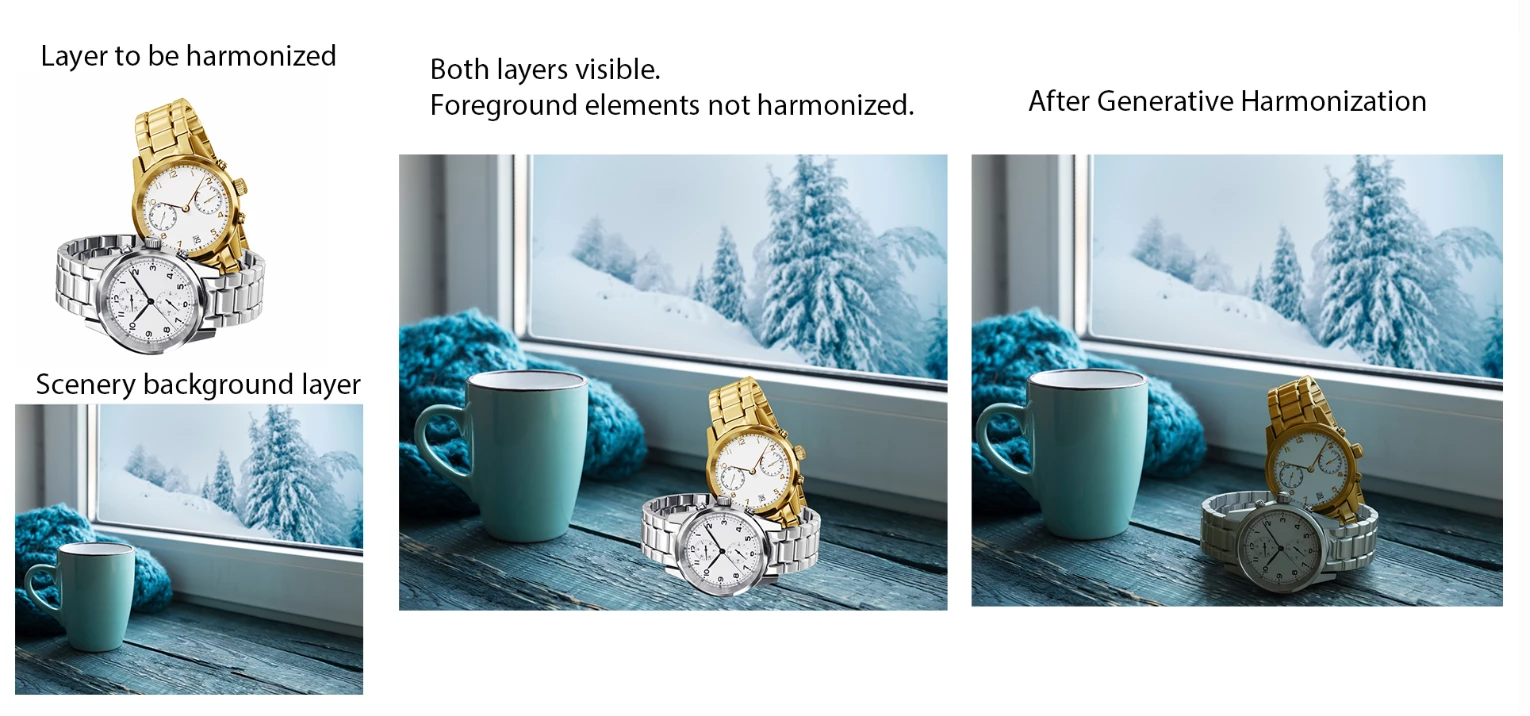
Desktop instructions:
- Open the scenery or background image to which you want to add an object in Photoshop (beta).
- Add the object image to a new layer.
- If the object image has a background, select Remove background from the Contextual Task Bar.
- In the Layers panel, select the pixel layer of the object image.
- Edit the image to change the size and placement.
- Select Harmonize from the Contextual Task Bar and choose a suitable variation.

The object blends seamlessly with the background. The generated results appear in a new layer.
Harmonize will consume 1 standard generative credit per generation.
When you add a new object to a composition, Harmonize intelligently analyzes the surrounding context, automatically adjusting color, lighting, shadows, and visual tone to create seamless, cohesive composites. This significantly reduces the need for time-consuming manual adjustments and is ideal for designers creating surreal composites, marketers building dynamic campaign visuals, or digital artists experimenting with whimsical scenes. This makes the process of producing high-quality, realistic composites faster, more intuitive, and more efficient than ever before.
Please give it a try and provide feedback here.
Thank you!
 AdChoices