Exit
  • Global community
    • Language:
      • Deutsch
      • English
      • Español
      • Français
      • Português
  • 日本語コミュニティ
  • 한국 커뮤니티
0

HELP: Photoshop can't open file

New Here ,
Sep 20, 2022 Sep 20, 2022

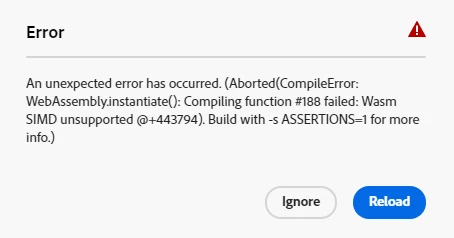
Lina26217791zg3o_0-1663738610635.png

Can anyone please help me what to do with this? I can open any file. 

I'm using Windows, Chrome Version 105.0.5195.127 (Official Build) (64-bit).

Thanks

199
Translate
Report
Community guidelines
Be kind and respectful, give credit to the original source of content, and search for duplicates before posting. Learn more
community guidelines
New Here ,
Sep 20, 2022 Sep 20, 2022

EDIT: I can't open any file. 

Translate
Report
Community guidelines
Be kind and respectful, give credit to the original source of content, and search for duplicates before posting. Learn more
community guidelines
Community Expert ,
Sep 21, 2022 Sep 21, 2022

Hi

What exact version of Photoshop and operating system do you have, also what kind of files are you trying to open and from where

Translate
Report
Community guidelines
Be kind and respectful, give credit to the original source of content, and search for duplicates before posting. Learn more
community guidelines
New Here ,
Sep 21, 2022 Sep 21, 2022

Hi Ged, I'm using Photoshop Beta running on Windows/ Chrome. 

I'm trying to open jpg files. 

Translate
Report
Community guidelines
Be kind and respectful, give credit to the original source of content, and search for duplicates before posting. Learn more
community guidelines
Community Expert ,
Sep 21, 2022 Sep 21, 2022

@LTQVHV I'll move this thread to the Photoshop beta section

Translate
Report
Community guidelines
Be kind and respectful, give credit to the original source of content, and search for duplicates before posting. Learn more
community guidelines
Adobe Employee ,
Sep 21, 2022 Sep 21, 2022
LATEST

Hi @LTQVHV,


Thanks for the post and sorry that you're having trouble opening any files in Photoshop Web?

I've added the Web topic to this thread, let me know if that is not correct.


Can you provide any more details on your system, such as available RAM?

Here are the minimum system requirements incase we're hitting something there: https://helpx.adobe.com/photoshop/system-requirements-web.html


Are you able to start a new file successfully?


Regards,

Pete

Translate
Report
Community guidelines
Be kind and respectful, give credit to the original source of content, and search for duplicates before posting. Learn more
community guidelines