
Participant
March 23, 2025
Question

How to remove icons from Application Bar

  • March 23, 2025
  • 2 replies
  • 266 views

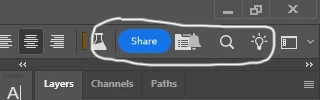
I'm assuming from my searching around that the icons circled in the attached image can't be removed. In the event that I'm wrong, how would I remove some or all of them? The Features To Review icon almost completely obscures the color selector for Text and it's awkward to aim for sometimes.
2 replies

Trevor.Dennis
Community Expert
Community Expert
March 23, 2025

What version are you running?  Only I thought they at least removed the distracting blue colour a while back.

Otherwise this works, but you should probably take more time than I did.

Participant
March 23, 2025

Lol, it's the Check Engine Light solution! I don't mind looking at them, I just want to have better access to the Text color box.

kglad
Community Expert
Community Expert
March 23, 2025

what app?

Participant
March 23, 2025

My apologies. Photoshop Beta. All versions.

kglad
Community Expert
Community Expert
March 23, 2025

in the future, to find the best place to post your message, use the list here, https://community.adobe.com/

p.s. i don't think the adobe website, and forums in particular, are easy to navigate, so don't spend a lot of time searching that forum list. do your best and we'll move the post (like this one has already been moved) if it helps you get responses.


<"moved from cc desktop">