
Inspiring
June 5, 2024
Answered

Install .abr bursh files Photoshop (Beta)

  • June 5, 2024
  • 3 replies
  • 1509 views

Setting up brand new computer, OS Windows 11 Pro. Copied .abr brushes from Photoshop 2024 which was on the old computer, OS Windows 10 Pro. Trying to install the brushes in Photoshop (Beta). The Properties indicates the file opens with Adobe Photoshop 2024. There is an option to change that in Properties. That option opens Explorer. From C drive, I'm not sure where to place the file or if I even need to change what APP opens it. Without changing the app that opens the .abr file I tried C>Users>User Name>App Data>Adobe Photoshop (Beta)>Adobe Photoshop (Beta) settings>Presets>Brushes. I also tried Presets>Tools instead of brushes. Then, launched Photoshop Beta, clicked on brushes, tried to Load - nothing happened. If this is the wrong place to post this please move it, thank you.
This topic has been closed for replies.
Correct answer Trevor.Dennis

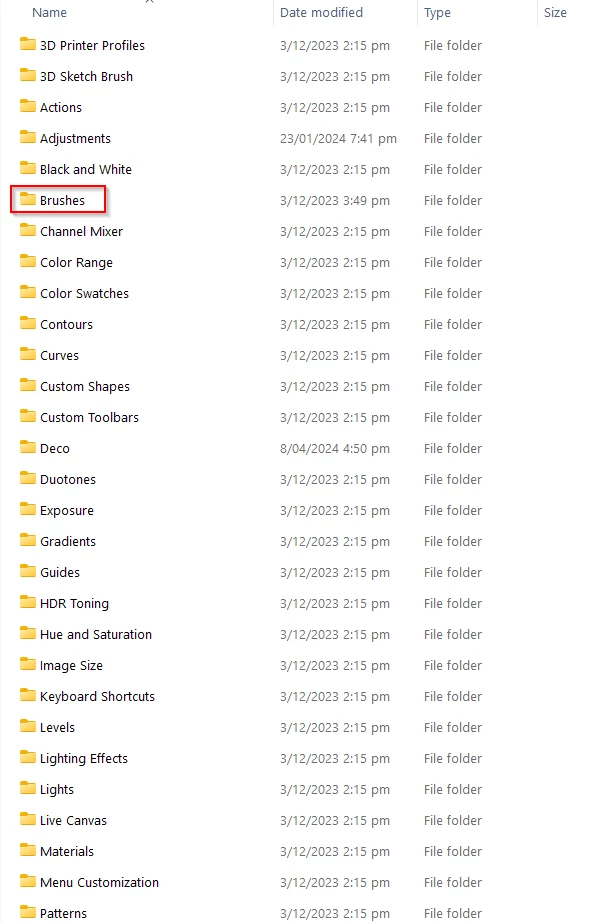
I like to place .abr files directly rather than use import (preset)

you are on Windows so nice and easy,

C:\Users\[Your user name]\AppData\Roaming\Adobe\Adobe Photoshop 2024\Presets


This only works for that particular version, so you'd need to do it all over again if you use ther beta version.

So what I do is place presets in a My Docs folder, and place a shortcut to that folder in the Presets folder. You have to think about it if creating your own presets and groups.

3 replies

Participating Frequently
September 2, 2024
yyy4781.jpg
Participating Frequently
September 2, 2024

beta ? sad me

Kevin Stohlmeyer
Community Expert
Community Expert
June 5, 2024

@pixelfor simply go to the brushes panel and choose Import Brushes from the side panel menu.

pixelforAuthor
Inspiring
June 5, 2024

Thank you!

Trevor.Dennis
Community Expert
Trevor.DennisCommunity ExpertCorrect answer
Community Expert
June 7, 2024

I like to place .abr files directly rather than use import (preset)

you are on Windows so nice and easy,

C:\Users\[Your user name]\AppData\Roaming\Adobe\Adobe Photoshop 2024\Presets


This only works for that particular version, so you'd need to do it all over again if you use ther beta version.

So what I do is place presets in a My Docs folder, and place a shortcut to that folder in the Presets folder. You have to think about it if creating your own presets and groups.