Participant
October 6, 2023
Question

Layer mask thumbnail looks different

  • October 6, 2023
  • 4 replies
  • 964 views

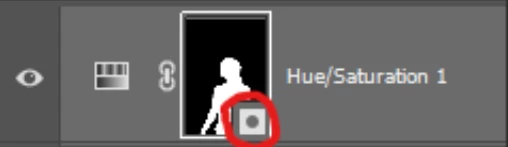
I've noticed that with the latest Beta of PS the layer mask thumbnail looks different with someting in the lower right corner. Can anyone tell me what it's supposed to mean? Thank you

 

This topic has been closed for replies.

4 replies

Anya Anti
Participant
November 6, 2023

Yes please make it go away or at least the option to turn it off! It makes no sense and just blocks a good portion of the mask preview

Participant
October 27, 2023

I thought this was a new feature when I did the latest PSD update today 25.1, not beta. Why do we need this? Who thought we needed this? I would like it to be gone.

Trevor.Dennis
Community Expert
Community Expert
October 28, 2023

The most recent version of Photoshop beta can disable the layer mask badges in Layer Panel Options.

I am sure the same function will be added to the full release version shortly.


BTW  The differentiate raster and vector masks, which is a useful feature for users like designers who will be using a lot of vector masks.  If you have the screen space, you can effectively minimize the badges by setting layer icons to Large.

Participant
October 30, 2023

At least that's one use for it but what makes absolutely zero sense to me is why would you only be able to disable this in the Beta version but not in the production version of PS??
I guess eventually the ability to disable this will reach the production version as well.

Participant
October 8, 2023

Is there any way to hide this icon? It obstructs the thumbnail and is really annoyng.

Participant
October 10, 2023

So far I have not found any way to disable this buy luckily this does not happen in the production version of PS.

Legend
October 7, 2023

It appears to mean it's a mask. I can't see the point really.

Participant
October 10, 2023

I could not agree more. I was trying to think of any possible way that this could somehow be useful but I came up with nothing. I mean we already know it's a mask except now this little icon is actually blocking a significant portion of the mask that normally would be useful to quickly get a visual idea of what you're actually masking.