

Pieter  van Roijen
Inspiring
September 5, 2023
Answered

Maybe a small bug in menus?

  • September 5, 2023
  • 2 replies
  • 252 views

I have some menus added with color through EDIT ->MENUS...

But lately some colors are missing, BLUE, VIOLET and GRAY.

Menu items with these colors "disappeared" they only show up with a cursor roll-over. 

As demonstrated here:
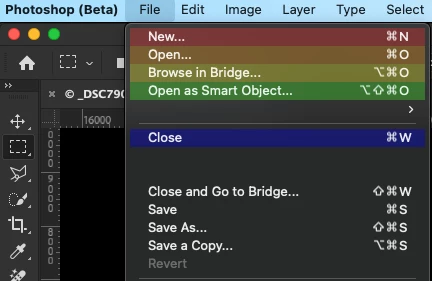
Blue appears when rollover with the cursor.

In the menu  EDIT->MENUS... these colors will also not appear
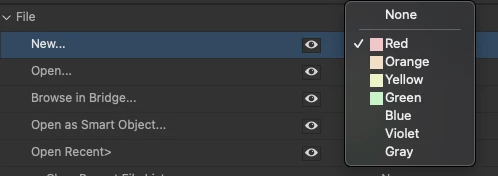
Switching "SHOW MENU COLORS" on/off in SETTINGS->PREFERENCES->INTERFACE doesn't help. Neither does reseting PS to default preferences

This hapens only in Ps beta (25.1.0) since one of the latest updates. in Ps (24.7.0) it works fine.
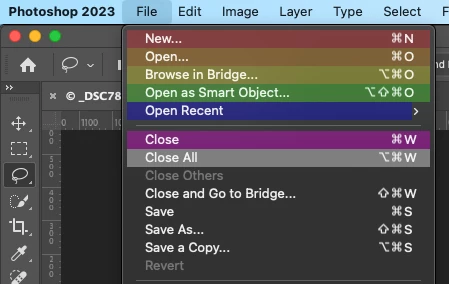
As a workaround i changed the menu's in Ps beta i want to highlite to only the visible colors RED, ORANGE, YELLOW and GREEN. Less clear for me then with all the colors but it is workable. Maybe it is something in the settings i missed or it is a bug.

Mac Ventura 13.5.1 on M1

This topic has been closed for replies.
Correct answer Pieter van Roijen

Thank you Cory, i already followed your tips which i found in another thread earlier on but reseting did not help.

I wrote in my post 'Neither does reseting PS to default preferences', but i meant to say PS beta instead of PS.


Having said that, tonight there was an update for beta and (drumroll...) i checked the menu settings and now all colors are visible again, so i changed the colors i missed back to my original choice. 


Or it was a fix in the beta, or the update overwrote a (wrong) setting.  Glad to say that whatever it was it fixed my problem.

Sometimes happiness do exists in small things.

2 replies

Pieter  van Roijen
Pieter van RoijenAuthorCorrect answer
Inspiring
September 7, 2023

Thank you Cory, i already followed your tips which i found in another thread earlier on but reseting did not help.

I wrote in my post 'Neither does reseting PS to default preferences', but i meant to say PS beta instead of PS.


Having said that, tonight there was an update for beta and (drumroll...) i checked the menu settings and now all colors are visible again, so i changed the colors i missed back to my original choice. 


Or it was a fix in the beta, or the update overwrote a (wrong) setting.  Glad to say that whatever it was it fixed my problem.

Sometimes happiness do exists in small things.

CShubert
Community Manager
Community Manager
September 7, 2023

Hi @Pieter van Roijen 


Try resetting Prefs for the Beta:

/Users/yourname/Library/Preferences/ Photoshop Beta Settings (Mac Ventura)

/Users/yourname/Library/Preferences/Adobe\ Photoshop\ \(Beta\)\ Settings (Mac)
C:\Users\user name\AppData\Roaming\Adobe\Adobe Photoshop (Beta)\Adobe Photoshop (Beta) Settings )Win)

Launch BETA Photoshop While Pressing The Keyboard Shortcut

With Photoshop closed, press and hold Shift+Ctrl+Alt (Win) / Shift+Command+Option (Mac) on your keyboard and then Launch Photoshop the way you normally would.

https://helpx.adobe.com/photoshop/using/preferences.html#Manually