MeredithStotzner
Community Manager
Community Manager
August 3, 2022
Question

Multi-Image Content-Aware Fill in Beta for Photoshop Desktop

  • August 3, 2022
  • 4 replies
  • 2822 views

Have you ever wanted to use a second image to complete your photo AND let Photoshop do the matching and blending?   Our Beta version of Content-Aware Fill can sample pixels from a second similar image. 
Check out the details here:
https://helpx.adobe.com/photoshop/using/multi-image-content-aware-fill.html

Multi-ImageContent-Aware Fill in Action
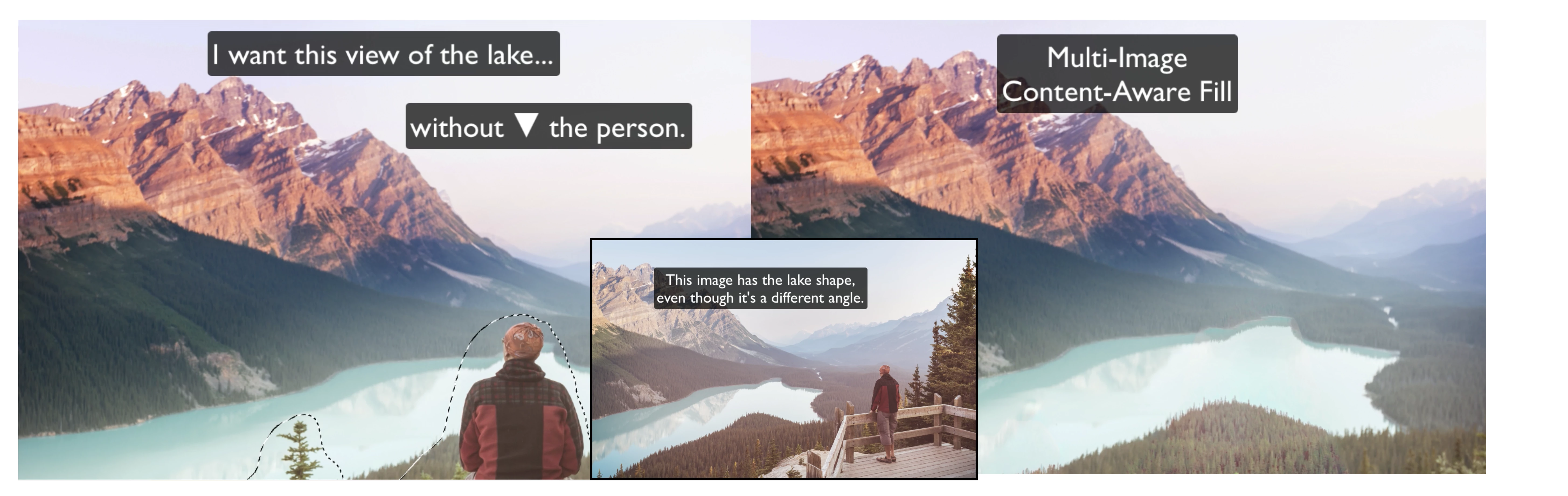
In the example below, the person in the original image (left) was removed and the unique shape of the lake was preserved by using a second image (inset).  The in-panel color controls were used to help make the final match (right).


Complete What's Missing 
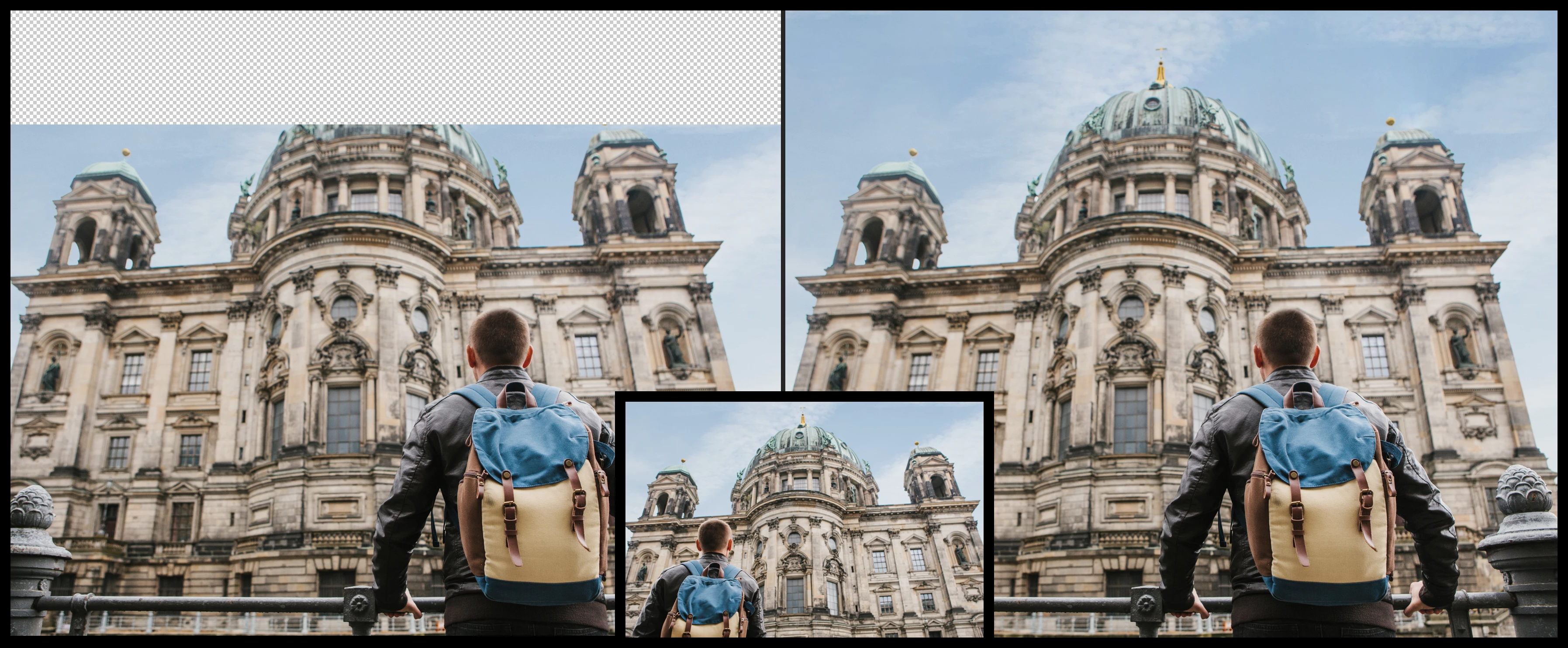
In another example, the top of the building didn't make it into the frame (left) so we added some canvas to the image, then used Multi-Image Content-Aware Fill to complete the dome from another photo (inset). The result is nearly flawless (right).
Get Aligned
Sometimes the fill result can be improved by identifying corresponding points between the main image and the additional image. Use the Alignment tool to identify these points.
.    


These are some of our shining examples - now it's your turn!

Did it work for you?
Why or why not?

We are looking forward to hearing from you!
The MiCAF Team

This topic has been closed for replies.

4 replies

Trevor.Dennis
Community Expert
Community Expert
February 7, 2024

Good gracious!  This was posted eighteen months ago, and I didn't know it was a thing?

cagneyl56755649
Participant
October 30, 2022

I have the most up-to-date PS Beta. When I go into the CAF window the option for "Additional Document" is grayed out for the drop down box. Is there a setting somewhere I need to enable to make this work? 

MeredithStotzner
Community Manager
Community Manager
November 4, 2022

HI @cagneyl56755649 

There are three requirements for the “Additional Document” drop down to be enabled:

  1. The Intel X86 CPUs must support AVX. (Any Mac older than 8 or 9 years may not have it.) Go to Help->System Info in Photoshop, and check out the line that looks like: System architecture: Intel CPU Family:6, Model:14, Stepping:10 with MMX, SSE Integer, SSE FP, SSE2, SSE3, SSE4.1, SSE4.2, AVX, AVX2, HyperThreading , and see if AVX is included.

  2.  8-bit and 16-bit support only (So if you have a 32-bit image and enter Content-Aware Fill, the Additional Document option is dimmed out).

  3. RGB, CMYK, LAB and Grayscale support only.

So if any of the requirements above is not met, the drop down will be grayed out.
Does that solve the mystery?
Thanks,
Meredith
cagneyl56755649
Participant
November 4, 2022
Thank you!!!
Participant
August 22, 2022

I downloaded the Photoshop Beta but Multi Image Content was not available, just Restoration. I am using the most current version of photoshop. 

Pete.Green
Community Manager
November 3, 2022

Hi @mlnfhecht,


Where were you looking for Multi Image Content aware fill?

Hopefully you've found it by now, but if not, you can find it by making a selection and then choosing Edit > Content Aware Fill, and find the additional document settings on the right pane: 


cagneyl56755649
Participant
November 4, 2022
Right, but the drop down is grayed out as if there is no other image to
choose.
Participant
August 13, 2022

I am very pleased to see Multi-image Content-Aware Fill hopefully being added to Photoshop! Just saw Colin Smith's video on it, downloaded the beta, and gave it a twirl. It removed a person in an image that was in front of a complex background with buildings, shadows, and lots of different textures and colors in seconds that took me about an hour to do yesterday using conventional Ps tools and looked much better than my efforts. I hope y'all can get this working prime time for the next Ps version. Thanks.