Participant
July 12, 2023
Answered

my generator fill box has dissapeared

  • July 12, 2023
  • 9 replies
  • 468 views

How do you fix the problem when your generater fill box has disappered. I do not get any box .

Correct answer Trevor.Dennis

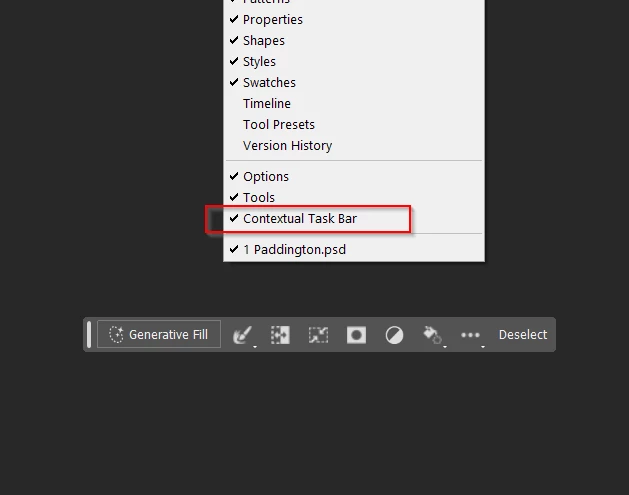
It sounds like you don't have the Context Aware Taskbar turned on at the bottom of the Window menu
9 replies

jimh53781106
Participant
July 13, 2023

Did not remember how I got it in the first place and when it went away I could not locate any instructions on how to get it back.  Thanks so much for the advise.


Participant
July 13, 2023
Yes ! that was the problem thank you it is working now.
Trevor.Dennis
Community Expert
Trevor.DennisCommunity ExpertCorrect answer
Community Expert
July 13, 2023

It sounds like you don't have the Context Aware Taskbar turned on at the bottom of the Window menu

jimh53781106
Participant
July 13, 2023

I am using Mac version on a Studio and have the very same issue.  Uninstalled and reinstaled Beta version but it did not resolve the issue.  Can go to dropdown and select generative fill and it works but it does not work as it once did.

Help


Kevin Stohlmeyer
Community Expert
Community Expert
July 12, 2023

Photoshop 24.6 is the public release not the 24.7 beta that contains Generative Fill.

Participant
July 12, 2023

I am a Photoshop 24.6. 

Kevin Stohlmeyer
Community Expert
Community Expert
July 12, 2023

Hi @Vicki31044332176h can you confirm you are on Beta 24.7 and not Photoshop 24.6? You should have both installed.

Participant
July 12, 2023

I usually have a generator box appear when I open the marquee tool. now when I open the marquee tool no generator box pops up just like if I was using traditional Photoshop without a generator

Kevin Stohlmeyer
Community Expert
Community Expert
July 12, 2023

Hi @Vicki31044332176h have you made a selection first?