
Known Participant
March 12, 2024
Answered

New Layer Highlight feature in Photoshop

  • March 12, 2024
  • 4 replies
  • 7066 views

Hi,


So I have noticed that recently Photoshop added a new feature and I'm not sure that it only bothers me, but I don't find an answer where to turn this off if possible.
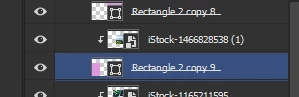
 

Before when I hovered layers in photoshop I don't recall it would highlight  the layers, only when I clicked on them.
Now suddenly it's highlighting the layers I'm hovering over, which makes it very confusing to see which layer I'm actually working on.
The layer is blue when hovered.
And it's grey when selected with click
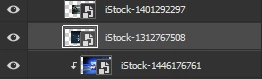
Can I turn this feature off?

It's beyond annoying, it slows my work down and I don't wish to get used to it as it's just a distraction.


Processor Intel(R) Core(TM) i7-10750H CPU @ 2.60GHz 2.59 GHz
Installed RAM 32.0 GB (31.8 GB usable)
Device ID 27756CCC-6C04-49DB-A87F-479753B83DCC
Product ID 00330-80000-00000-AA836
System type 64-bit operating system, x64-based processor
Pen and touch Pen support
Win 10



Thanks for the help!

Correct answer davescm

@Cheetara5EB7 

See here in the options bar for the move tool:


Dave


4 replies

Participant
October 7, 2024

Click on the Move Tool and then uncheck the "Show Transform Controls" option.


Dwerb Corporation
Known Participant
June 26, 2024

I dont know who is running the show at adobe, but they do not share the customer vision.
I dont want this feature. I have never wanted it. I am 20% the way through my masters with 3 more years to go and I need consistant functionality to get my school work done on time.

Why can we not just LEAVE WHAT WORKS ALONE.

c.pfaffenbichler
Community Expert
Community Expert
June 26, 2024

You can turn the feature off, so what is the problem? 

Antknee7297
Participating Frequently
July 16, 2024

It should be a feature that you have the ability to turn on, not a feature that is automatically on that we must turn off

Legend
April 24, 2024
Participant
April 24, 2024

And looks like you can't really deactivate it unless you deactivate all of the extras in: View - Extras. So annoying.

Legend
April 24, 2024

No, read the linked help article. You are incorrect.

Ged_Traynor
Community Expert
Community Expert
March 12, 2024

@Viktoria24203226e6hj not seeing that issue here with Photoshop version 25.5.1, it is a feature that's available in the Beta version though

https://community.adobe.com/t5/photoshop-beta-discussions/how-to-disable-annoying-mouse-hovering-on-layers/td-p/14482933

Known Participant
March 12, 2024

That's true, sorry, I've been using the beta for so long that I forgot it's not the normal Photoshop.

Thanks for the link it helped!

jane-e
Community Expert
Community Expert
June 26, 2024


quote

That's true, sorry, I've been using the beta for so long that I forgot it's not the normal Photoshop.

By @Viktoria24203226e6hj(Author)


Moved from Photoshop to Photoshop Beta