
Participant
May 23, 2023
Answered

No AI feature with new update

  • May 23, 2023
  • 139 replies
  • 286667 views

Just updated to the new beta version for PS, 24.6.0. (with AI)
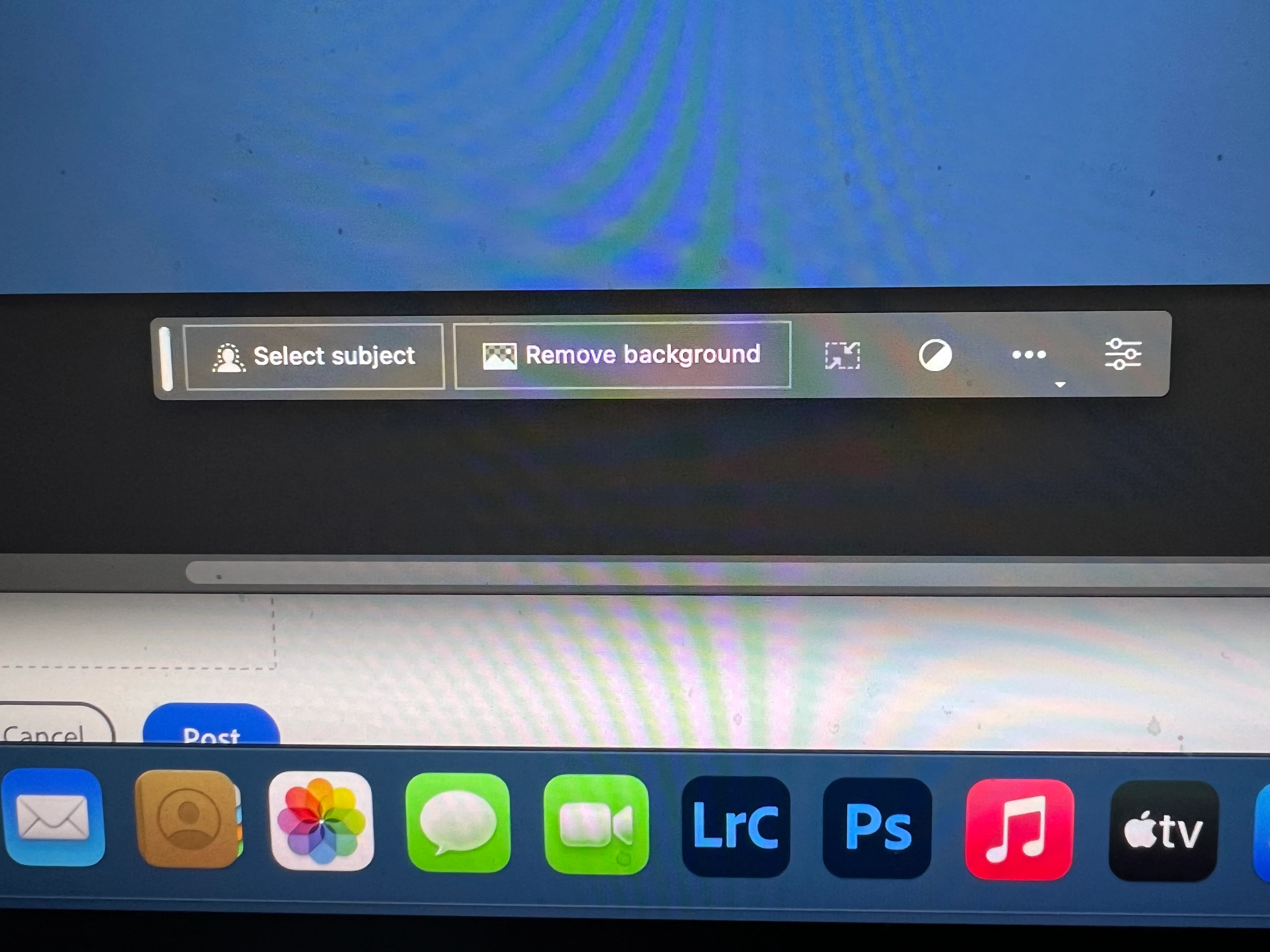
I got the new UI but it lacks the AI portion (or option) in the menu bar, or anywhere else.
Is there a minimum hardware requirement that I need? I might have missed the minimum requirements.
I am running Apple iMac Monterey 12.6.6. (Late 2015 build).
I am providing a screen shot of the UI I have available to me at this moment.
Thanks for any help you could provide.
Correct answer Kevin Stohlmeyer

Hi @Andrew30210510i27y uninstall that version then reinstall. The iterative version with Generative fill is 24.6.0 20230520.m.2181 4e0245f arm64 you are on the 516 release.

139 replies

Participant
June 7, 2023

my generative fill doesn't appere even though i have installed the latest version of photoshop (beta), any helps ?

Kevin Stohlmeyer
Community Expert
Community Expert
June 7, 2023

Hi @Enrico Giusep30345394qbdt go to Photoshop Help Menu System info - what version Photoshop do you have?

If it's 24.5 and your CC desktop shows that as current, you may be under a managed account like Enterprise or Teams.

In cases like that you need to contact your IT or plan administrator to change the setting in the Adobe Admin console to allow releases within a 30 day window, otherwise they wont show for a month.

Participant
June 6, 2023

June 6th

Adobe Photoshop Version: 24.6.0 20230603.m.2196 77b00e0 x64
It appears that the AI option is gone once again

I'm Do a selection but no UI pops up

Known Participant
June 5, 2023

i have no "general tool" tha's is showing when i'm selecting an area (with photoshop Beta last version i'm testing before buying), everything seems ok, connection , cloud, but still, no "generate tool" and no prompt case, what's wrong?

Kevin Stohlmeyer
Community Expert
Community Expert
June 5, 2023

Hi @Eric269890627poe it appears you are not on the latest beta version 24.6 0524.

Please uninstall this version and check your CC Desktop app for the latest beta install.

Participant
June 4, 2023

hi guys


I have downloaded the latest version of photoshop beta which is 24.6 

but its not showing the generative ai 

any idea how to fix it?


Thank you 

Kevin Stohlmeyer
Community Expert
Community Expert
June 6, 2023

Hi @rubin302716363dmy Download the latest beta and see if this solves this. You may have to uninstall the beta first to see the new version available.
Adobe Photoshop Version: 24.6.0 20230603.m.2196 77b00e0 x64 

Participant
June 2, 2023

I have ps beta downloaded. Newest version etc. I get the contextutual task bar but generative fill is not shown.

Kevin Stohlmeyer
Community Expert
Community Expert
June 6, 2023

Hi @John30252517dc68 https://helpx.adobe.com/enterprise/using/customize-creative-cloud-app.html#enable-beta-app-install

Most likely you are in a managed account. have your Admin/IT allow betas and turn off the 30-day delay on releases.

Participant
June 2, 2023

Need Generate Ai

jane-e
Community Expert
Community Expert
June 2, 2023
Need Generate Ai
By @Boburbek3023711106h0


Have you installed Photoshop Beta 24.6 yet?


Jane

BOOTHMEISTER6024
Participant
June 1, 2023

I have installed the Beta version which runs fine, but the option to use generative fill is not present in either the menu system or on the toolbar. It's just not listed. Any ideas?

jane-e
Community Expert
Community Expert
June 1, 2023

@BOOTHMEISTER6024 


Can you tell us which version of Photoshop Beta you have installed? Generative Fill is in 24.6.


Jane


Participant
June 1, 2023

Having installed the latest version of Photoshop beta, I found the new generative fill to be missing. This is not a case of it being greyed out and needing a DOB etc, it is not there at all. 


I have checked for updates, uninstalled the beta and reinstalled it, tried to update my account. Logged out of everything, re-logged in. Nothing seems to work. 


Has anyone else had this issue and knows of a solution?


Many thanks. 


Participant
June 1, 2023

Additional info: Version number: 24.6.0 20230516.m.2174

Participating Frequently
May 30, 2023

Same issue, context menu not appearing despite being enabled in window settings (m2 mac os) 

Participant
May 30, 2023

If you have the problem regarding the birthdate: 

Open Adobe Behance in your browser -> login -> you'll be asked to set a birthdate. It should work after that. 

Participating Frequently
May 30, 2023

doesnt work to me, tried this uncountable times.

Participating Frequently
May 30, 2023

i even deleted my whole behance account but even then the date of birth page didnt popped up