
Participant
May 23, 2023
Answered

No AI feature with new update

  • May 23, 2023
  • 139 replies
  • 286890 views

Just updated to the new beta version for PS, 24.6.0. (with AI)
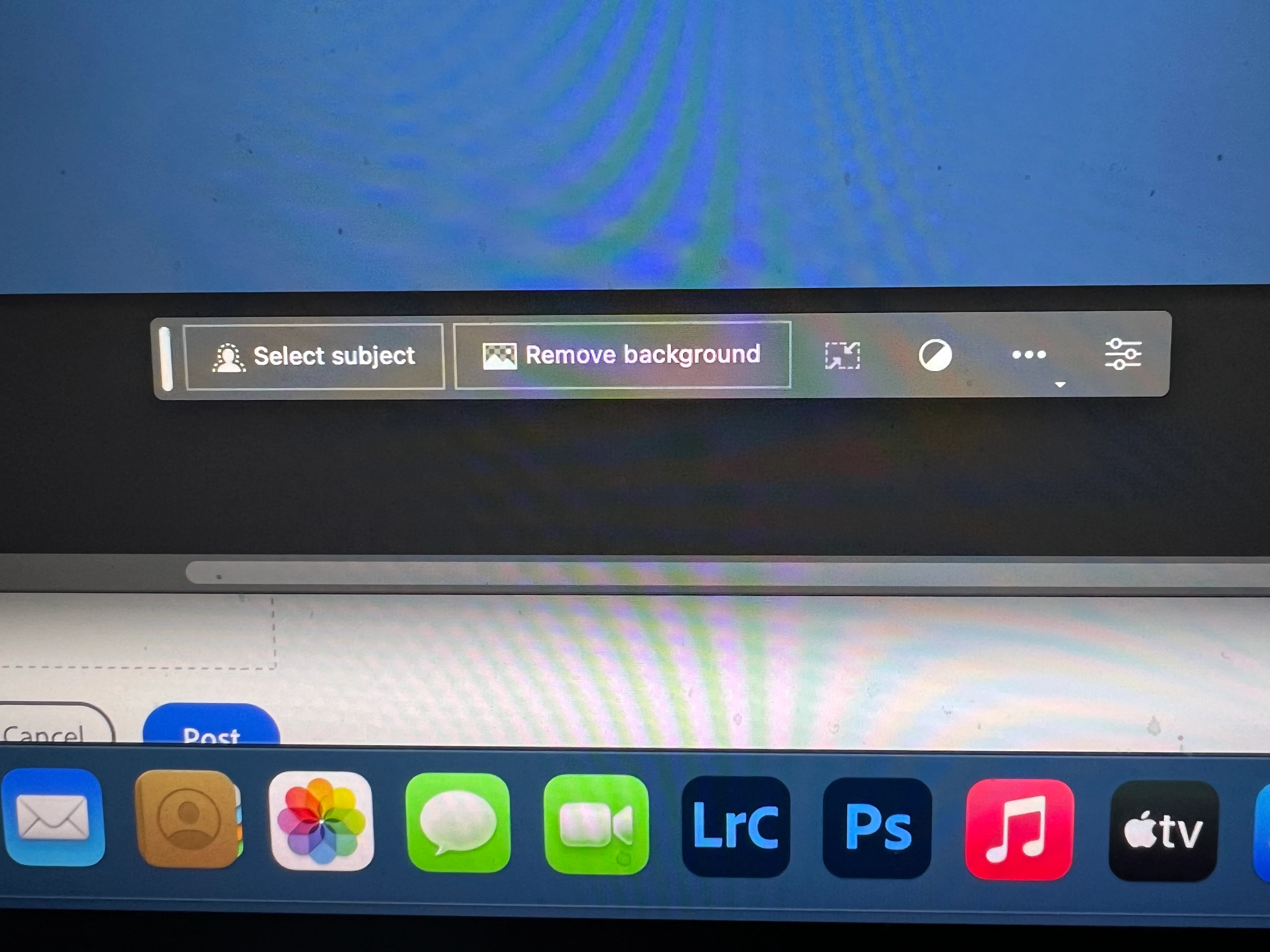
I got the new UI but it lacks the AI portion (or option) in the menu bar, or anywhere else.
Is there a minimum hardware requirement that I need? I might have missed the minimum requirements.
I am running Apple iMac Monterey 12.6.6. (Late 2015 build).
I am providing a screen shot of the UI I have available to me at this moment.
Thanks for any help you could provide.
Correct answer Kevin Stohlmeyer

Hi @Andrew30210510i27y uninstall that version then reinstall. The iterative version with Generative fill is 24.6.0 20230520.m.2181 4e0245f arm64 you are on the 516 release.

139 replies

Participant
February 20, 2025

Hi guys! I updated and it looks like the Contextual Task Bar automatically turned off for me. I had to turn it back on myself.

Enable the Contextual Task Bar

Here’s the most crucial step of the process. Under the ‘Windows’ dropdown menu, an option called ‘Contextual Task Bar’ can be enabled or disabled with a single click. Be sure to have this menu option enabled, or your selections will not display options for Generative Fill.

Participant
February 11, 2025

It's 2025 and my app updated 11 days ago, and the generative fill isn't showing up when I make a selection. It feels like a complete guessing game if it's going to show in the app or not. I've seen it occasionally, but it's extremely unreliable, and that is quite frustrating.

Participant
December 13, 2023

As of my last update in January 2023, the landscape of AI is continually evolving, and several new features and advancements have been prominent:

  1. Generative AI Transformations: Cutting-edge models, like GPT-4, showcase improved generative capabilities, enabling more natural language understanding and content creation, from text to image generation.

  2. AI in Healthcare Diagnosis: AI applications in healthcare have advanced, with diagnostic tools leveraging deep learning algorithms for more accurate and timely detection of medical conditions from various imaging and clinical data.

  3. AI-driven Personalization: Enhanced personalization in various industries, including e-commerce and content recommendation, using AI to tailor experiences based on individual preferences and behaviors.

  4. Explainable AI (XAI): A growing focus on creating AI models that provide transparent explanations for their decisions, addressing the need for interpretability and ethical considerations in AI systems.

  5. AI for Climate Modeling: AI is increasingly utilized in climate science, assisting in complex modeling, predicting environmental changes, and developing strategies for sustainable solutions to address climate challenges.

  6. Quantum Computing and AI Integration: Exploring the synergy between quantum computing and AI to tackle complex computational problems, opening new possibilities for solving tasks that are currently beyond the reach of classical computing.

  7. AI in Cybersecurity: Improved AI-driven cybersecurity solutions that utilize machine learning to detect and respond to cyber threats in real-time, enhancing the security posture of organizations.

  8. Natural Language Understanding (NLU) Advancements: Enhanced NLU models contribute to more context-aware conversational AI, facilitating more meaningful interactions and understanding in natural language processing applications.

  9. Edge AI for Real-time Processing: The proliferation of AI at the edge, allowing devices to perform real-time processing without relying on cloud infrastructure, enabling faster decision-making in applications like IoT and robotics.

  10. AI Ethics and Bias Mitigation: Increased attention on addressing ethical concerns and biases in AI algorithms, with the development of tools and frameworks to ensure fair and responsible AI deployment.

Remember that the field is dynamic, and new features and advance with AI may have occurred since my last update. Stay informed through reputable sources and research organizations for the latest developments in the exciting and rapidly evolving field of AI.

wcling
Participant
November 16, 2023

This help me get the bar back

Select top left menu "Window" then select from dropdown "Contexual Task Bar"


Participant
April 22, 2024

THANK YOU!!!!!!!!!!!!! this drove me nuts for the last 5min lol

Known Participant
October 20, 2023

When you select the area you would like to edit, right click and its in the list that pops up.

Participating Frequently
July 5, 2023

Have you tried a reinstall?

Participant
July 5, 2023

24.6 is correct build but m.2196 not m2181.


How to change? Thanks in advance.


CShubert
Community Manager
Community Manager
July 5, 2023

@kiwitechcoach we have updated the correct answer, please go to your CCD app and click Updates, then check for updates and make sure you download Adobe Photoshop Version: 24.7.0 20230628.m.2223 0770f83 x64.


Restart your computer, then see if you have access to GF.


Participant
June 29, 2023

Bonjour,

J'ai téléchargé la dernière version Photoshop Beta. 

J'ai maintenant accès à la nouvelle barre des taches contextuelle mais après selectionner une zone au lasso, je n'ai pas la commande Remplissage génératif.

Comment l'ajouter ?

Merci pour vos retours.

Participant
June 28, 2023

I am so sick and tired of this sht... Wasting so much time just for nothing.


I have full license and installed photoshop beta and still no "generative fill" available. 


I have read the docs and complaints of others. I opened Behance but there is no field to enter date of birth.


This is so useless and wasting so much time... Why they can not make it work out of the box?


Sick of this fkin stpid ppl that do not have any idea of how to make product available without ppl becoming headache.

Known Participant
June 28, 2023

Adobe assistance is one of the wort, we all paid for a full acces according to our licence, and we get no assistance from Adobe although we all have he same problem or with "generativ fill" or with "AI suppress tool"...

Participant
June 21, 2023

I've downloaded the beta generative fill and it's not letting me generate fill. It just selects the object and then there's the option to modify the object selection. I've looked at other Adobe posts, sadly the solution hasn't worked for me. Image attached after I press on select subject.