

Adobe Employee
June 20, 2022
Question

Photo Restoration Neural Filter now available in Photoshop Beta!

  • June 20, 2022
  • 53 replies
  • 128704 views

Hello Beta Community!


We are excited to share that Photo Restoration is now available in the Photoshop Beta. Photo Restoration is a new Neural Filter that uses an AI trained model to help restore old or damaged photographs. Using the Photo Restoration filter, users can restore the quality of their images using the basic editing options or choose to further refine using our advanced options (adjustments). Once complete, there is always an option to export the image to the main Photoshop workspace for further refinement.


Main Editing Features:

  • Photo enhancement - Improve color, contrast, and details
  • Enhance faces - Improve the detail on face specifically
  • Scratch reduction - Restore areas of the photo that have been scratched or damaged (off by default)


Advanced Editing Features (Adjustments):

  • Noise reduction
  • Color noise reduction
  • Halftone artifact reduction
  • JPEG artifacts reduction


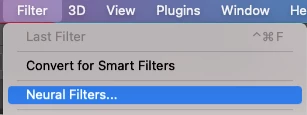
To access the filter, go to File > Neural Filters > Photo Restoration and switch the toggle to “on”. This will initiate the filter download and activate it for use.

 

Please share any thoughts and comments here on our community thread, or in-app through our Beta feedback panel (accessed via the flask icon in the upper righthand corner of the application). We look forward to hearing your feedback and seeing what you create!

53 replies

Polo Freitas
Known Participant
October 24, 2022

While we wait for the filter to return, if it ever comes back (I don't think it will ever come back) I leave here the link of GFPAN that does a very good job, very similar to 23.4v: https://replicate.com/xinntao/gfpgan


Polo Freitas
Known Participant
October 18, 2022

Update for Photoshop 24, and the bad filter continues, I'm very disappointed, I believed that today with all the Adobe party, the v23.4 comes back, but no, I think it won't come back 😞

Known Participant
October 19, 2022

I really hope the "good Filter" is coming back!

But it is incomprehensible why Adobe has released this Filter in its current Form!
This is really embarrassing to release such an unfinished Filter...


Adobe could rename this Filter to "MonsterFaces"-Filter, this would describe better what the Filter does 😉

Participant
October 11, 2022

When is this filter coming back?  Everytime I try to use it, it either does nothing at all or gives me an error message "temporarily disabled". 

CShubert
Community Manager
Community Manager
October 4, 2022

Hi @อาคม24521099yebm was there a question or something you wanted to share about the pdf of stock usage?  Happy to try to help if you do.


Thank you,

bobk2992755
Participating Frequently
October 7, 2022

I think they use probably the Algorithm "GFPGAN 🙂

But they have modified it in a bad way and the Faces become this Plastic/Cartoon Look (with too much Clarity/Contrast/Sharpness).


If they go back to the "clean" GFPGAN Algorithm we get Results like this and everything look great again:

https://github.com/TencentARC/GFPGAN


I dont believe they are using GFPGAN any longer (if it was that exact one), which is the problem. The GFPGAN version has changed (replaced) the teeth slightly (gap of missing tooth) and possibly the top lip in that image, while the latest Neural Filter just applied some image adjustments and didnt replace anything. So for some reason, the had to quickly remove the GFPGAN type method and revert to another one.  I will be very shocked if we get the ealrier version back to be honest.

bobk2992755
Participating Frequently
October 1, 2022

Well I was excited by the new update that I got through today... it updated the Photorestore filter.... now you can adjust how bad it does it lol.....  Bad or really bad.  Bring back the 23.4!!  Why does Adobe not listen?? Very disapointed with the lack of response to this.

harvey2811
Participant
September 30, 2022

I have the latest Beta version (PS 2023) which includes Photo Restoration under Neural Filters. I used this just once to revive a photo of my late sister. It worked brilliantly, but since then (about a week now,) each time I try to use the filter, it seems to start off okay but then comes to a halt with the message "We've temporarily disabled this filter because of an error". Will this feature be restored soon?

Polo Freitas
Known Participant
September 30, 2022

I think we will not go back to the initial filter, what happened? they could say why they took it, instead of trying to do something that looks like it but much worse.

Known Participant
September 30, 2022

Here is the same Picture, rendered with GFPGAN! This is looking much more natural (No HighContrast, No Artifacts, No Plastic-Look):

here as Comparison the bad Adobe-Result:


Adobe, you should really see the Difference now...


Here is the Link to GitHub:

https://github.com/TencentARC/GFPGAN

Polo Freitas
Known Participant
September 30, 2022

The results of GFPGAN v1.3 are very similar to the version that worked well in photoshop, however in photoshop there was something more refined, too bad it doesn't come back, I don't know why they removed it, maybe it comes back as a third-party plugin... it's been 3 or 4 versions that give ridiculous results, I don't even know why they ask to test.

Pete.Green
Community Manager
September 29, 2022

Hi all,


Thanks for all of the feedback so far! Please keep it coming.


With the latest beta update released this week, there is a new addition to the Photo Restoration Neural Filter that offers more control with Facial Enhancement via an "Enhance Face" slider.


How are the results for you with this new control?


Regards,

Pete

Known Participant
September 30, 2022

I have tried the new "EnhanceFace"-Slider, but it's still make "Plastic Faces"... 😔


The main Problem is not the "Intensity". The main Problem is the BAD new Algorithm, which produce plastic/artificial/oversharpened Faces with Artifacts!


Please revert to the OLD Algorithm, which produce realistic looking Faces whitout Artifacts...


Look here, the result is looking unrealistic and like painted with the latest Beta:


And the new bad Algorithm has some more Problems!

- Resolution is rendered in LowResolution

- The Eyes/Mouth/Nose etc has much Artifacts and unrealistic Details. Instead the OLD Algorithm create always realistic Face-Details!!!


Adobe please really revert to the OLD Algorithm!!! Or make at Least an Switch to choose between the old or new Algorithm!!!

This bad new Algorithm totally destroys this great new feature!

Chaddisfaction92
Participant
September 26, 2022

When using this filter, I receive the "We've temporarily disabled this filter because of an error." message. This and Color Transfer are the only two Beta filters that seem to have this error. Is there any solution available for this yet? I'm most curious to use the Photo Restoration filter, as it will be of great help for an upcoming award ceremony that I'm a part of. 

Pete.Green
Community Manager
September 26, 2022

Sorry for the errors!

We're going to be updating the error messaging in an upcoming version soon to hopefully help shed more light on what's going on.


Things you can try:


Let us know how it goes!

Regards,

Pete


Participant
September 27, 2022

Same error for me.  Using the latest version of Catalina on mac (10.15.7) and can't get the Photo Restoration filter to work after trying about ten different images of various formats and dimensions.  It's the same error that everyone else is getting "we've temporarily disabled this filter because of an error".  Also tried disabling the "Use Graphics Processor" option in the Neural filter dropdown menu, but it still doesn't work.  Very disappointing, Adobe.  

Polo Freitas
Known Participant
September 23, 2022

I tested it with the photo of your video, see how the filter got worse, a lot...