

PS beta 26.5m3003 - "Export as" is locked to PNG [SOLVED]
After publishing this thread, I found out that this appears to be the same issue already reported here for other menus:
I would delete this post but I haven't been able to find how to do it, so just ignore it or merge it with the other thread, thanks.
-----------------------------------------------------------------------------------
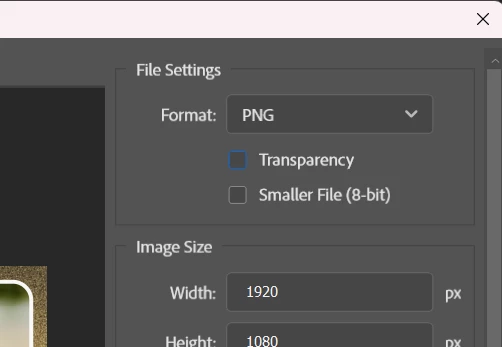
Issue: When using File>Export>Export as.., the drop-down menu in File Settings cannot be changed from PNG to other formats.
- Photoshop version: 26.5 m3003
- OS: Windows 11
Steps to reproduce:
- File>Export>Export as...
- Try to change Format: PNG to something else in File Settings
- The menu does not open, so it is not possible to choose another format
Expected result: Being able to select other formats, such as jpeg.
Actual result: The "Format" selector does not respond to mouse clicks and does not open the drop-down menu. Checking or unchecking "Transparency" and "8 bit" makes no difference.
If I go to Edit>Preferences>Export and enable "Use legacy 'Export as' ", then it works correctly (but in legacy mode).
Note: I don't normally use this function; this issue was brought to my atention by someone else. So, I am not sure if this is a known, ongoing bug or if I am overlooking something. Just in case, I am posting this report.
Thanks!
 AdChoices