MeredithStotzner
Community Manager
Community Manager
March 31, 2023
Question

Remove Tool in Beta for Photoshop Desktop

  • March 31, 2023
  • 67 replies
  • 158658 views

Hello Beta Team,
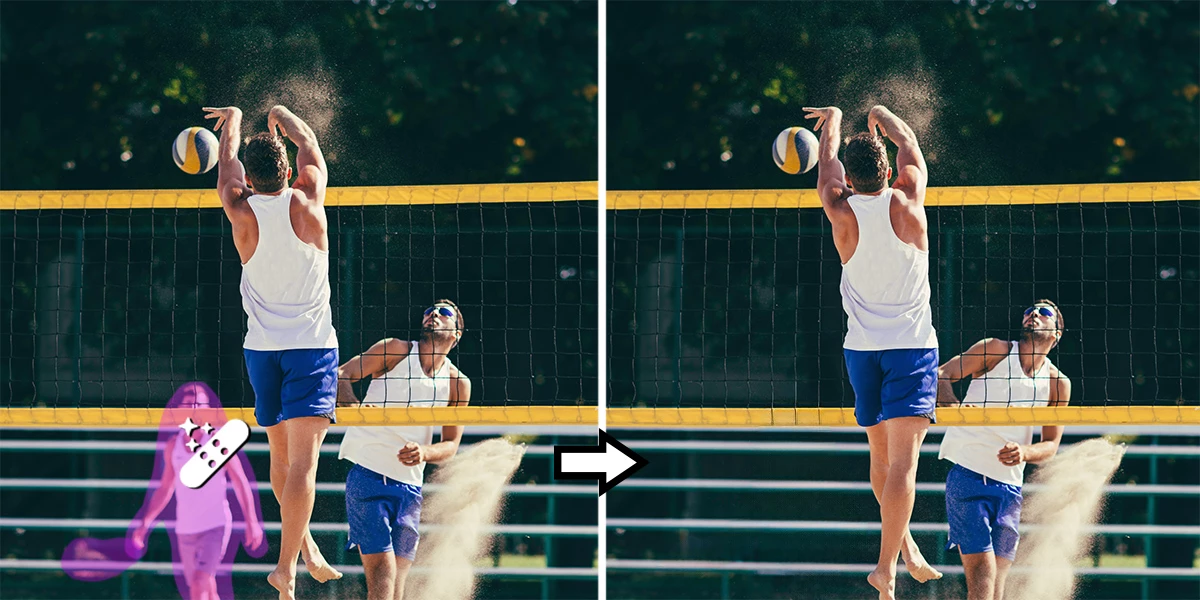
The Remove tool replaces areas of your image with realistic and relevant content.
 Use this tool to remove any distracting regions or elements, no matter how small or large.

Simply brush this artificial-Intelligence-powered tool over objects and people to make them disappear… as if they were never there. 

Complicated backgrounds and structures, such as fences or edges are seamlessly completed.


What we want for you:
This should seem like the magic you expect out of Photoshop!

For our experienced users and those with a discerning eye, our goal is to reduce or eliminate the clean-up after the fill. You should be spending less time repeating a fill for better results. You should also not need to clean-up by switching to another tool, such as the Clone Stamp.


What we want from you:

If you have multiple systems, please try this tool on all of them. Hardware will make a difference.

Please compare the results to your usual method of removing/filling objects. Let us know…
Was it like magic?
Did this save you time?


Let us know by clicking on the Beaker and giving the results a thumbs-up or a thumbs-down.



How to use the Remove Tool in Photoshop Desktop Beta
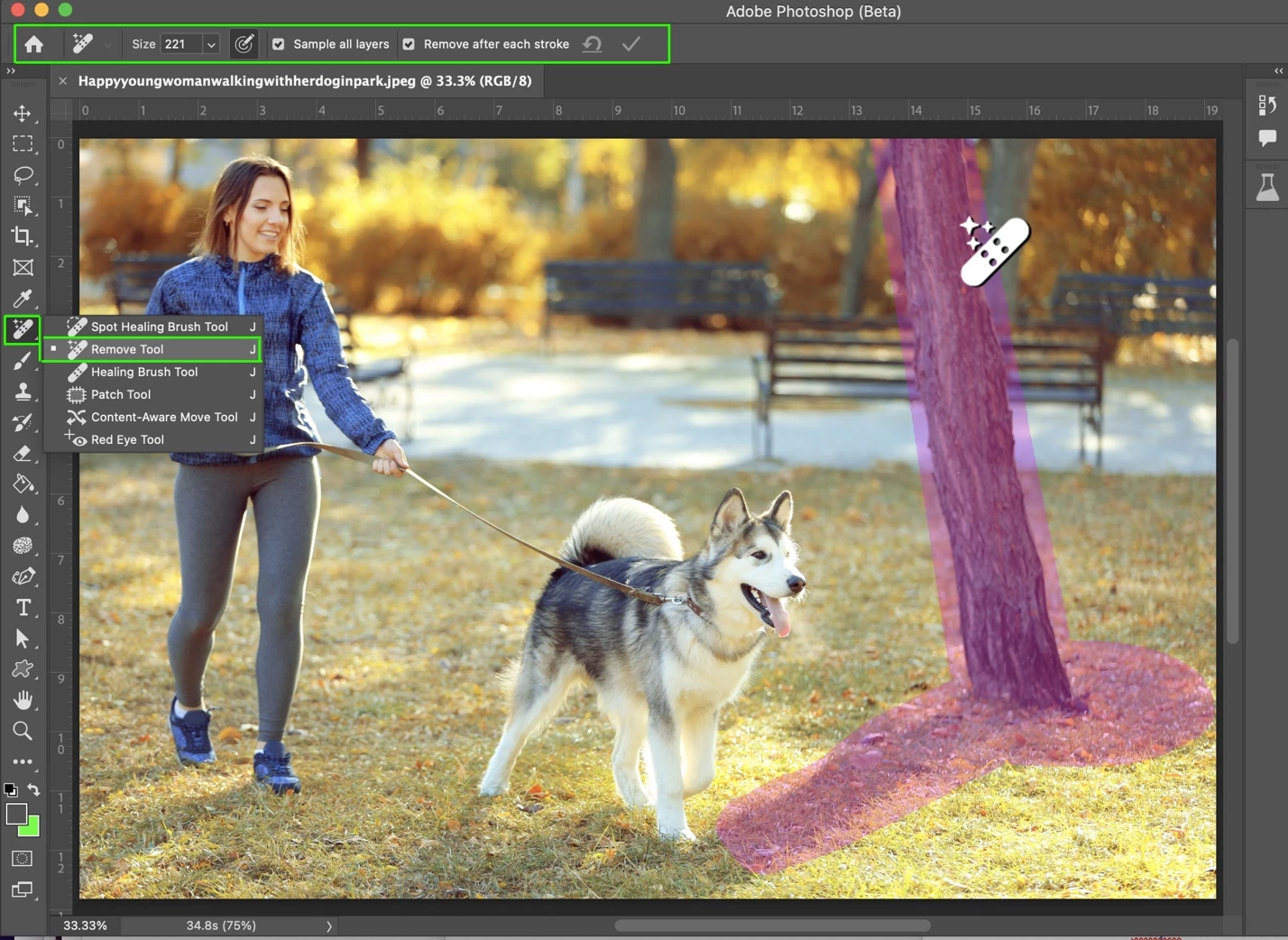
 

  1. Select the Remove tool from the toolbox.
    Find it in the Healing brush tool group. Expand the group by clicking on the Spot Healing Brush tool, Patch tool, or Red Eye tool to show the Remove Tool.

    Note: You may see a “Installing required components…” dialog the first time you use the tool after installation. Don’t worry, that’s normal.

  2. Choose a brush size in the options bar.
    • Choose a brush size that lets you brush over the entire object – with a little extra for good measure – so you don’t have to do a lot of brushing!
    • Brush hardness and brush opacity settings are not used by this tool
             
  3. (Optional) If you want to make multiple brush strokes to cover the large or complex object, turn off Remove after each stroke in the options bar.
    • Remove after each stroke = ON  will apply the fill as soon as you complete a single stroke with the tool.
    • Remove after each stroke = OFF will apply the fill after clicking the apply button; allowing for multiple strokes of the brush on the object before applying the fill.  
         
  4. (Optional) Turn on Sample All Layers in the options bar to sample data from all visible layers.
    Note: The new pixels will be created on the current, selected layer.
    Hint: Create & select a new layer, then turn on Sample All Layers for a non-destructive workflow.

  5. Click and drag over area you want to remove.
    • Be sure to cover the entire area. Results are better if a bit of the background behind the object or person is also covered.

    If Remove after each stroke = ON is selected, the new pixels will be appear after completing the stroke. Skip the next step. You’re done!


  1. If Remove after each stroke = OFF, continue to stroke of the area(s) to be removed, then click Apply in the Options bar or  Enter/Return on the keyboard.
    • Use Reset all Brush Strokes to clear all the strokes and start over.


We are looking forward to hearing from you!
Thank you,
The Remove Tool Team


This topic has been closed for replies.

67 replies

keithc45045168
Inspiring
April 26, 2023

I am fully up to date with Photoshop Beta but the remove tool does not show. I have reset my tool bar to default but no success.

Pete.Green
Community Manager
April 26, 2023

Hi @keithc45045168 ,


Do you see the Remove tool in Edit > Toolbar under the Extra tools on the right?

Or if you hit CMD+F/Ctrl+F and search for Remove Tool does it show up there for you?


keithc45045168
Inspiring
April 26, 2023
No, Nothing shows
Aurora_Media
Participant
April 26, 2023

I can engage the tool and when I draw around the content I want removed, it doesn't remove it after it processes. Any idea why this would be happening?

MeredithStotzner
Community Manager
Community Manager
April 26, 2023

Hi Aurora_Media,
Are you drawing a circle around the content you want to remove? 
The correct way to use the tool is to brush on the content you want to remove. (Please see the example in the original post).

If that's not the issue, could you please check which layer you are working on and if Sample All Layers is checked in the Options Bar across the top?

Thank you,
Meredith


Participant
April 25, 2023

Removal Tool works well some times and other times the masked area turns into a Green / Grey mask.

This happens on different images and different objects.

Participant
April 24, 2023

The remove tool worked great for me for the first few days, however it now seems to have a glitch.  After the first removal brush which works as it should, subsequent removals in the same area, and sometimes different areas, result in just a black fill instead of photo content.  I tried a reinstall of the Beta and the same thing still occurs.  System is a Ryzen 5 5700X, with AMD 6700XT GPU and 32 GB of RAM.   Screenshot attached.

Participant
April 24, 2023

Update....I had an update for my GPU drivers, once installed the remove tool works ok again.

Participant
April 24, 2023

Will this tool be available in Photoshop Elements when released?

Participating Frequently
April 24, 2023

Hi all. I somehow always get an error message when i select only the "remove tool" in photoshop beta:
Could not complete your request because of a program error.
I have already tried everything in my power to work around the problem, but nothing has helped.
Does anyone happen to know how I can fix the problem?
The error does not occur when I save or open the file....
I have copied here the error code that I have created with the plugin "Photoshop User Diagnostics".


Photoshop Error information
Code: -1
Text: because of a program error
Message: Could not complete your request because of a program error.
Stack:
Adobe Photoshop 24.5.0 20230412.m.2137 91413a4
0	address: 0x00007FF789134861	base: 0x00007FF784530000	module name: 'Photoshop.exe'	 symbol: dunamis_http_setSendRequestCallback:-1 in n.a.
1	address: 0x00007FF7876B8F54	base: 0x00007FF784530000	module name: 'Photoshop.exe'	 symbol: xmlCheckHTTPInput:-1 in n.a.
2	address: 0x00007FF7876B82F9	base: 0x00007FF784530000	module name: 'Photoshop.exe'	 symbol: xmlCheckHTTPInput:-1 in n.a.
3	address: 0x00007FF786854DE4	base: 0x00007FF784530000	module name: 'Photoshop.exe'	 symbol: xmlCheckHTTPInput:-1 in n.a.
4	address: 0x00007FF786854619	base: 0x00007FF784530000	module name: 'Photoshop.exe'	 symbol: xmlCheckHTTPInput:-1 in n.a.
5	address: 0x00007FF786854479	base: 0x00007FF784530000	module name: 'Photoshop.exe'	 symbol: xmlCheckHTTPInput:-1 in n.a.
6	address: 0x00007FF78686652D	base: 0x00007FF784530000	module name: 'Photoshop.exe'	 symbol: xmlCheckHTTPInput:-1 in n.a.
7	address: 0x00007FF787704155	base: 0x00007FF784530000	module name: 'Photoshop.exe'	 symbol: xmlCheckHTTPInput:-1 in n.a.
8	address: 0x00007FF787707057	base: 0x00007FF784530000	module name: 'Photoshop.exe'	 symbol: xmlCheckHTTPInput:-1 in n.a.
9	address: 0x00007FF7877069EA	base: 0x00007FF784530000	module name: 'Photoshop.exe'	 symbol: xmlCheckHTTPInput:-1 in n.a.
10	address: 0x00007FF7876DD6A6	base: 0x00007FF784530000	module name: 'Photoshop.exe'	 symbol: xmlCheckHTTPInput:-1 in n.a.
11	address: 0x00007FF784A438F8	base: 0x00007FF784530000	module name: 'Photoshop.exe'	 symbol: ?do_always_noconv@?$codecvt_null@_W@archive@boost@@EEBA_NXZ:-1 in n.a.
12	address: 0x00007FF784A4398D	base: 0x00007FF784530000	module name: 'Photoshop.exe'	 symbol: ?do_always_noconv@?$codecvt_null@_W@archive@boost@@EEBA_NXZ:-1 in n.a.
13	address: 0x00007FF784A13EF4	base: 0x00007FF784530000	module name: 'Photoshop.exe'	 symbol: xmlCleanupThreads:-1 in n.a.
14	address: 0x00007FF784A27021	base: 0x00007FF784530000	module name: 'Photoshop.exe'	 symbol: ?do_always_noconv@?$codecvt_null@_W@archive@boost@@EEBA_NXZ:-1 in n.a.
15	address: 0x00007FF784E2F00F	base: 0x00007FF784530000	module name: 'Photoshop.exe'	 symbol: xmlFreeRMutex:-1 in n.a.
16	address: 0x00007FF784A1718B	base: 0x00007FF784530000	module name: 'Photoshop.exe'	 symbol: xmlCleanupThreads:-1 in n.a.
17	address: 0x00007FF784AB7212	base: 0x00007FF784530000	module name: 'Photoshop.exe'	 symbol: xmlFileMatch:-1 in n.a.
18	address: 0x00007FF9EABA7604	base: 0x00007FF9EAB90000	module name: 'KERNEL32.DLL'	 symbol: BaseThreadInitThunk:-1 in n.a.
19	address: 0x00007FF9EBB026A1	base: 0x00007FF9EBAB0000	module name: 'ntdll.dll'	 symbol: RtlUserThreadStart:-1 in n.a.


Kevin Stohlmeyer
Community Expert
Community Expert
April 24, 2023

Hi @FlashTheOnlyOne Go to Photoshop Help Menu/System Info and copy/paste details in a reply. Post only once as the system takes time to process the large amount of data.


Participating Frequently
April 24, 2023

Here is the info I copy and pasted from my system info

Adobe Photoshop Version: 24.5.0 20230412.m.2137 91413a4  x64
Number of Launches: 6
Operating System: Windows 10 64-bit
Version: 10 10.0.19044.2846
System architecture: AMD CPU Family:15, Model:1, Stepping:0 with MMX, SSE Integer, SSE FP, SSE2, SSE3, SSE4.1, SSE4.2, AVX, AVX2, HyperThreading
Physical processor count: 12
Logical processor count: 24
Processor speed: 3793 MHz
Built-in memory: 32715 MB
Free memory: 20971 MB
Memory available to Photoshop: 25148 MB
Memory used by Photoshop: 70 %
Crash Handler: Adobe
DCX Version: 6.23.1
SAM SDK Version: 3.6.5
ACP.local Status:
 - SDK Version: 3.0.1.1
 - Core Sync Status: Reachable and compatible
 - Core Sync Running: 6.5.0.24
 - Min Core Sync Required: 4.3.66.28
Live Edit Client SDK Version: 4.0.0
Content Credentials is not available
Manta Canvas: Enabled.
Alias Layers: Disabled.
Highbeam: Enabled.
Wintab Digitizer Services
    Spec Version 1.4
    Impl Version 1.39
    Num Devices 0
Image tile size: 1028K
Image cache levels: 4
Font Preview: Medium
HarfBuzz Version: 4.3.0
TextEngine: Unified Text Engine
 ======= GPU
Native API stable: True
OpenGL API stable: True
OpenCL API stable: True
D3D12Warp renderer: False
GPUDeny:               0
GPUForce:              0
useGPU:                1
useOpenCL:             1
isGPUCapable:          1
GPUName:               NVIDIA GeForce RTX 2070 SUPER
GPUVendor:             NVIDIA
IsNativeGPUCapable:    1
IsOpenGLGPUCapable:    1
IsOpenCLGPUCapable:    1
HasSufficientRAM:      1
  GPU accessible RAM:                 8,391 MB
  Required GPU accessible RAM:        1,500 MB
UseGraphicsProcessorChecked:   1
UseOpenCLChecked:              1
Windows remote desktop:  0
Display: 1
  Display Bounds: top=0, left=0, bottom=1440, right=2560
Display: 2
  Display Bounds: top=0, left=2560, bottom=1440, right=5120
 ------- Sniffer output
[0 ms]
  Launch GPUSnifferThread

[0 ms]
  Start RunAllAPIs

[0 ms]
  "C:\Program Files\Adobe\Adobe Photoshop (Beta)\sniffer.exe" -baseTimeMS=783195051 -comment=Photoshop Version: Adobe Photoshop 24.5.0 20230412.m.2137 91413a4 x64

[691 ms]
  Start sniffer 2023-04-24 21:35:21
  # Photoshop Version: Adobe Photoshop 24.5.0 20230412.m.2137 91413a4 x64
  C:\Program Files\Adobe\Adobe Photoshop (Beta)\sniffer.exe -baseTimeMS=783195051 -comment=Photoshop Version: Adobe Photoshop 24.5.0 20230412.m.2137 91413a4 x64
  
  {62 ms}
  Start platform native
    # displays:                   2
    Display 0
      Display:                      \\.\DISPLAY1
      Main:                         TRUE
      Built in:                     FALSE
      Stereo:                       FALSE
      Bounds:                       (0, 0) -> (2,560, 1,440)
      Dimensions:                   (2,560 1,440)
      Physical size:                (0 0)
      Pixel size:                   (0 0)
      Dynamic range:                (0 1)
      Potential dynamic range:      (0 1)
      Reference dynamic range:      (0 0)
      Attached Device:              (DeviceID name=NVIDIA GeForce RTX 2070 SUPER index=0)
    
    Display 1
      Display:                      \\.\DISPLAY2
      Main:                         FALSE
      Built in:                     FALSE
      Stereo:                       FALSE
      Bounds:                       (2,560, 0) -> (5,120, 1,440)
      Dimensions:                   (2,560 1,440)
      Physical size:                (0 0)
      Pixel size:                   (0 0)
      Dynamic range:                (0 1)
      Potential dynamic range:      (0 1)
      Reference dynamic range:      (0 0)
      Attached Device:              (DeviceID name=NVIDIA GeForce RTX 2070 SUPER index=0)
    
    # devices:                    1
    Device 0
      Name:                         NVIDIA GeForce RTX 2070 SUPER
      Preferred:                    TRUE
      Power Envelope:               UNKNOWN
      Attachment:                   UNKNOWN
      # attached displays:          2
        \\.\DISPLAY1
        \\.\DISPLAY2
      GPU accessible RAM:                8,391 MB
      VRAM:                              8,391 MB
      Dedicated System RAM:                  0 MB
      Shared System RAM:                17,152 MB
      API version:                  12.0 (12.0)
      Device version:               12.0 (12.0)
      Vendor name:                  NVIDIA
      Model:                        NVIDIA_GEFORCE_RTX_2070_SUPER
      Driver date:                  2022-12-05  000000.000000-000
      Driver age:                   4 months
      Driver version:               31.0.15.2756
      Supports UMA:                 UNSUPPORTED
      D3D-ID:                       7812
  End platform native
  {223 ms}
  
  {223 ms}
  Start platform OpenGL
    # displays:                   2
    Display 0
      Display:                      \\.\DISPLAY1
      Main:                         TRUE
      Built in:                     FALSE
      Stereo:                       FALSE
      Bounds:                       (0, 0) -> (2,560, 1,440)
      Dimensions:                   (2,560 1,440)
      Physical size:                (0 0)
      Pixel size:                   (0 0)
      Dynamic range:                (0 1)
      Potential dynamic range:      (0 1)
      Reference dynamic range:      (0 0)
      Attached Device:              (DeviceID name=NVIDIA GeForce RTX 2070 SUPER/PCIe/SSE2 index=0)
    
    Display 1
      Display:                      \\.\DISPLAY2
      Main:                         FALSE
      Built in:                     FALSE
      Stereo:                       FALSE
      Bounds:                       (2,560, 0) -> (5,120, 1,440)
      Dimensions:                   (2,560 1,440)
      Physical size:                (0 0)
      Pixel size:                   (0 0)
      Dynamic range:                (0 1)
      Potential dynamic range:      (0 1)
      Reference dynamic range:      (0 0)
      Attached Device:              (DeviceID name=NVIDIA GeForce RTX 2070 SUPER/PCIe/SSE2 index=0)
    
    # devices:                    1
    Device 0
      Name:                         NVIDIA GeForce RTX 2070 SUPER/PCIe/SSE2
      Preferred:                    TRUE
      Power Envelope:               INTEGRATED
      Attachment:                   UNKNOWN
      # attached displays:          2
        \\.\DISPLAY1
        \\.\DISPLAY2
      GPU accessible RAM:                8,391 MB
      VRAM:                              8,391 MB
      Dedicated System RAM:                  0 MB
      Shared System RAM:                17,152 MB
      API version:                  2.1 (2.1.2 NVIDIA 527.56)
      Device version:               2.1 (2.1.2 NVIDIA 527.56)
      Vendor name:                  NVIDIA
      Model:                        NVIDIA_GEFORCE_RTX_2070_SUPER
      Driver date:                  2022-12-05  000000.000000-000
      Driver age:                   4 months
      Driver version:               31.0.15.2756
      GLSL version:                 1.20 (1.20 NVIDIA via Cg compiler)
  End platform OpenGL
  {420 ms}
  
  {420 ms}
  Start platform OpenCL
    # displays:                   0
    
    # devices:                    1
    Device 0
      Name:                         NVIDIA GeForce RTX 2070 SUPER
      Preferred:                    TRUE
      Power Envelope:               DISCRETE
      Attachment:                   UNKNOWN
      # attached displays:          0
      GPU accessible RAM:                8,589 MB
      VRAM:                              8,589 MB
      Dedicated System RAM:                  0 MB
      Shared System RAM:                     0 MB
      API version:                  3.0 (OpenCL 3.0 CUDA)
      Device version:               3.0 (OpenCL 3.0 CUDA)
      Vendor name:                  NVIDIA
      Model:                        NVIDIA_GEFORCE_RTX_2070_SUPER
      Driver date:                  UNKNOWN
      Driver age:                   UNKNOWN
      Driver version:               UNKNOWN
      Bandwidth:                    386 GB / s
      Compute score:                3,779.8
      Device name string:           NVIDIA GeForce RTX 2070 SUPER
      Device vendor string:         NVIDIA Corporation
      Platform name string:         NVIDIA CUDA 
      Platform vendor string:       NVIDIA Corporation
  End platform OpenCL
  {613 ms}
  
  Exit code kExitNormal
  End sniffer 2023-04-24 21:35:21
[kStatusNormal, kExitNormal]

[692 ms]
  Finish RunAllAPIs

[2360 ms]
  Start GetSnifferResult

[2360 ms]
  Finish GetSnifferResult

 ------- Sniffer output
 ======= GPU
License Type: Subscription
Serial number: 94070252151434171679
GUIDBucket: 
Composite Core (enable_composite_core): on 
Composite Core GPU (comp_core_gpu): on 
Composite Core Threads (MultithreadedCompositing): on 
Composite Core UI (comp_core_ui): off 
Composite Core Feature Prefs (CompCoreFeaturePrefs): off 
Document Graph (enable_doc_graph): off 

Application folder: C:\Program Files\Adobe\Adobe Photoshop (Beta)\
Temporary file path: C:\Users\Julian\AppData\Local\Temp\
Photoshop scratch has async I/O enabled
Scratch volume(s):
  Startup, 930,9G, 316,4G free
Required Plugins folder: C:\Program Files\Adobe\Adobe Photoshop (Beta)\Required\Plug-ins\
Primary Plugins folder: C:\Program Files\Adobe\Adobe Photoshop (Beta)\Plug-ins\

Installed components:
   ACE.dll   ACE 2023/02/15-13:42:29   79.533c8ff   79.533c8ff
   act_tracing.dll   Copyright (c) 2021 Adobe. All Rights Reserved   1.0.58   
   AdobeLinguistic.dll   Adobe Linguisitc Library   dfba77e   
   AdobeOwl.dll   Adobe Owl   5.5.0   
   AdobePDFL.dll   PDFL 2023/01/28-17:08:16   79.4c0bb7e   79.4c0bb7e
   AdobePIP.dll   Adobe Product Improvement Program   8.2.0.16   
   AdobeSVGAGM.dll   AdobeSVGAGM   79.b4ac713   79.b4ac713
   AdobeXMP.dll   Adobe XMP Core 2023/02/09-06:26:14   79.c0204b2   79.c0204b2
   AdobeXMPFiles.dll   Adobe XMP Files 2023/02/09-06:26:14   79.c0204b2   79.c0204b2
   AdobeXMPScript.dll   Adobe XMP Script 2023/02/09-06:26:14   79.c0204b2   79.c0204b2
   AGM.dll   AGM 2023/02/15-13:42:29   79.533c8ff   79.533c8ff
   AID.dll   AID DLL   1.0.0.58   
   AIDE.dll   AIDE 2023/02/18-12:18:34   79.78f7814   79.78f7814
   aifm.dll   AIFM   1.0   23.68434
   AILib.dll   Adobe Illustrator 2023   27.1.0   
   aiport.dll   AIPort   1.0   23.68434
   ARE.dll   ARE 2023/02/15-13:42:29   79.533c8ff   79.533c8ff
   AXE8SharedExpat.dll   AXE8SharedExpat 2022/12/13-13:20:11   79.002995e   79.002995e
   AXEDOMCore.dll   AXEDOMCore 2022/12/13-13:20:11   79.002995e   79.002995e
   BIB.dll   BIB 2023/02/15-13:42:29   79.533c8ff   79.533c8ff
   BIBUtils.dll   BIBUtils 2023/02/15-13:42:29   79.533c8ff   79.533c8ff
   boost_chrono.dll   photoshopdva   22.0.0   
   boost_date_time.dll   photoshopdva   22.0.0   
   boost_filesystem.dll   photoshopdva   22.0.0   
   boost_regex.dll   photoshopdva   22.0.0   
   boost_system.dll   photoshopdva   22.0.0   
   boost_threads.dll   photoshopdva   22.0.0   
   CoolType.dll   CoolType 2023/02/15-13:42:29   79.533c8ff   79.533c8ff
   CRClient.dll   Adobe Crash Reporter Client DLL   4.8.0.6   
   DirectML.dll   DirectML Redistributable Library   1.9.1+220902-1323.1.dml-1.9.d6f03b3   
   dnssd.dll   Bonjour   3,0,0,2   
   dvaaccelerate.dll   photoshopdva   22.0.0   
   dvaappsupport.dll   photoshopdva   22.0.0   
   dvaaudiodevice.dll   photoshopdva   22.0.0   
   dvaaudiodsp.dll   photoshopdva   22.0.0   
   dvacore.dll   photoshopdva   22.0.0   
   dvacrashhandler.dll   Adobe Audition CC 2017   10.0.0   
   dvamarshal.dll   photoshopdva   22.0.0   
   dvamediatypes.dll   photoshopdva   22.0.0   
   dvametadata.dll   photoshopdva   22.0.0   
   dvametadataapi.dll   photoshopdva   22.0.0   
   dvametadataUI.dll   photoshopdva   22.0.0   
   dvanet.dll   photoshopdva   22.0.0   
   dvaplayer.dll   photoshopdva   22.0.0   
   dvascripting.dll   photoshopdva   22.0.0   
   dvatransport.dll   photoshopdva   22.0.0   
   dvaui.dll   photoshopdva   22.0.0   
   dvavulcansupport.dll   photoshopdva   22.0.0   
   dynamic-torqnative.dll   Unified Extensibility Platform   uxp-7.0.1-3-e8edf70   
   dynamiclink.dll   photoshopdva   22.0.0   
   ExtendScript.dll   ExtendScript 2022/08/18-12:50:45   82.4   82.4
   filterport.dll   FilterPort   1.1   O
   icucnv71.dll   International Components for Unicode    Build 14.0.04ee3a5   
   icuin71.dll   International Components for Unicode    Build 14.0.04ee3a5   
   icuuc71.dll   International Components for Unicode    Build 14.0.04ee3a5   
   ippcc.dll   ippCC. Intel(R) Integrated Performance Primitives. Color Conversion.   2021.6 (r0xbffe3c5b)   
   ippcck0.dll   ippCC. Intel(R) Integrated Performance Primitives. Color Conversion.   2021.6 (r0xbffe3c5b)   
   ippccl9.dll   ippCC. Intel(R) Integrated Performance Primitives. Color Conversion.   2021.6 (r0xbffe3c5b)   
   ippccy8.dll   ippCC. Intel(R) Integrated Performance Primitives. Color Conversion.   2021.6 (r0xbffe3c5b)   
   ippcore.dll   core. Intel(R) Integrated Performance Primitives. Core Library.   2021.6 (r0xbffe3c5b)   
   ippcv.dll   ippCV. Intel(R) Integrated Performance Primitives. Computer Vision.   2021.6 (r0xbffe3c5b)   
   ippcvk0.dll   ippCV. Intel(R) Integrated Performance Primitives. Computer Vision.   2021.6 (r0xbffe3c5b)   
   ippcvl9.dll   ippCV. Intel(R) Integrated Performance Primitives. Computer Vision.   2021.6 (r0xbffe3c5b)   
   ippcvy8.dll   ippCV. Intel(R) Integrated Performance Primitives. Computer Vision.   2021.6 (r0xbffe3c5b)   
   ippi.dll   ippIP. Intel(R) Integrated Performance Primitives. Image Processing.   2021.6 (r0xbffe3c5b)   
   ippik0.dll   ippIP. Intel(R) Integrated Performance Primitives. Image Processing.   2021.6 (r0xbffe3c5b)   
   ippil9.dll   ippIP. Intel(R) Integrated Performance Primitives. Image Processing.   2021.6 (r0xbffe3c5b)   
   ippiy8.dll   ippIP. Intel(R) Integrated Performance Primitives. Image Processing.   2021.6 (r0xbffe3c5b)   
   ipps.dll   ippSP. Intel(R) Integrated Performance Primitives. Signal Processing.   2021.6 (r0xbffe3c5b)   
   ippsk0.dll   ippSP. Intel(R) Integrated Performance Primitives. Signal Processing.   2021.6 (r0xbffe3c5b)   
   ippsl9.dll   ippSP. Intel(R) Integrated Performance Primitives. Signal Processing.   2021.6 (r0xbffe3c5b)   
   ippsy8.dll   ippSP. Intel(R) Integrated Performance Primitives. Signal Processing.   2021.6 (r0xbffe3c5b)   
   ippvm.dll   ippVM. Intel(R) Integrated Performance Primitives. Vector Math.   2021.6 (r0xbffe3c5b)   
   ippvmk0.dll   ippVM. Intel(R) Integrated Performance Primitives. Vector Math.   2021.6 (r0xbffe3c5b)   
   ippvml9.dll   ippVM. Intel(R) Integrated Performance Primitives. Vector Math.   2021.6 (r0xbffe3c5b)   
   ippvmy8.dll   ippVM. Intel(R) Integrated Performance Primitives. Vector Math.   2021.6 (r0xbffe3c5b)   
   JP2KLib.dll   JP2KLib 2023/02/06-19:10:37   79.02b25b1   79.02b25b1
   libeay32.dll   The OpenSSL Toolkit   1.0.2zf   
   libifcoremd.dll   Intel(r) Visual Fortran Compiler   10.0 (Update A)   
   libiomp5md.dll   Intel(R) OpenMP* Runtime Library   5.0   
   libmmd.dll   Intel(R) C/C++/Fortran Compiler   Mainline   
   libzip.dll   photoshopdva   22.0.0   
   LogSession.dll   LogSession   8.2.0.16   
   mediacoreif.dll   photoshopdva   22.0.0   
   Microsoft.AI.MachineLearning.dll   Microsoft® Windows® Operating System   1.13.20221021.1.b353e0b   
   mkl_avx2.2.dll   Intel(R) oneAPI Math Kernel Library   2022.1   
   mkl_avx512.2.dll   Intel(R) oneAPI Math Kernel Library   2022.1   
   mkl_core.2.dll   Intel(R) oneAPI Math Kernel Library   2022.1   
   mkl_def.2.dll   Intel(R) oneAPI Math Kernel Library   2022.1   
   mkl_mc3.2.dll   Intel(R) oneAPI Math Kernel Library   2022.1   
   mkl_sequential.2.dll   Intel(R) oneAPI Math Kernel Library   2022.1   
   mkl_vml_avx2.2.dll   Intel(R) oneAPI Math Kernel Library   2022.1   
   mkl_vml_avx512.2.dll   Intel(R) oneAPI Math Kernel Library   2022.1   
   mkl_vml_def.2.dll   Intel(R) oneAPI Math Kernel Library   2022.1   
   mkl_vml_mc3.2.dll   Intel(R) oneAPI Math Kernel Library   2022.1   
   MPS.dll   MPS 2023/02/16-16:16:44   79.52a7d42   79.52a7d42
   onnxruntime.dll   Microsoft® Windows® Operating System   1.13.20221021.1.b353e0b   
   opencv_world452.dll   OpenCV library   4.5.2   
   pdfport.dll   PDFPort 2020/11/19-11:34:27   79.625377   79.625377
   Plugin.dll   Adobe Photoshop 2023   24.5   
   PlugPlugExternalObject.dll   Adobe(R) CEP PlugPlugExternalObject Standard Dll (64 bit)   11.5.2   
   PlugPlugOwl.dll   Adobe(R) CSXS PlugPlugOwl Standard Dll (64 bit)   11.5.2.130   
   PSCloud.dll                                                   1.0.0.1   
   PSRes.dll   Adobe Photoshop 2023   24.5   
   PSViews.dll   Adobe Photoshop 2023   24.5   
   ScCore.dll   ScCore 2022/08/18-12:50:45   82.4   82.4
   ssleay32.dll   The OpenSSL Toolkit   1.0.2zf   
   SVGRE.dll   SVGRE   79.099073f   79.099073f
   svml_dispmd.dll   Intel(R) C/C++/Fortran Compiler   Mainline   
   VulcanControl.dll   Vulcan Application Control Library   7.2.0.34   
   VulcanMessage5.dll   Vulcan Message Library   7.2.0.34   
   WinRTSupport.dll   Adobe Photoshop Windows RT Support   1.0.1.0   
   WRServices.dll   WRServices    Build 17.5.1.73e2151   17.5.1.73e2151
   Unified Extensibility Platform  uxp-7.0.1-3-e8edf70
   UPIC  2.6.0


Required plugins:

   Accented Edges 24.5 - from the file “Filter Gallery.8bf”
   Adaptive Wide Angle 24.5 - from the file “Adaptive Wide Angle.8bf”
   Angled Strokes 24.5 - from the file “Filter Gallery.8bf”
   ApplyImageDataFilter NO VERSION - from the file “GigapixelAIApply.8bf”
   Average 24.5 - from the file “Average.8bf”
   Bas Relief 24.5 - from the file “Filter Gallery.8bf”
   BMP 24.5 - from the file “Standard MultiPlugin.8bf”
   Camera Raw 15.2 - from the file “Camera Raw.8bi”
   Camera Raw Filter 15.2 - from the file “Camera Raw.8bi”
   Chalk && Charcoal 24.5 - from the file “Filter Gallery.8bf”
   Charcoal 24.5 - from the file “Filter Gallery.8bf”
   Chrome 24.5 - from the file “Filter Gallery.8bf”
   Cineon 24.5 - from the file “Cineon.8bi”
   Clouds 24.5 - from the file “Clouds.8bf”
   Color Halftone 24.5 - from the file “Standard MultiPlugin.8bf”
   Colored Pencil 24.5 - from the file “Filter Gallery.8bf”
   Conté Crayon 24.5 - from the file “Filter Gallery.8bf”
   Craquelure 24.5 - from the file “Filter Gallery.8bf”
   Crop and Straighten Photos 24.5 - from the file “CropPhotosAuto.8li”
   Crop and Straighten Photos Filter 24.5 - from the file “Standard MultiPlugin.8bf”
   Crosshatch 24.5 - from the file “Filter Gallery.8bf”
   Crystallize 24.5 - from the file “Standard MultiPlugin.8bf”
   Cutout 24.5 - from the file “Filter Gallery.8bf”
   Dark Strokes 24.5 - from the file “Filter Gallery.8bf”
   De-Interlace 24.5 - from the file “Standard MultiPlugin.8bf”
   Dicom 24.5 - from the file “Dicom.8bi”
   Difference Clouds 24.5 - from the file “Clouds.8bf”
   Diffuse Glow 24.5 - from the file “Filter Gallery.8bf”
   Displace 24.5 - from the file “Standard MultiPlugin.8bf”
   Dry Brush 24.5 - from the file “Filter Gallery.8bf”
   Entropy 24.5 - from the file “statistics.8ba”
   Export Color Lookup Tables 24.5 - from the file “Export3DLUT.8be”
   Extrude 24.5 - from the file “Standard MultiPlugin.8bf”
   FastCore Routines 24.5 - from the file “FastCore.8bx”
   Fibers 24.5 - from the file “Standard MultiPlugin.8bf”
   Film Grain 24.5 - from the file “Filter Gallery.8bf”
   Filter Gallery 24.5 - from the file “Filter Gallery.8bf”
   Fresco 24.5 - from the file “Filter Gallery.8bf”
   GatherImageDataFilter NO VERSION - from the file “GigapixelAIGather.8bf”
   Glass 24.5 - from the file “Filter Gallery.8bf”
   Glowing Edges 24.5 - from the file “Filter Gallery.8bf”
   Grain 24.5 - from the file “Filter Gallery.8bf”
   Graphic Pen 24.5 - from the file “Filter Gallery.8bf”
   Halftone Pattern 24.5 - from the file “Filter Gallery.8bf”
   Halide Bottlenecks 24.5 - from the file “HalideBottlenecks.8bx”
   HDRMergeUI 24.5 - from the file “HDRMergeUI.8bf”
   HSB/HSL 24.5 - from the file “Standard MultiPlugin.8bf”
   IFF Format 24.5 - from the file “Standard MultiPlugin.8bf”
   Ink Outlines 24.5 - from the file “Filter Gallery.8bf”
   JPEG 2000 24.5 - from the file “JPEG2000.8bi”
   Kurtosis 24.5 - from the file “statistics.8ba”
   Lens Blur 24.5 - from the file “Lens Blur.8bf”
   Lens Correction 24.5 - from the file “Lens Correction.8bf”
   Lens Flare 24.5 - from the file “Standard MultiPlugin.8bf”
   Liquify 24.5 - from the file “Liquify.8bf”
   Matlab Operation 24.5 - from the file “ChannelPort.8bf”
   Maximum 24.5 - from the file “statistics.8ba”
   Mean 24.5 - from the file “statistics.8ba”
   Measurement Core 24.5 - from the file “MeasurementCore.8me”
   Median 24.5 - from the file “statistics.8ba”
   Mezzotint 24.5 - from the file “Standard MultiPlugin.8bf”
   Minimum 24.5 - from the file “statistics.8ba”
   MMXCore Routines 24.5 - from the file “MMXCore.8bx”
   Mosaic Tiles 24.5 - from the file “Filter Gallery.8bf”
   Multiprocessor Support 24.5 - from the file “MultiProcessor Support.8bx”
   Neon Glow 24.5 - from the file “Filter Gallery.8bf”
   Note Paper 24.5 - from the file “Filter Gallery.8bf”
   NTSC Colors 24.5 - from the file “NTSC Colors.8bf”
   Ocean Ripple 24.5 - from the file “Filter Gallery.8bf”
   OpenEXR 24.5 - from the file “Standard MultiPlugin.8bf”
   Paint Daubs 24.5 - from the file “Filter Gallery.8bf”
   Palette Knife 24.5 - from the file “Filter Gallery.8bf”
   Patchwork 24.5 - from the file “Filter Gallery.8bf”
   Paths to Illustrator 24.5 - from the file “Standard MultiPlugin.8bf”
   PCX 24.5 - from the file “PCX.8bi”
   Photocopy 24.5 - from the file “Filter Gallery.8bf”
   Picture Package Filter 24.5 - from the file “ChannelPort.8bf”
   Pinch 24.5 - from the file “Standard MultiPlugin.8bf”
   Pixar 24.5 - from the file “Pixar.8bi”
   Plaster 24.5 - from the file “Filter Gallery.8bf”
   Plastic Wrap 24.5 - from the file “Filter Gallery.8bf”
   Pointillize 24.5 - from the file “Standard MultiPlugin.8bf”
   Polar Coordinates 24.5 - from the file “Standard MultiPlugin.8bf”
   Portable Bit Map 24.5 - from the file “PBM.8bi”
   Poster Edges 24.5 - from the file “Filter Gallery.8bf”
   Radial Blur 24.5 - from the file “Standard MultiPlugin.8bf”
   Radiance 24.5 - from the file “Radiance.8bi”
   Range 24.5 - from the file “statistics.8ba”
   Render Color Lookup Grid 24.5 - from the file “Export3DLUT.8be”
   Reticulation 24.5 - from the file “Filter Gallery.8bf”
   Ripple 24.5 - from the file “Standard MultiPlugin.8bf”
   Rough Pastels 24.5 - from the file “Filter Gallery.8bf”
   Save for Web 24.5 - from the file “Save for Web.8be”
   ScriptingSupport 24.5 - from the file “ScriptingSupport.8li”
   Shear 24.5 - from the file “Standard MultiPlugin.8bf”
   Skewness 24.5 - from the file “statistics.8ba”
   Smart Blur 24.5 - from the file “Standard MultiPlugin.8bf”
   Smudge Stick 24.5 - from the file “Filter Gallery.8bf”
   Solarize 24.5 - from the file “Solarize.8bf”
   SP Substance Suite NO VERSION - from the file “MaterialSuite.8li”
   Spatter 24.5 - from the file “Filter Gallery.8bf”
   Spherize 24.5 - from the file “Standard MultiPlugin.8bf”
   Sponge 24.5 - from the file “Filter Gallery.8bf”
   Sprayed Strokes 24.5 - from the file “Filter Gallery.8bf”
   Stained Glass 24.5 - from the file “Filter Gallery.8bf”
   Stamp 24.5 - from the file “Filter Gallery.8bf”
   Standard Deviation 24.5 - from the file “statistics.8ba”
   Substance NO VERSION - from the file “MaterialFilter.8bf”
   Sumi-e 24.5 - from the file “Filter Gallery.8bf”
   Summation 24.5 - from the file “statistics.8ba”
   Targa 24.5 - from the file “Standard MultiPlugin.8bf”
   Texturizer 24.5 - from the file “Filter Gallery.8bf”
   Tiles 24.5 - from the file “Standard MultiPlugin.8bf”
   Topaz Gigapixel AI NO VERSION - from the file “GigapixelAIAutomation.8li”
   Topaz Photo AI NO VERSION - from the file “TopazPhotoAI.8bf”
   Topaz Sharpen AI 18.0 - from the file “tltopazsharpenaips_x64.8bf”
   Torn Edges 24.5 - from the file “Filter Gallery.8bf”
   Twirl 24.5 - from the file “Standard MultiPlugin.8bf”
   Underpainting 24.5 - from the file “Filter Gallery.8bf”
   Vanishing Point 24.5 - from the file “VanishingPoint.8bf”
   Variance 24.5 - from the file “statistics.8ba”
   Water Paper 24.5 - from the file “Filter Gallery.8bf”
   Watercolor 24.5 - from the file “Filter Gallery.8bf”
   Wave 24.5 - from the file “Standard MultiPlugin.8bf”
   WIA Support 24.5 - from the file “WIASupport.8li”
   Wind 24.5 - from the file “Standard MultiPlugin.8bf”
   Wireless Bitmap 24.5 - from the file “WBMP.8bi”
   ZigZag 24.5 - from the file “Standard MultiPlugin.8bf”

Optional and third party plugins: NONE


Duplicate and Disabled plugins: NONE


Plugins that failed to load: NONE

Unified Extensibility Platform - Extensions:

   Home Screen (Loaded) 6.5.0.61 - from the file "Required Folder"
   CDO: 1.136.2
        CmdN: 1.17.4
        CDP: 1.160.2
        Projects: 1.7.0
      Loaded at: 165 ms - launch time impact: 1635 ms
   ccx-timeline (Prepared) 3.1.4.0 - from the file "Required Folder"
   CCX Commenting UXP Webview (Loaded) 29.0.0.0 - from the file "Required Folder"
      Loaded at: 10946 ms - launch time impact: 0 ms
   Beta Feedback (Prepared) 1.15.1.0 - from the file "Required Folder"
   CCX Sharesheet UXP (Prepared) 24.10.0.0 - from the file "Required Folder"
   Photoshop Cloud Value Dialog (Loaded) 1.0.1.0 - from the file "Required Folder"
      Loaded at: 169 ms - launch time impact: 0 ms
   Share Panel (Loaded) 1.0.6.0 - from the file "Required Folder"
      Loaded at: 171 ms - launch time impact: 0 ms
   CC Libraries Panel (Prepared) 3.22.9.0 - from the file "C:\Program Files\Common Files\Adobe/CEP/Extensions\CC_LIBRARIES_PANEL_EXTENSION_3_22_9\"
   CAPTURE: 2.0.41  STOCK: 4.0.2
   Substance 3D (Prepared) 0.1.6.0 - from the file "Required Folder"
   Adjustments Panels (Prepared) 1.12.33.0 - from the file "Required Folder"
   Photoshop UXP Export-As (Prepared) 5.8.23.0 - from the file "Required Folder"
   Photoshop Facepile (Loaded) 1.2.1.0 - from the file "Required Folder"
      Loaded at: 10947 ms - launch time impact: 0 ms
   Photoshop In App Messaging (Loaded) 3.7.0.0 - from the file "Required Folder"
      Loaded at: 10948 ms - launch time impact: 0 ms
   Photoshop Selection Feedback (Prepared) 0.5.0.0 - from the file "Required Folder"
   Photoshop User Diagnostics (Loaded) 1.0.0.0 - from the file "C:\Program Files\Adobe\Adobe Photoshop (Beta)\Plug-ins\user-diagnostics/"
      Loaded at: 8011 ms - launch time impact: 0 ms
   Plugins Panel (Prepared) 1.4.3.0 - from the file "Required Folder"
   IC popup message (Loaded) 1.0.0.0
      Loaded at: 8494 ms - launch time impact: 0 ms
   Multilayer Protection (Loaded) 1.0.0.0
      Loaded at: 8496 ms - launch time impact: 0 ms
   Discover Panel (Loaded) 3.4.1.9 - from the file "Required Folder"
      Loaded at: 10951 ms - launch time impact: 20 ms
   Content Credentials (Registered) 0.37.3.0 - from the file "Required Folder"
   Neural Filters (Registered) 1.15.0.95 - from the file "Required Folder"
   Scan time: 0 ms - entries: 39 

Extensions:

   Libraries  1.0.0 - from the file “C:\Program Files\Common Files\Adobe\CEP\extensions\CC_LIBRARIES_PANEL_EXTENSION_3_22_9\index.html”
   PugetBench for Photoshop  0.93.1 - from the file “C:\Program Files (x86)\Common Files\Adobe\CEP\extensions\pugetsystems.psbenchmark\Client\index.html”
   com.adobe.capture.extension  2.0.41 - from the file “C:\Program Files\Common Files\Adobe\CEP\extensions\CC_LIBRARIES_PANEL_EXTENSION_3_22_9\extensions\capture\capture.html”
   com.adobe.stock.panel.licensing-embedded  1.0.0 - from the file “C:\Program Files\Common Files\Adobe\CEP\extensions\CC_LIBRARIES_PANEL_EXTENSION_3_22_9\extensions\stock-panel-licensing\index.html”
   Oxygen Art - Samurai  1.0.0 - from the file “C:\Users\Julian\AppData\Roaming\Adobe\CEP\extensions\net.oxygenart.samurai\index.html”
   Export As  4.8.15 - from the file “C:\Program Files\Adobe\Adobe Photoshop (Beta)\Required\CEP\extensions\com.adobe.photoshop.crema\index.html”
   Export As  4.8.15 - from the file “C:\Program Files\Adobe\Adobe Photoshop (Beta)\Required\CEP\extensions\com.adobe.photoshop.crema\index.html”
   com.adobe.cclibraries.manager  1.0.0 - from the file “C:\Program Files\Common Files\Adobe\CEP\extensions\CC_LIBRARIES_PANEL_EXTENSION_3_22_9\manager.html”

Installed TWAIN devices: NONE
Participant
April 24, 2023

Hi, I keep getting the "Unable to use the tool at this time", already tried everithing in the comments. Can you explain the causes of that message?


Known Participant
April 24, 2023

It runs fine for me after I run the "match color" command with the"neutralize" option enabled for removing color cast.

nicholasa81928854
Participating Frequently
April 24, 2023
Can you show me step by step on how this is achieved?
Participant
April 23, 2023

Hello! When I try to use the remove tool on my Mac OS Ventura, this shows up: 

Actually, eventually it seems to work allright. But what are the hardware requirements, indeed?

Also, when after using the remove tool I correct something with spot healing brush, and then return to the remove tool on the same picture, it stops doing its job, making strange colorful stains instead


Adobe Employee
April 24, 2023

Could you try the following steps and see if it fixes the problem?
1. Go to Preferences > Image Processing.

2. Select “More Stable” for the Remove Tool Processing.

3. Relaunch PS for the change to take effect.
Do you mind posting the screenshot of About This Mac by choosing About This Mac from the Apple menu in the corner of your screen? 

Thanks!


Participant
April 29, 2023

1-2-3 - it helped! Thank you! (sorry for delay, was in a trip) 

The "hardware" message still appears. My computer:


Participant
April 22, 2023

Remove tool not selectable, clicking it causes a "program error" window to pop up

Participant
April 23, 2023

I'm having this problem on my Windows PC as well. Any fixes? Thanks!

Inspiring
April 21, 2023

Just got the PS 24.4.1 update
the remove tools feature is not yet available here, when will it be available?