Participant
December 28, 2023
Answered

Stempel werden nicht übertragen

  • December 28, 2023
  • 4 replies
  • 369 views

Kopierstempel und Reparatur-Pinsel nehmen zwar eine Stelle auf, aber übertragen diese nicht.
Ebenen, Auswahlwerkzeuge uä wurden kontrolliert. Auch nach Neustart tritt der Fehler auf.

This topic has been closed for replies.
Correct answer Kevin Stohlmeyer

Hi @KateCymmerPhotography First check to make sure the tools are set to sample current and below or all layers.

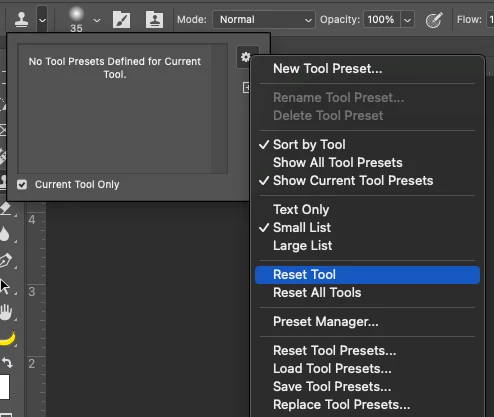
If they are then try resetting the tool.
If that does not work, please reply with a screenshot of your workspace with the image active, tool selected and the layers panel expanded.

4 replies

Participant
December 29, 2023

Sorry, the problem is solved. Your solution was correct, I was just too stupid to realize that all my shortcuts are reseted and I didn't change what was necessary.

Participant
December 29, 2023

@Kevin Stohlmeyer 

ok, the problem now occurs as soon as I use the content-based cropping. There's only one layer and the stamp doesn't work either when I apply it to "all layers". Nothing is masked.

Participant
December 29, 2023

Thank you for your help.
Unfortunately, I couldn't try your tip with resetting the filter, because today the tools work again in the beta version.

Yesterday I had checked the layers and masking tools. That wasn't the problem. Reloading an image didn't help, and also not restarting PS Beta.

This morning it suddenly goes without me having changed anything. Let's see how long I can work.

Kevin Stohlmeyer
Community Expert
Kevin StohlmeyerCommunity ExpertCorrect answer
Community Expert
December 28, 2023

Hi @KateCymmerPhotography First check to make sure the tools are set to sample current and below or all layers.

If they are then try resetting the tool.

If that does not work, please reply with a screenshot of your workspace with the image active, tool selected and the layers panel expanded.