
Inspiring
June 27, 2024
Answered

Unexpected "Some text layers might need to be updated"

  • June 27, 2024
  • 4 replies
  • 2627 views

How to replicate: open the attached document in PS Beta (Adobe Photoshop Version: 25.11.0 20240626.m.2679 509bf35 x64) and PS 2024 (Adobe Photoshop Version: 25.9.1 20240610.r.626 e3aae35 x64).


In PS Beta the following message is shown:
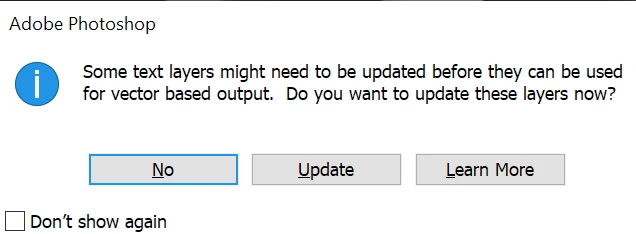
 

In PS 2024, there is no message shown.

OS: Windows 10 x64

This topic has been closed for replies.
Correct answer DiodorS

Current beta (Adobe Photoshop Version: 25.12.0 20240717.m.2702 779bbfa x64) no longer shows the "Some text layers might need to be updated" dialog.

4 replies

DiodorSAuthorCorrect answer
Inspiring
July 21, 2024

Current beta (Adobe Photoshop Version: 25.12.0 20240717.m.2702 779bbfa x64) no longer shows the "Some text layers might need to be updated" dialog.

CShubert
Community Manager
Community Manager
June 28, 2024

Thank you @DiodorS we have found the issue:

This alert comes for updating the text layers and can be due to multiple reasons.
 
To resolve this issue:
  1. Once this alert for updating the text layer shows up, click "Update". Save the doc.
  2. In case you select "No" then it can be updated by double clicking on the text layer thumbnail. This alert will come only once if you save the doc after updating the text layer.


This issue will be resolved in future releases as updates to both Ps beta and Ps release come in line with each other.


Thanks,

Cory - Photoshop Product Manager

DiodorSAuthor
Inspiring
July 13, 2024

Thanks Cory! I switch between Beta and non-Beta versions, and don't want to modify/update the text layers back and forth. If there is no way to disable this new text engine features in Beta, I will simply stop using Beta and wait for the non-Beta text engine to catch up.

DiodorSAuthor
Inspiring
June 28, 2024

Hi @CShubert! Yes, that was originally a part of "fake colors" layer buried deep inside many groups. I've included only the problematic layer, to give you a minimal example. There were also other text layers using the same font, but only this one caused the message to pop up.


I've created another test file ("test2-clean.psd"), starting from an empty doc and dragging the text layer over. Same issue. (I wasn't able to attach it to the response, had to edit the original post. The original attachment disappeared...)


 Do you see the same issue with other files as well, or just this file?

Only this file. Although I don't normally use text layers at all, and I have no other files with text layers created from scratch.


> What do you think is unique to this file vs others...

No idea, sorry 😞


I've opened the "test2-clean.psd" file in PS Beta, clicked "update", and saved as "test2-clean-after-updating.psd". I've then parsed both PSD files to look for differences.

I've found a change in "cinf" layer tag ("COMPOSITOR_INFO") of the text layer:


before updating: minorlong\u0\u0\u0\t  \u0\u0\u0\u3fixlong\u0\u0\u0\u1\u0\u0\u0\u0
after updating:  minorlong\u0\u0\u0\u0b\u0\u0\u0\u3fixlong\u0\u0\u0\u0\u0\u0\u0\u0
                                    ^^^^                            ^^^


I haven't parsed the compositor info itself and I have no idea what's the meaning of those fields.


I observed this unexpected behavior for the first time, let's say, 1..2 months ago. Older Beta versions did not show this message.

It should be possible to run a binary search (like git bisect) to find a commit that introduced this bug.

CShubert
Community Manager
Community Manager
June 27, 2024

Hi @DiodorS we see the same issue but are curious, this psd file shows Camera (Canon/Sigma) data in the file info, was this a larger file that was raw and now you have edited or cropped to just this text, or...?  Do you see the same issue with other files as well, or just this file?  What do you think is unique to this file vs others...


Thanks,

Cory - Photoshop Product Manager