Answered

1. Uninstall from the application folder.
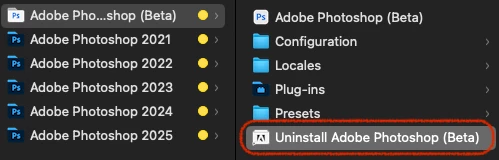
2. If not, find the original data of the uninstaller and uninstall it.
/Library/Application Support/Adobe/Uninstall/PHSPBETA_26_x_x.app
3. If that doesn't work, uninstall Photoshop 2025 and reinstall Photoshop Beta.
Then uninstall Photoshop Beta and reinstall Photoshop 2025.
Sign up
Already have an account? Login
To post, reply, or follow discussions, please sign in with your Adobe ID.
Sign inSign in to Adobe Community
To post, reply, or follow discussions, please sign in with your Adobe ID.
Sign inEnter your E-mail address. We'll send you an e-mail with instructions to reset your password.
 AdChoices