

Updated Frame Tool Now in Photoshop Beta
We are excited to share that updates to the Frame Tool are now available for Beta testing. This update adds new shapes, functionality and a contextual task bar to the existing Frame Tool. See below for additional detail and how to access the updates for testing. We’re looking forward to your feedback!
New Shapes for Frame Tool:
In addition to rectangle and elliptical shapes, Frame Tool can now draw triangle and custom shaped frames. Access this functionality from the tool options bar once the Frame Tool has been selected from the tool bar.
New Contextual Task Bar:
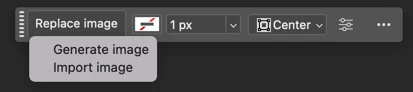
The new contextual task bar for frames appears after a frame has been drawn on the canvas. From the new contextual task bar, users can add a generated image to their frame, import an image to place inside the frame and adjust stroke color, size and alignment.

Once an image has been placed (or generated) inside a frame, the contextual task bar will update with added functionality to replace or regenerate the previously placed image. From here, users can continue to edit stroke color, size and alignment.
Thanks for trying the updated Frame Tool and we look forward to your feedback!
 AdChoices