
Exit
  • Global community
    • Language:
      • Deutsch
      • English
      • Español
      • Français
      • Português
  • 日本語コミュニティ
  • 한국 커뮤니티
0

Yellow solid opacity box on some layers

Explorer ,
Sep 24, 2025 Sep 24, 2025

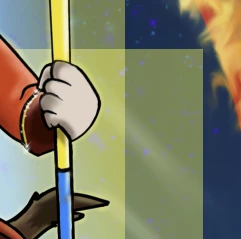
I'm having an issue where after updating to 27.0.0 where artwork created in a lesser version (Beta, but previous version) is showing a light yellow opactiy solid box behind the artwork...this is not the hightlight outline to desginate individual layers-and it's not present on the regular PS version 26.4.0-and it doesn't appear on that version when I open it there. There's been no changes to my settings from the previous Beta to the current version.   Is there a new setting I need to disable?  It shows at 45% to 55% zoom, then disappears.

Windows 11, 32GB, 12GB graphics mem.Screenshot 2025-09-24 144309.png
TOPICS
Desktop-Windows
82
Translate
Report
Community guidelines
Be kind and respectful, give credit to the original source of content, and search for duplicates before posting. Learn more
community guidelines
Adobe Employee ,
Sep 25, 2025 Sep 25, 2025
LATEST

Hi @Sambikit could you share this file with the team to see what might be the issue?  Feel free to send to shubert@adobe.com


Thanks,

Cory - Photoshop Product Manager

Translate
Report
Community guidelines
Be kind and respectful, give credit to the original source of content, and search for duplicates before posting. Learn more
community guidelines