Participant
December 7, 2024
Question

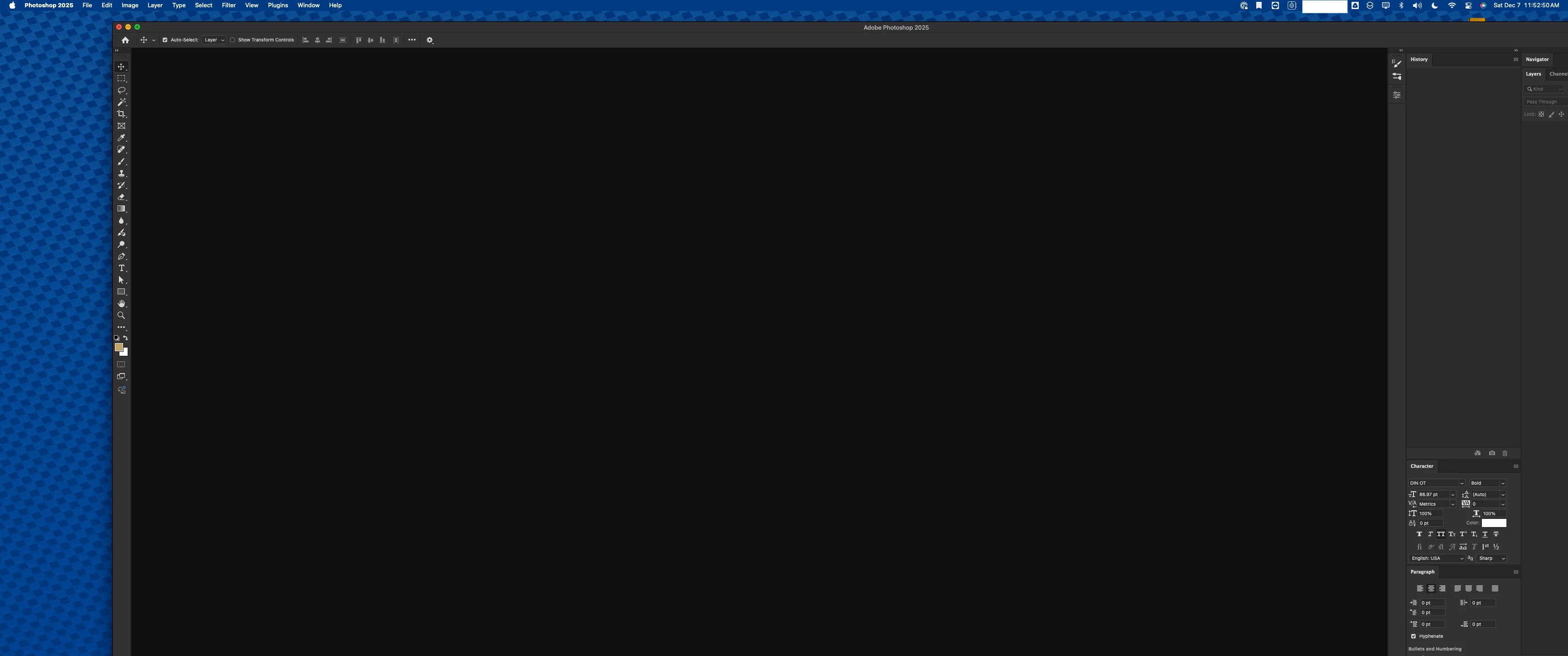
Adobe Photoshop 26.0.01 window won't resize.

  • December 7, 2024
  • 1 reply
  • 162 views

I am having trouble resizing the window. Even when I'm working on a photoshop document, I can't seem to make it smaller than this. Anyone have this issue?

System Info
Mac OS Sequoia 15.0.1
This topic has been closed for replies.

1 reply

Anshul_Saini
Community Manager
Community Manager
December 9, 2024

Hi @jasenmancilla,


I understand how frustrating it can be when a window doesn’t resize as expected. Let’s work together to identify what might be causing this issue.


Could you try the following steps and let me know your observations?


1. Close apps running in the background, especially those visible in the system menu bar, as they may be consuming resources or interfering with window management.

2. Are you using any window management apps, such as Rectangle, Magnet, or BetterSnapTool? These can sometimes conflict with resizing behavior.

3. If you’re using a multi-monitor setup or macOS’s Stage Manager feature, try disabling Stage Manager temporarily to see if it changes the behavior.


Lastly, could you test Photoshop in macOS Safe Mode? Safe Mode runs only essential system processes and can help determine if a third-party app is causing the issue.


Let me know how it goes or if you have any additional details to share.


Best,

Anshul Saini
