


Participant
September 3, 2024

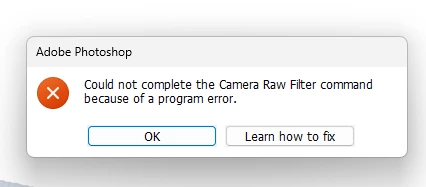
“Could not complete the Camera Raw Filter command because of a program error”
  • September 3, 2024
  • 98 replies
  • 18029 views

i m facing issue in letest photoshop..
i try all the ways, like reinstallation, older version, but still not working 

any buddy knows solution ???
please Help me...
Bhargav


[subject renamed for clarity]


98 replies

Participant
November 16, 2024

Today whilst using Photoshop the ability to open RAW files (Nikon NEF) suddenly stopped and I get the message "could not complete your request because of a program error"

I get this message if I try and open a NEF file, if I click on the menu "Filter" "Camera Raw filter" I also get the message if I go into preference and try and reset the RAW preferences by holding down ctrl and clicking the button Camera Raw Preferences.


I have uninstalled and re-installed Photoshop but it hasn't fixed the problem, I have also checked for updates via Creative Cloud.


It's strange that it was working fine and I was able to open RAW files, edit and save and then suddenly this stopped working, it's as if Camera Raw has been corrupted but I can't find a solution.


So I'm looking for help on this one

D Fosse
Community Expert
Community Expert
November 17, 2024

Yes, there's been quite a few reports on this. It seems to be a bona fide bug. I'm trying to collect threads so that they can be merged and posted properly under "Bugs".

Participant
November 17, 2024

Io ho comperato l'Adobe Creative Cloud su Amazon scontato, leggo che altri hanno lo stesso problema mio. Vi sono altrim utenti che hanno fatto l'acquisto da Amazon? 

Ged_Traynor
Community Expert
Community Expert
November 14, 2024

@BhargavKbmy try resetting your ACR preferences

garryd73943729
Participant
November 16, 2024

I'm having the same issue with the 17.0.1 update, and this fix isn't working.  Raw won't open as a plugin or standalone, and isn't even allowing me to open the preferences.  I assume that it's a fault with the update?

jane-e
Community Expert
Community Expert
November 14, 2024

@BhargavKbmy 


I've moved your post from Creative Cloud Desktop to the Photoshop forum. 


Jane

Known Participant
November 5, 2024

When I tried to open the Camera Raw filter in Photoshop, it said, " Could not complete the camera raw filter command because of a program error." I tried everything I could. I even got help from Adobe Help Center; they resolved the issue, but it returned in a few minutes. I am using Windows 11 Photoshop version 26.0.0

( latest )


kglad
Community Expert
Community Expert
November 5, 2024

in the future, to find the best place to post your message, use the list here, https://community.adobe.com/

p.s. i don't think the adobe website, and forums in particular, are easy to navigate, so don't spend a lot of time searching that forum list. do your best and we'll move the post (like this one has already been moved) if it helps you get responses.


<"moved from cc desktop bugs">
nikunj.m
Community Manager
Community Manager
November 5, 2024

Hi, we're sorry about the trouble! Please go to the Help menu in Photoshop, then System info and copy the text. Paste the information as a reply here so that we can review the details. 

Meanwhile, you can try re-installing Camera Raw using the installer available at this link: https://adobe.ly/4fbTOiF


Let us know if it makes a difference! 
Thanks,
Nikunj

LB Photography xoxo
Participating Frequently
October 28, 2024

Is anyone else having issues with the Camera Raw filter after updating to Photoshop 2025? My Photoshop keeps freezing every time I try to open the filter. Thanks. 

AxelMatt
Community Expert
Community Expert
October 28, 2024


My System: Intel i7-8700K - 64GB RAM - NVidia Geforce RTX 3060 - Windows 11 Pro 25H2 -- LR-Classic 15 - Photoshop 27 - Nik Collection 8 - PureRAW 5 - Topaz Photo
LB Photography xoxo
Participating Frequently
October 28, 2024

That worked !!! Thank you so much 🙂 

Participating Frequently
October 17, 2024

Hello. After the last Photoshop update, when I want to open the photo as camera raw in both the latest version and the previous version, I get the error in the image. Unfortunately, I cannot work because of this error. How can I solve this problem urgently?


merhaba. son photoshop güncellemesi sonra hem en son versiyonda hem daha önceki versiyonda fotoğrafı camera raw olarak açmak istediğimde göreseldeki hatayı almaktayım . ve bu hata yüzünden iş yapamıyorum maalesef. bu sorunu acil şekilde nasıl çözebilirim?

jane-e
Community Expert
Community Expert
October 17, 2024

@albümsel 


Try resetting Camera Raw Preferences:

Reset Camera Raw preferences

  1. Hold down the Command key and select Photoshop > Preferences > Camera Raw (macOS)
    or
    hold down the Ctrl key and select Edit > Preferences > Camera Raw (Windows).

  2. Click Yes in the dialog that asks "Delete the Camera Raw Preferences?"

    Details here:

Participant
September 5, 2024

I tried everything. Nothing helps. 


Legend
September 5, 2024

Pleqse post a system report Help->System Info

JerryandLoisPhotography
Known Participant
September 3, 2024

Hoping someone can help.

I have a new machine (7 months old), 64 gig memory, 10tb across 3 internal SSDs, Intel(R) Core(TM) i9-14900K 3.20 GHz, and so on, so it's reasonably fast. Running Win 11 Pro, scratch disk on a separate volume from boot disk, lots of empty/available disk space. All updates current to now.
And yet - I consistently, irritatingly get this PS error  (cannot open ACR) - a lot - if PS has been running for sometimes only 5 minutes, sometimes after 1/2 hour, sometimes 2 hours.
Sometimes I can edit 10 files in a row, sometimes PS chokes on the first file since it was launched.

Quitting, relaunching PS resets the "clock" until the next time the error happens.  After rebooting PS, the same file can open ACR, no problem (it's not the file).

Doesn't matter how large or how small the file is.

Running PS version 25.11.0 (Release).

I also have the current PS Beta installed, which also runs into the same error.  This also happened when I had removed the beta.

I've uninstalled and reinstalled PS, I've reset my prefs, all to no avail.

Can someone help?
Anyone else seeing this?

It's random, frequent but not predictable, and a huge interruption to work flow!

Thanks in advance!

Ged_Traynor
Community Expert
Community Expert
September 3, 2024

@JerryandLoisPhotography try resetting your ACR preferences

JerryandLoisPhotography
Known Participant
September 3, 2024

Hi Ged.
I've actually done this a few times, and still get this very unwanted behavior...  
Happy to try again, but lacking confidence that this will cure the problem.
Have you actually encountered this behavior?  And if so, did resetting the prefs help?
Thanks for responding!