Participant
November 8, 2023
Answered

Crop tool bug: no free crop possible anymore

  • November 8, 2023
  • 2 replies
  • 1227 views

Cropping freely is not possible anymore.

Crop by "ratio" should enable to crop freely (v25 it worked). "Ratio" now produces same result as WxHxResolution and will crop only by set aspect ratio, holding Shift/Alt produces same result.
Tested v25 same (wrong) result.


However v24.7.2 produces intended result.
This topic has been closed for replies.
Correct answer Kevin Stohlmeyer

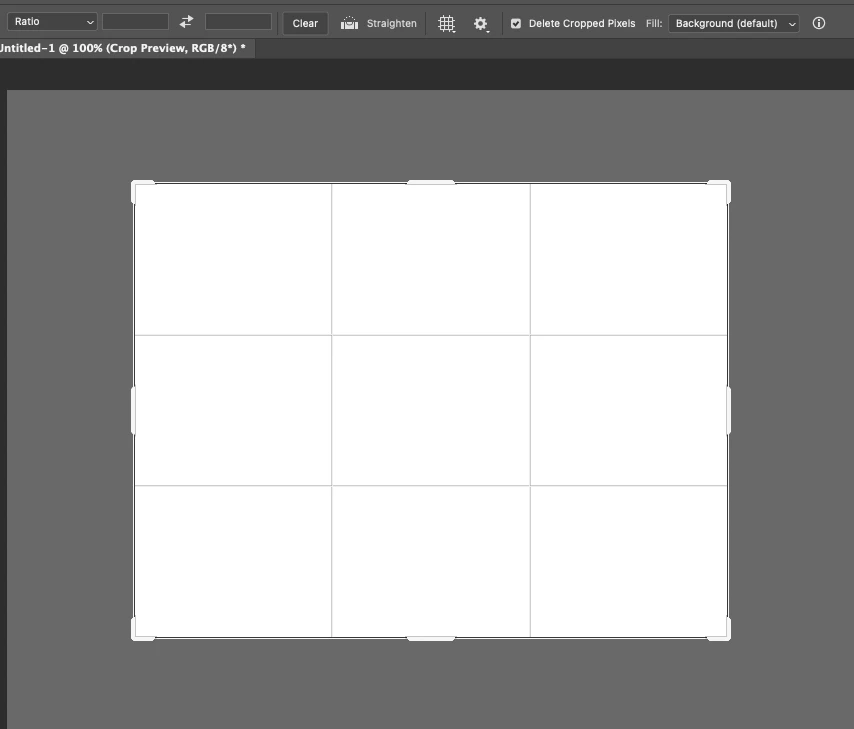
@Mischel2659771122ob I've tested this on 24.7 and 25.1 and my crop tool works as expected freely even on ratio. I can drag my handles to resize at will:


Try these two steps:

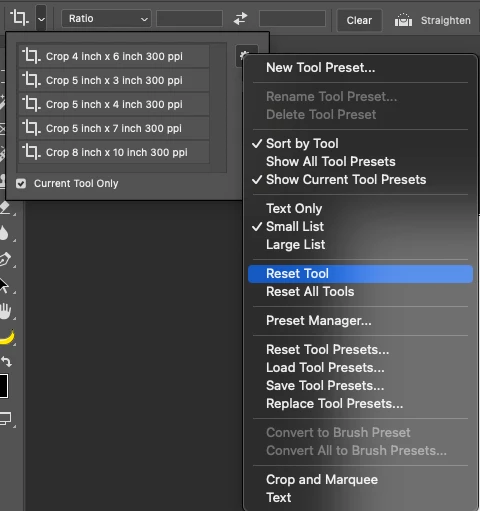
1. Reset the tool itself. Go to to the Tool options and choose reset tool.


2. If that does not work, reset Photoshop completely. Go to the Settings/General window and click "Reset Photoshop Preferences upon Quit". Relaunch Photoshop.


2 replies

Participant
November 8, 2023

Resetting tool did the trick, works on v25 and v25.1. Thanks!

Kevin Stohlmeyer
Community Expert
Kevin StohlmeyerCommunity ExpertCorrect answer
Community Expert
November 8, 2023

@Mischel2659771122ob I've tested this on 24.7 and 25.1 and my crop tool works as expected freely even on ratio. I can drag my handles to resize at will:


Try these two steps:

1. Reset the tool itself. Go to to the Tool options and choose reset tool.


2. If that does not work, reset Photoshop completely. Go to the Settings/General window and click "Reset Photoshop Preferences upon Quit". Relaunch Photoshop.