
Pamela99
Known Participant
July 21, 2023
Question

Crop tool not working properly & missing buttons on options bar

  • July 21, 2023
  • 3 replies
  • 435 views

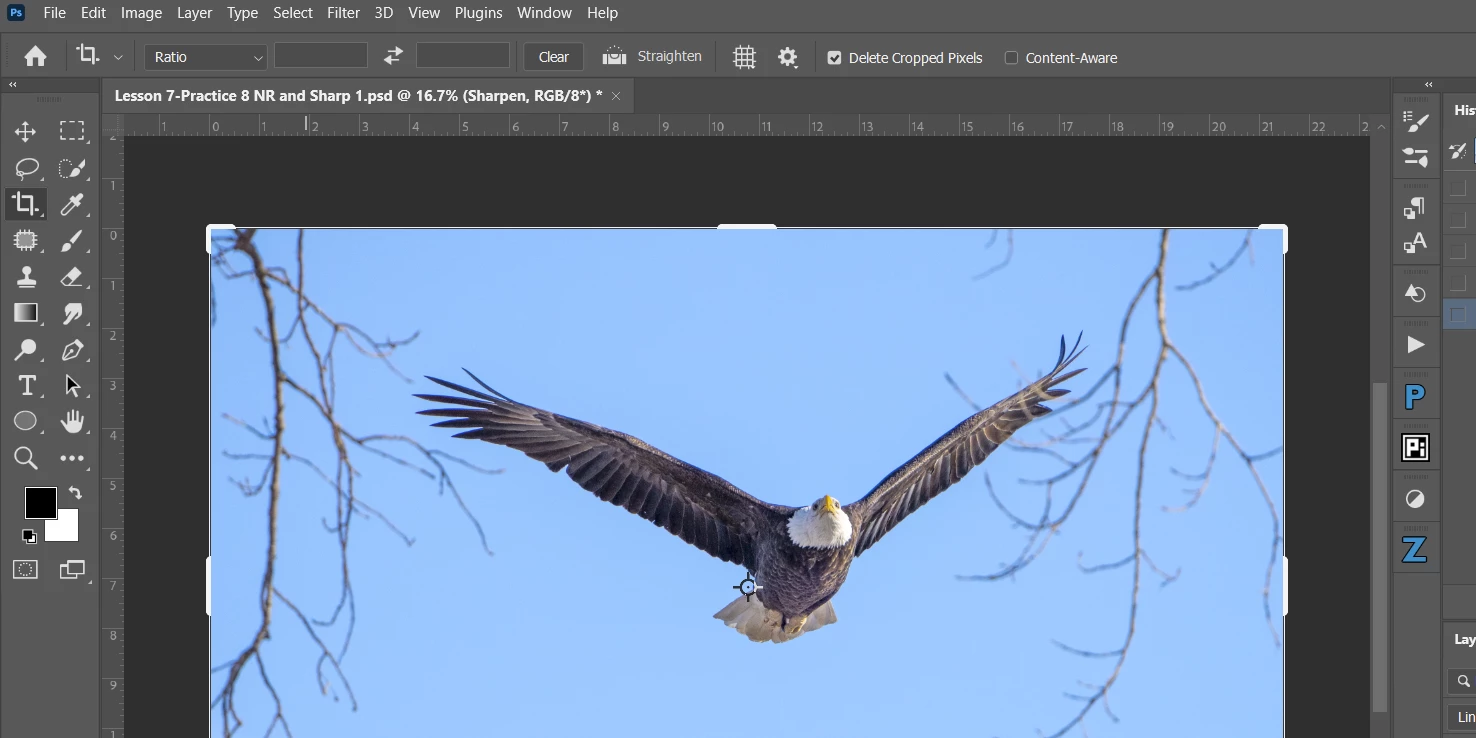
The crop tool in my latest Photoshop CC update [24.6.0]  is missing the buttons used to accept the crop. In addition the C shortcut is not working. And, if I rotate an image and then take it into Camera Raw the canvas is rotated as well and it is not possible to make any adjustments.I tried adjusting the UI to medium from large but that didn't make any difference.



This topic has been closed for replies.

3 replies

Kevin Stohlmeyer
Community Expert
Community Expert
July 24, 2023

@Jeff Arola that thread is for the UI cutting off the buttons. She doesn't see them at all because she hasn't actually cropped anything. It's also why the undo button is grayed out.

Jeff Arola
Community Expert
Community Expert
July 21, 2023

See this thread for a temporary solution until Adobe fixes the issue:

https://community.adobe.com/t5/photoshop-ecosystem-discussions/ps-24-6-0-crop-tool-missing-some-butt...

Kevin Stohlmeyer
Community Expert
Community Expert
July 21, 2023

Hi @Pamela99 you haven't made a crop yet - you just activated the tool. There is nothing to accept or cancel. The buttons show after you use the crop tool: