Participant
June 6, 2025
Question

I'm unable to use generative fill

  • June 6, 2025
  • 3 replies
  • 266 views

No matter what I do, I get this error: 
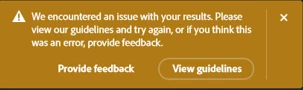

Please help

3 replies

Community Expert
June 7, 2025

Based on the image you shared and depending on the prompt you are providing for the generative fill, it might produce results that are not within the guidelines. You can click the provide feedback button to share with Adobe.

stan soroAuthor
Participant
June 6, 2025

Thanks for replying! No nudity.
Actually this happens no matter what I do, any image, anything.

Device name DESKTOP-N9BG6PC
Processor 13th Gen Intel(R) Core(TM) i9-13900K 3.00 GHz
Installed RAM 64.0 GB (63.8 GB usable)
Device ID 95CDCCBF-21A0-4B9C-B446-F0A73E30C9A4
Product ID 00331-10000-00001-AA258
System type 64-bit operating system, x64-based processor
Pen and touch No pen or touch input is available for this display
Windows 11


AxelMatt
Community Expert
Community Expert
June 6, 2025

It seems there are content in your image that is blocked regarding the AI guidelines, like nudity or so.

Unfortunately you haven't given us any information about your image and what you're trying to do with generative fill. 

So all is a look into a crystal ball.


You can checked the guidelines here: https://www.adobe.com/legal/licenses-terms/adobe-gen-ai-user-guidelines.html


If you wish to get more help we need more informations like a screenshot of your image if it's possible.


My System: Intel i7-8700K - 64GB RAM - NVidia Geforce RTX 3060 - Windows 11 Pro 25H2 -- LR-Classic 15 - Photoshop 27 - Nik Collection 8 - PureRAW 5 - Topaz Photo