

luisnbispo
Participant
December 14, 2022

P: 24.1 - Where has Delete and Fill context menu gone?

  • December 14, 2022
  • 84 replies
  • 18691 views

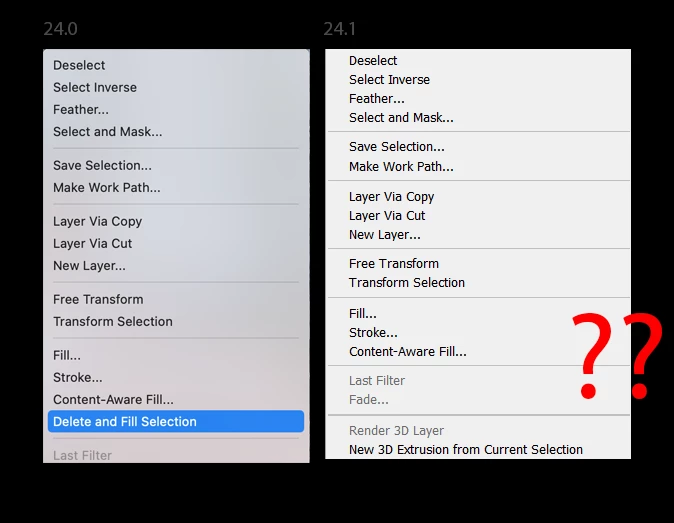
I just updated photo shop today two version 24.1 and I have noticed delete and fill has been removed. This is really disheartening because it works so much better than content aware fill. Normally you can right click on the selection to access this, but I have looked through all the menus and have not found it since this update.


This topic has been closed for replies.

84 replies

Known Participant
December 15, 2022

Good find - but that's how it's been since delete and fill was introduced.  As I recall, a key shortcut that only worked if you disabled something else first.  The right click method works, though.  Well, until I updated and it vanished - it's a huge feature and obviously a bug so I'm sure it will be resolved soon by the good folks at Adobe.

Christopher K. Wright
Participant
December 15, 2022

hat this been resolved ? it isnt there for me. one click delete and fill isnt an option?????

CShubert
Community Manager
Community Manager
December 14, 2022

Thank you @luisnbispo and all for letting the team know. We are looking into this and will get back to you when we have an answer.


Cory

Kevin Stohlmeyer
Community Expert
Community Expert
December 14, 2022
john beardsworth
Community Expert
Community Expert
December 14, 2022

I am not sure that it is correct that the context menu has been replaced by Shift Delete. That linked page refers to the October release 24.0 and 24.0.1 certainly had the context menu (I saw it this morning). The page also says there is a Delete and Fill Selection context menu. The context menu has disappeared in 24.1.


While Shift Delete will help for now, this looks like a bug.

Known Participant
December 18, 2022

@john beardsworth I agree, it looks like a bug to me, I'll move this thread to the bug section


So as many of you have probably noticed, at least on mac, after update 24.1 the right click 'delete & fill' function that was released with 24.0 is entirely gone.  Shift + Delete just brings up the Fill dialog box as it did before.  I know this was first reported in the bug section, but it appears there's now confusion over if that's a bug or if it was intentional to remove that feature.  One or two people on that thread reported that they contacted Adobe and were told the feature was removed with version 24.1.

I think it's a misunderstanding.  I'm fairly certain they wouldn't introduce a very useful and successful feature witht the ps 2023 release that's well praised in many articles only to remove it  less than 2 months later.

But I could be wrong.  I WOULD like to know, however, if that issue (if it IS a bug) has been resolved as I reverted Photoshop one version back to 24.0.1 to retain delete and fill because I use it daily.

If anyone has any official word on if it's a known bug or if it's intentional, that would be greatly appreciated.  I would like to keep my photoshop up to date, but am holding off until there's word that it's been resolved. 

Thanks, all!