

luisnbispo
Participant
December 14, 2022

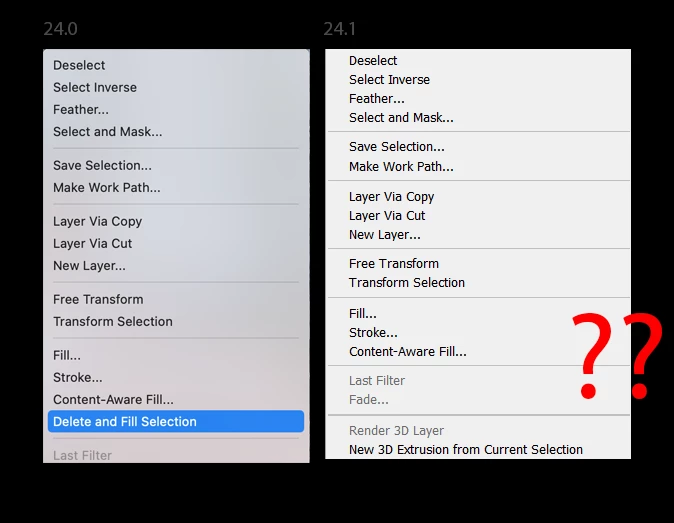
P: 24.1 - Where has Delete and Fill context menu gone?

  • December 14, 2022
  • 84 respuestas
  • 18689 visualizaciones

I just updated photo shop today two version 24.1 and I have noticed delete and fill has been removed. This is really disheartening because it works so much better than content aware fill. Normally you can right click on the selection to access this, but I have looked through all the menus and have not found it since this update.


Este tema ha sido cerrado para respuestas.

84 respuestas

Known Participant
December 15, 2022

Good find - but that's how it's been since delete and fill was introduced.  As I recall, a key shortcut that only worked if you disabled something else first.  The right click method works, though.  Well, until I updated and it vanished - it's a huge feature and obviously a bug so I'm sure it will be resolved soon by the good folks at Adobe.

Christopher K. Wright
Participant
December 15, 2022

hat this been resolved ? it isnt there for me. one click delete and fill isnt an option?????

CShubert
Community Manager
Community Manager
December 14, 2022

Thank you @luisnbispo and all for letting the team know. We are looking into this and will get back to you when we have an answer.


Cory

Kevin Stohlmeyer
Community Expert
Community Expert
December 14, 2022
john beardsworth
Community Expert
Community Expert
December 14, 2022

I am not sure that it is correct that the context menu has been replaced by Shift Delete. That linked page refers to the October release 24.0 and 24.0.1 certainly had the context menu (I saw it this morning). The page also says there is a Delete and Fill Selection context menu. The context menu has disappeared in 24.1.


While Shift Delete will help for now, this looks like a bug.

Ged_Traynor
Community Expert
Community Expert
December 18, 2022

The Delete and Fill Selection has disappeared from the dropdown menu in my Photoshop. I'm using the selection tool, then right click to select the Delete and Fill Selection option and it's no longer there. I was only using it in my last project. I love that tool, it works beautifully. I've updated PS just recently, so could this be a bug?
Image attached


Adobe Photoshop Version: 24.1.0 20221206.r.166 be4691b x64
Number of Launches: 3573
Operating System: Windows 10 64-bit
Version: 10 10.0.19045.2364
System architecture: Intel CPU Family:6, Model:14, Stepping:3 with MMX, SSE Integer, SSE FP, SSE2, SSE3, SSE4.1, SSE4.2, AVX, AVX2, HyperThreading
Physical processor count: 4
Logical processor count: 8
Processor speed: 3408 MHz
Built-in memory: 32627 MB
Free memory: 20915 MB
Memory available to Photoshop: 25078 MB
Memory used by Photoshop: 70 %


Hi

The issue has been reported here

https://community.adobe.com/t5/photoshop-ecosystem-bugs/p-24-1-where-has-delete-and-fill-context-men...

You can revert back to version 24.0.1 from the Creative Cloud app until Adobe address the issue