Exit
  • Global community
    • Language:
      • Deutsch
      • English
      • Español
      • Français
      • Português
  • 日本語コミュニティ
  • 한국 커뮤니티
2

P: Action Panel Buttons are no longer Buttons

Mentor ,
Dec 02, 2015 Dec 02, 2015

With Photoshop CC 2015 the new UI, the buttons in the action panel have lost their button-ness.
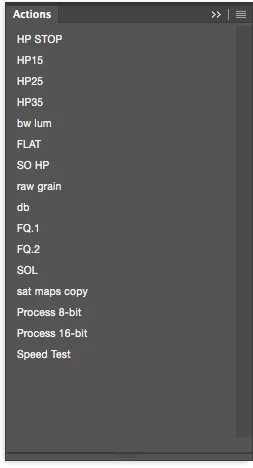
Bug Fixed
TOPICS
macOS , Windows
442
Translate
Report
Community guidelines
Be kind and respectful, give credit to the original source of content, and search for duplicates before posting. Learn more
community guidelines

correct answers 1 Correct answer

Adobe Employee , Jun 21, 2016 Jun 21, 2016
Translate
4 Comments
Adobe Employee ,
Dec 02, 2015 Dec 02, 2015
They've just lost the bevel to have the new flat look but they are still buttons and behave like buttons. Or is there some functionality that you're missing?
Translate
Report
Mentor ,
Dec 02, 2015 Dec 02, 2015
functioning fine... just a UI issue.

there are line breaks with the lighter interface though...
Translate
Report
Adobe Employee ,
Dec 02, 2015 Dec 02, 2015
OK. I'll see if there's a better way to distinguish breaks with the default interface. (Using the color coding in the dark interface gives a line break)
Translate
Report
Adobe Employee ,
Jun 21, 2016 Jun 21, 2016
LATEST
This issue should be fixed by the CC 2015.5 upgrade released today: https://blogs.adobe.com/photoshop/2016/06/adobe-releases-major-photoshop-cc-update-today-and-announc...
Translate
Report
