Legend
December 18, 2024

P: Clicking Font dropdown arrow crashes Photoshop 26.2

  • December 18, 2024
  • 5 replies
  • 1651 views

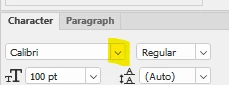
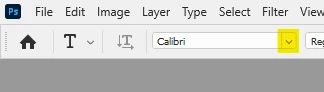
Clicking the font dropdown arrow in Options bar or Character panel with no document window open crashes Photoshop 26.2. Confirmed on both Windows 10 Pro and MacOS Sequoia 15.2 Intel. Have not tested on Apple Silicon. I have sent crash reports from both computers.


Font menu displays normally with a document window open.
 

5 replies

Mohit Goyal
Community Manager
Community Manager
January 29, 2025

Hi all,


We are happy to announce the release of Photoshop version 26.3 (public release), which incorporates the resolution for this particular problem. To see the list of all fixed issues, click here


To update Photoshop to 26.3, click "Update" in the Creative Cloud desktop app next to Photoshop. More detailed instructions for updating


Let us know if the update resolves the problem for those affected, and share your feedback.


Thanks,

Mohit

Pete.Green
Community Manager
December 20, 2024

Wanted to inform the thread that a fix for this crash with no document open should be coming to Ps beta next week.

Happy holidays everyone!

Pete.Green
Community Manager
December 18, 2024

Thanks for reporting this @ExUSA . We are able to reproduce this and are taking a look. Sorry about this crash!


Workaround: Open or create any document prior to opening the Font browser. 


Regards,

PG

nikunj.m
Legend
December 18, 2024

Hi, thanks for reporting this! I was able to reproduce this on Apple Silicon Mac as well like Jeff! We've shared the info with the product team.


Thanks,
Nikunj

Jeff Arola
Community Expert
Community Expert
December 18, 2024

I can confirm it happens on Apple Silicon macOS Sequoia 15.2 with Photoshop (ps ver 26.2)