
Known Participant
June 30, 2016

P: Disappearing Text/Font Issues

  • June 30, 2016
  • 31 replies
  • 2054 views

Since updating to Photoshop CC 2015.5, I have encountered many challenges in having text appear properly for me. Characters in a text layer will disappear and reappear on a whim and there's nothing that I've been able to troubleshoot that has helped.

Testing Notes:

  1. Bounding box is not an issue, as this happens as this will happen no only the LAST characters, but the FIRST characters of a text layer. Usually if the bounding box is not big enough, the whole word will disappear, not just one or two characters.

    The example below is created as Point Text, not a Paragraph Text, so there aren't any bounding boxes.
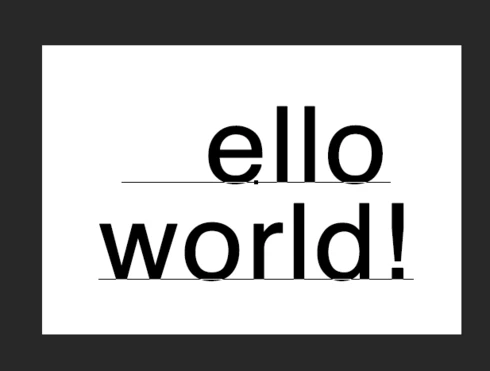


  2. This problem seems to affect capital letters especially, as changing it to
    lowercase works just fine (but see #4 below when it gets wacky again).
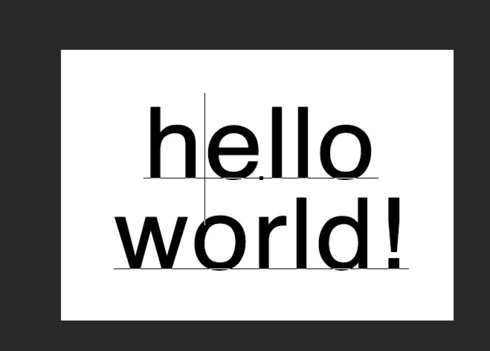


  3.  
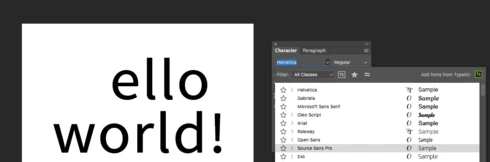
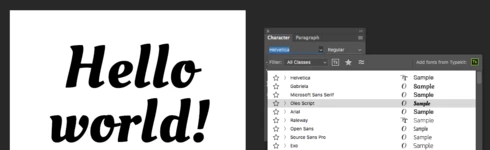
  4. This problem doesn't appear to discriminate between fonts. The screenshots above is your plain ol' Helvetica. Fonts that never had an issue in a past version of PS now have this issue. Some don't.

    When I hit the down arrow on the current font selected and roll over the
    different fonts installed on my computer (which gives a live preview of
    what the font looks like on my canvas), it will flip back and forth
    between showing the character and not, depending on what font is selected.

    Here's the font "Source Sans Pro" selected:


    Here's the font "Oleo" selected:


  5. The problem is really inconsistent. I've had the "H" in "Hello World" both appear, and then disappear again
    on its own whim (while playing around switching between a font that
    works properly and back to one that didn't before).

    Here's the font "Close" selected... Umm... a different word disappeared all together?!
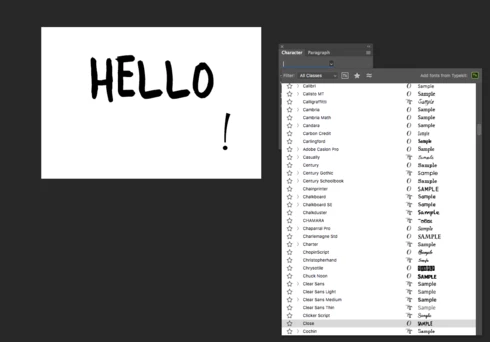


  6. Font size affects if a character shows up or not...

    Here's my font at 52pt:
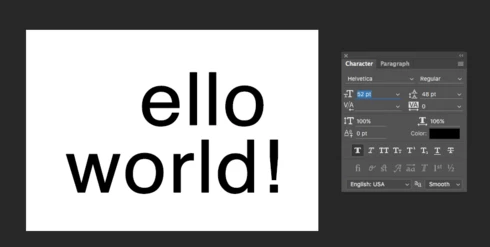


    Trying to test when the text will reappear, I selected the text and kept reducing the font (shift down arrow to jump the numbers down)... Ooo! It reappears at 12pt!
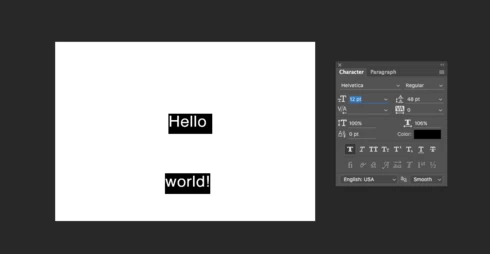


    Then clicking the check mark box to commit the change.... "Nah, just kidding! I'm not actually working."
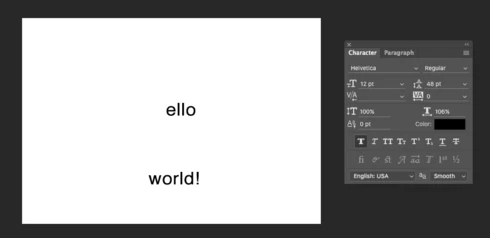


  7. I'm not sure if this problem has anything to do with the Alternative Character Selector that was introduced? This thing...
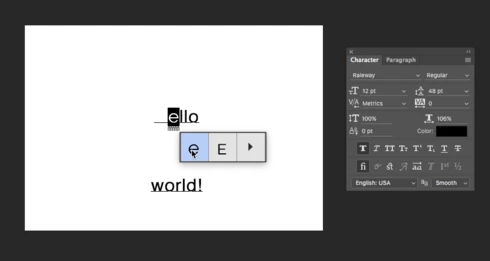


    Even this functionality in itself is inconsistent when it shows up (never sure what triggers the marquee underline; how to get the underline back; underline disappears when you select a different font; underline doesn't show up again when you select the same font as before, etc, etc)... but that is another issue all together...


Anyway, I could probably play around with this all day and it would do crazy stuff in all different ways. Hopefully this can be fixed and that this is helpful for you folks troubleshooting.

For now, I'm going to try to revert back to the previous release 😞

This topic has been closed for replies.

31 replies

David Mohr
Participating Frequently
March 15, 2019
Howdy Martha,

The bug is actually an issue with the file.  As a result, once a given document demonstrates this problem, it's liable to always have it.  As would be any documents created from it via a copy.  It's kinda like an infection (BUT IT IS NOT A VIRUS).  So it is possible that you opened an old doc that had the problem.  There have been no reports of this problem since the fix.

If you believe this to be incorrect, please ping me and we can examine your document.

Thanks,
David
Inspiring
March 15, 2019
This is 2019 and now I'm having the same issue. I do not update, but I guess one sneaked in. 
David Mohr
Participating Frequently
February 15, 2019
Howdy Manish,

Sorry for the late response; I was out of the office.

Are you having this problem with newly-created file or files that existed previously.  I ask because the file corruption bug has been fixed, but files which were created using the version with the bug could have the problem later.  If, however, you're having this with newly-created files, then this is a new, unreported and unknown failure.

Thanks,
David
Participant
January 3, 2019
How to fix text disappearing problem in photoshop cc 2019. Earlier it was not happening.. when i installed it..but suddenly it's not working...it's irritating....plzzz help sir...
David Mohr
Participating Frequently
June 30, 2017
Howdy,

Well, actually, this HAS been fixed in the latest release.  What version are you running?  On which OS?

Thanks,
David
Inspiring
June 26, 2017
Why hasn't this been fixed yet.....
The solution is to turn off faux bold, or randomly click and unclick on it - sometimes makes it move around or disappear long enough to save a flattened file.
What a terrible bug.
As someone said before, many fonts don't have a true bold option, thus the FAUX BOLD.
David Mohr
Participating Frequently
October 24, 2016
Hey Paul,

Unfortunately, I'm a little buried at the moment so I cannot really dig into this right now but can you try a quick test for me?  Could you go into your Preferences > Performance and turn OFF Use Graphics Processor.  It's starting to sound like you're having trouble with your GPU...  A longshot, but that might explain the symptoms AND why I cannot repro.

Thanks,
David

p.s. -- love your logo!  8-)
Participant
October 24, 2016
Also worth noting. If I see the problem I can close the file reopen it and it's fine, or sometimes the dissapearing text will be somewhere else in the file. If you save a copy to pdf or jpg or whatever the missing text is still missing. Whatever is rendered on screen is what you get. The fact that you can close and reopen the psd file and have it resolved or different is what gets me. Because you can think you're all good and next time you open the file it can be back to bite you.
Participant
October 24, 2016
No not using faux bold but I did find if I changed the rendering from Sharp or Crisp to none it is less likely to happen. It's strange because it's not single characters or words disappearing, it's as though a square block appears above your text erasing whatever characters lie below that box. It's random in size and so frustrating. You never know when or where it's going to strike. It's created havoc for me.
 
David Mohr
Participating Frequently
October 24, 2016
Hi Mike,

Are you using Faux Bold?  Do you have this problem with all fonts or just this one?  Also, have you tried the steps I outlined above?

The offer to create a library is universal to all text in a document and has nothing to do with displaying text.

Thanks,
David