
Known Participant
May 1, 2025

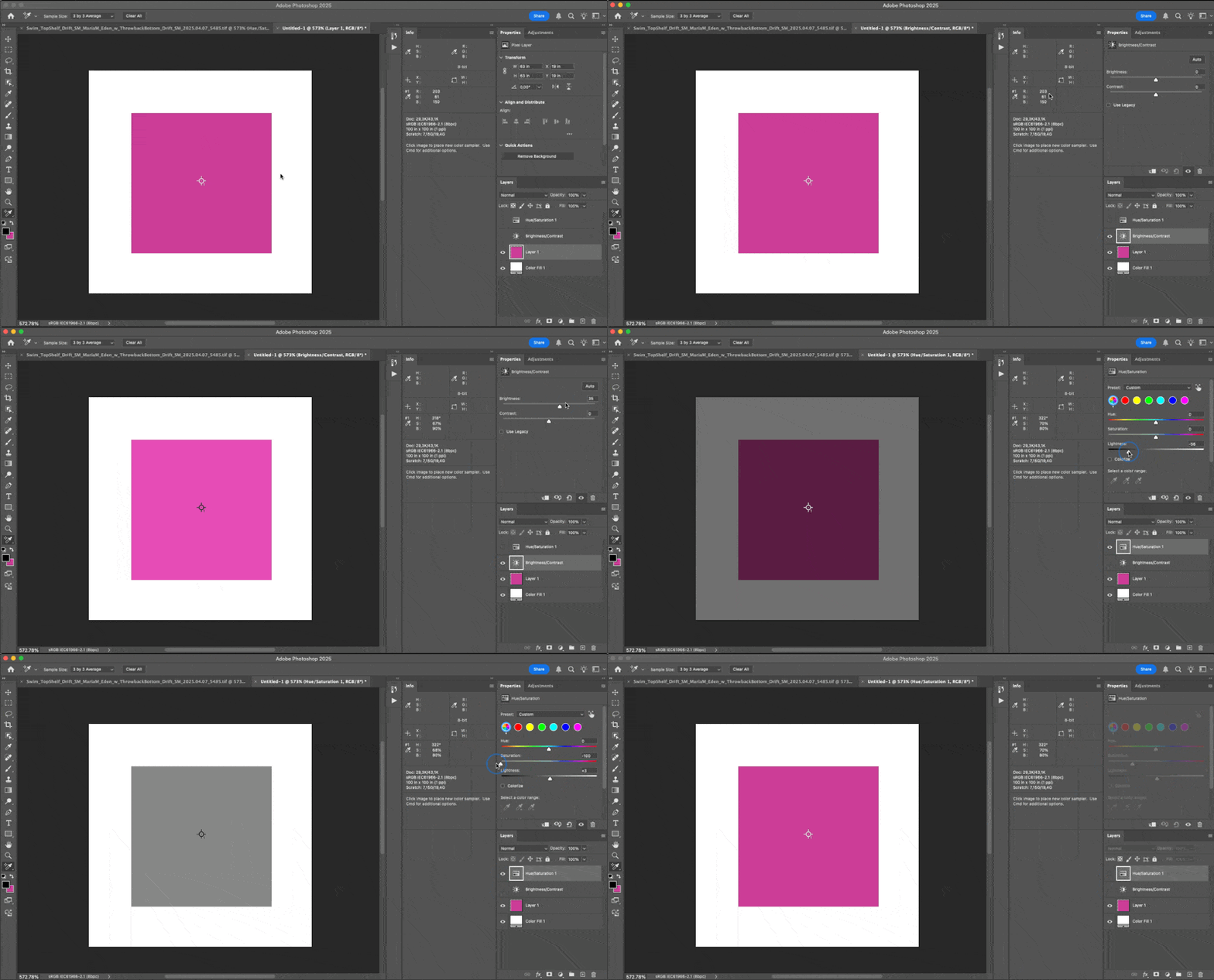
P: Info Panel Does Not Update Live When Adjusting Hue/Saturation with Color Sampler Tool PS 26.6

  • May 1, 2025
  • 7 replies
  • 2589 views
  • App Version: Adobe Photoshop 26.6

  • Platform/OS: macOS Sequoia 15.3.2 (MacBook Pro M2 Max)

Steps to Reproduce:

  1. Open an image.
  2. Use the Color Sampler Tool to place a point for monitoring color values.
  3. Add a Hue/Saturation adjustment layer.
  4. Click and hold the Saturation or Lightness slider and move it with the mouse.
  5. Observe the Info panel values for the sampled point.

    Expected Result:
    The Info panel should update color values live and continuously as the slider is being moved (without releasing the mouse button), just like in previous Photoshop versions.


Actual Result:

The Info panel does not update during the slider movement. Values only update after the mouse button is released.
This behavior is not present in other adjustment layers like Brightness/Contrast, where the Info panel updates in real time as expected.


Why this matters:

This regression breaks real-time feedback during color correction, making it impossible to adjust Hue/Saturation accurately based on sampled values. Live Info updates are critical for precise, professional editing workflows.
 

7 replies

MyronKaAuthor
Known Participant
June 19, 2025

I have already updated Adobe Photoshop Version: 26.8.0 (System: Mac OS 15.5.0 System architecture: Apple M2 Max)
But the problem, this bug still exists. This is a very important problem.
Why isn't it being fixed?

Known Participant
May 29, 2025

I'm having the same issue. Huge lag when using the hue/sat adjustment layer and have a color selected. Was not present until latest update


Some more detail: It exhibits this behavior if using the color picker tool within the hue/sat panel and the circular swatch that shows what color is chosen appears. If you just tap a color to select, but the circle swatch is not shown, no lag exhibited.

Claire H.
Community Manager
Community Manager
May 29, 2025

Hi @TheCraigist81, thanks for letting us know you're also experiencing this behavior! Our engineers are actively investigating this issue. We want a few more details, and a screen recording would be very helpful in solving this issue. Can you also send your system info, so we can try replicating it? You can find this by going to Help > System Info, copying and pasting it into a text file, and attaching it here. Thanks! ^CH

MyronKaAuthor
Known Participant
May 21, 2025

I don't have the opportunity to reinstall Photoshop, but I don't want to. Because I don't have the time to do it because I'm working intensively on it. I'm convinced that this error has not been fixed.  The values are not updated instantly when using the above conditions. There is a delay which has a very bad effect on the speed of work and is not convenient. Before the update, everything worked fine. This is very important for precise color collections, I have to use the keyboard arrows to update the values instantly.

MyronKaAuthor
Known Participant
May 21, 2025

I just upgraded to Photoshop26.7
Unfortunately, this does not work, it is a pity that it was not fixed in this update.
The values are displayed with a significant delay, which makes it impossible to use this method comfortably.
It doesn't work like all drag-and-drop tools. After each drag of the slider, I have to wait until the value is updated. This was not the case before. But the tool worked fine.

Claire H.
Community Manager
Community Manager
May 21, 2025

Hi @MyronKa, thanks for the update! I know this is super frustrating. Can you reinstall Photoshop with the new updated version? In the meantime, I will relay that you are still experiencing this issue in the 26.7 to the engineers. Thanks! ^CH

Srishti Bali
Legend
May 21, 2025

Updating Status

Srishti Bali
Legend
May 21, 2025

Hi @MyronKa


Thank you so much for your patience and for sharing all the details with us. We’ve addressed the issue in our latest release (26.7). Please update to the newest build and let us know if everything works smoothly now — we’re here to help if you need anything further.


Regards,

Srishti

MyronKaAuthor
Known Participant
May 1, 2025

After updating to Photoshop 26.6, I noticed that the Info panel no longer updates values smoothly and instantly when adjusting Hue/Saturation — especially the Lightness slider. While the values do eventually change, they now update with a noticeable delay and without real-time fluidity.

In previous versions, the Info panel responded immediately and continuously as I moved the slider, allowing for precise and intuitive adjustments. The new lag disrupts the editing flow and forces me to pause briefly to see the updated values.

Please bring back the smooth, real-time updates in the Info panel during Hue/Saturation adjustments — this delay is a step back in usability and efficiency.


My PC: MacBook Pro Max M2

Community Manager
May 1, 2025

Hi @MyronKa!

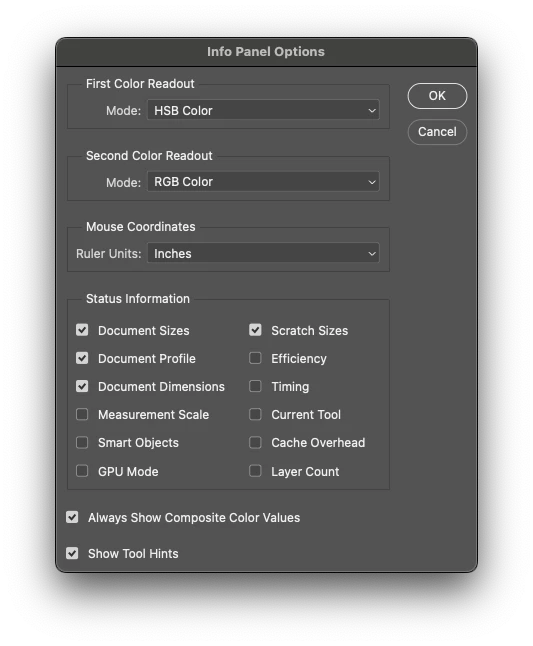
Thanks for reaching out! Unfortunately, I haven't been able to reproduce this issue on my end. Could you go to the Panel Options in the Info panel and share a screenshot of how you have it set up?

As an initial step, have you tried some of the obvious troubleshooting steps like uninstalling and reinstalling, or resetting your preferences? If you reset preferences, make sure to back them up first, as this will reset your workspaces, brushes, and other settings.


Thank you!

Alek

*(If you mention me with an @, like @Aleke, I’ll get a notification and can respond faster.)*
MyronKaAuthor
Known Participant
May 2, 2025

But this delay is only when I drag the slider with the pointer. When I change it with the arrows on the keyboard, everything works fine.


Notice that the values don't update while I'm tapping the slider, they only update when I release it.
