
P: Info Window shows an incorrect RGB values when an image is zoomed in
Procedure: Create an image with white background. Click “M” and draw a rectangle anywhere inside this image. Click “G” and fill in the rectangle with black color. Now, zoom in to the interface between the border of the black rectangle and its white surrounding. Zoom in as much as you can. Use “F8” key to display the Info Window. Now, move the cursor over the interface several times. You can notice that sometimes the Info Window show RGB values of white color even the cursor is located inside the black rectangle. It mostly occurs at the very border of the rectangle. That’s weird, isn’t it?
Now, click “I” to select the Eyedropper Tool. Move mouse cursor over the interface again and watch the Info Window. When you are located inside the border of the black rectangle and the Info Window shows 255,255,255 click on the image. The Eyedropper Tool will pick the color of the pixel and change the RGB values in Color Window. What will you see? The Info Window will show 255,255,255 (those are incorrect values), but the Color Window will change the RGB values to 0,0,0 (correct values). The Photoshop CC behaves the same with Use Graphic Processor option disabled. [Tools used: Photoshop CC 14.1.1 x64 with “Color Settings” change to “Monitor Color”, “Units” of “Rulers” changed to “Pixels”. No further adjustments. OS: Windows 7 x64 EN with all the latest updates installed].
Please look into this problem. Thank you. 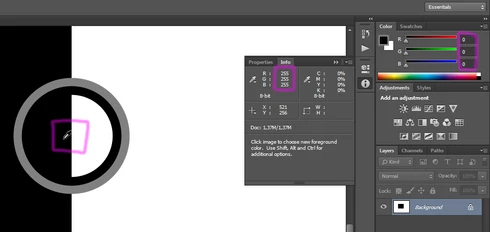
 AdChoices