
Inspiring
February 25, 2022

P: 'Match Fonts' not showing fonts available to activate from Adobe Fonts

  • February 25, 2022
  • 8 replies
  • 6418 views

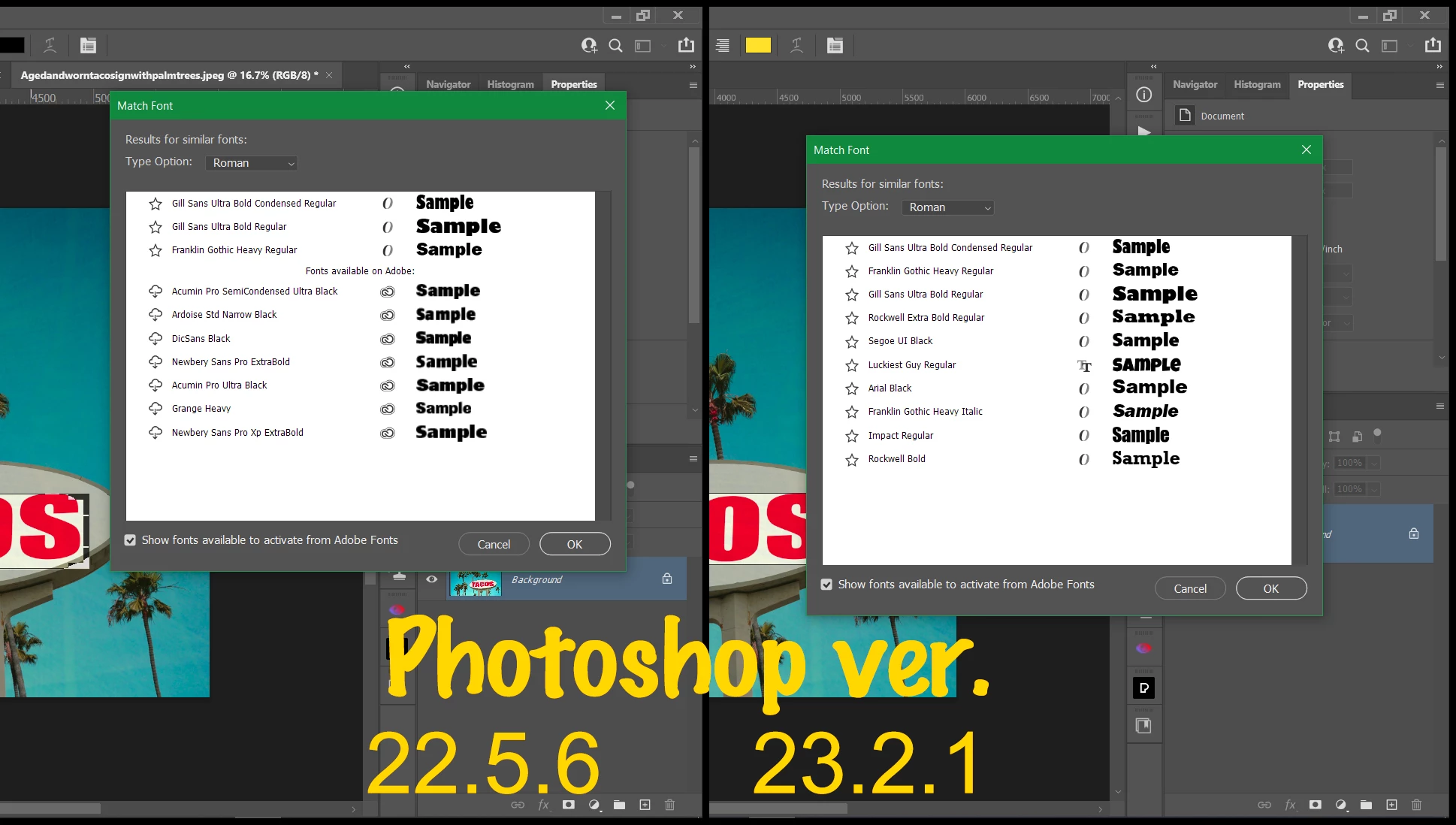
Using Windows 10 21H2. Since the update to V23, (not sure which sub-update), 'Match Fonts' feature will no longer show Fonts Available to activate from Adobe Fonts with the option set 'on'. V22 still works fine. Image posted shows two versions side by side.
 

This topic has been closed for replies.

8 replies

Frogman38Author
Inspiring
June 14, 2022

Yes thanks, 23.4 has resolved the issue. Now works as expected. 

Mohit Goyal
Community Manager
Community Manager
June 14, 2022

Hi all,


We're happy to announce the release of Photoshop 23.4. This update includes the fix for this issue. To see the list of all fixed issues, click here


To update Photoshop to 23.4, click "Update" in the Creative Cloud desktop app next to Photoshop. More detailed instructions for updating


Let us know if the update resolves the problem for those affected, and share your feedback.


Thanks,

Mohit

Legend
May 13, 2022

Yes. Slated for an upcoming update.

Frogman38Author
Inspiring
May 11, 2022

several updates later bug still exists. is this still 'in hand'

Legend
March 2, 2022

I've asked engineering to take a look. I'm seeing similar differences in results.

Frogman38Author
Inspiring
March 1, 2022

any update, has anyone tried with v23.2.1 on Windows?

Frogman38Author
Inspiring
February 25, 2022

I am using the latest version of Creative Cloud it is logged in. I have access to Adobe Fonts in the creative cloud app.

It is the Match Font Function does not display Adobe Fonts from the server in Photoshop 2022.

However I have Photoshop 2021 installed on the same PC and it accesses the Adobe Fonts from the server fine as my screenshots show.

If Creative Cloud App was not functioning why would an older version of Photoshop work when the newer one does NOT.

It is exactly the same on a fresh install of the latest version of Photoshop 2022 (23.2.1) on a different PC.

I had to install the older version of Photoshop to gain access to Match Fonts  to those on Adobe Font Server.

VinodBalakrishnan
Community Manager
Community Manager
February 25, 2022

@Frogman38 Photoshop is not connecting to the Adobe Font server. Please make sure you have the latest Creative Cloud application and signed into the application.