

danitosan
Inspiring
January 7, 2022

P: Old Font Explorer plug-in causes wrong document format in the open dialog causes constant crashes

  • January 7, 2022
  • 4 replies
  • 669 views

For some reason Photoshop is trying to open my files as FontExplorer X Pro format. No matter how many times I change that, it goes back to that format. This causes constant crashes. 

The only way to open a PSD file without crashing is to manually change that format to Photoshop. So I can't just open a file from the Finder, I've to maually go to Photoshop > Open > set the format and then open the file. 


I've tried deleting the preferences but didn't work. 
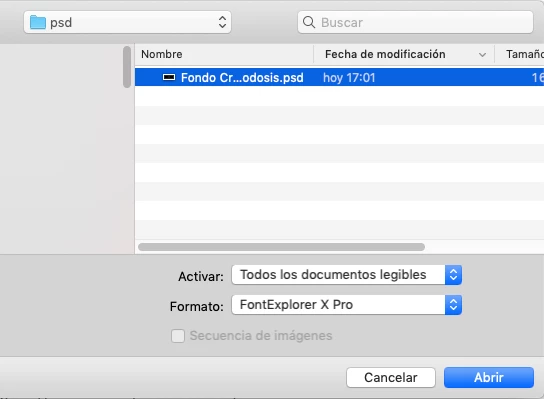


Sorry the dialogue is in Spanish, here's the translation but you know this window:

Activate: All readable documents

Format:.....

Cancel / Open


Photoshop 22.5.4

MacOS 10.14.6


Thanks in advance!

This topic has been closed for replies.

4 replies

danitosan
danitosanAuthor
Inspiring
January 11, 2022

Bingo! The second one solved the problem. 


I tried deleting the prefs before but didn't work. It was an old Font Explorer plugin, I deleted it and it works fine.


Thanks a lot! 

Legend
January 10, 2022

Two things to try:


1. Restore your preferences using this manual method:
https://helpx.adobe.com/photoshop/using/preferences.html#Manually
Does it work correctly?
If that doesn't solve it, you can quit Photoshop and put the Settings folder back.
If it does solve the problem, I would like to get the folder of settings to try and figure out what is bad with them.


2. Hold down the Shift key when launching Photoshop. When it asks if you want to skip plug-ins, click "Yes" - Try to replicate the problem. Does the problem persist?

danitosan
danitosanAuthor
Inspiring
January 10, 2022

Thanks for your reply, I've already checked that and it's Photoshop by default. Also manually changed all but didn't make a change. 

Legend
January 7, 2022

If you select a PSD in the Finder and Get Info, what does it show for the Open With section?