
deer83355243
Participant
January 30, 2025

P: Photoshop 2025 File info: Text Wrapping no longer works.

  • January 30, 2025
  • 5 replies
  • 531 views

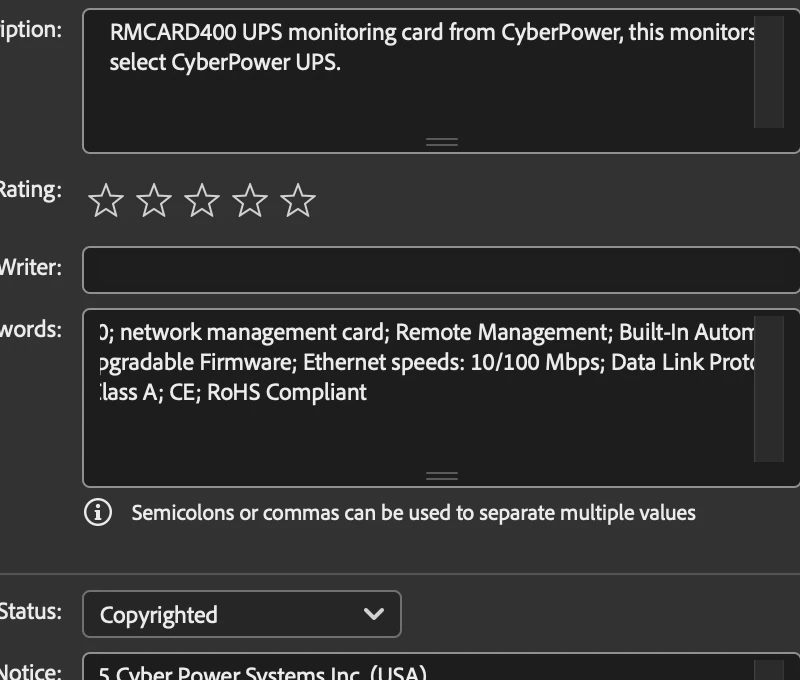
I recently updated Photoshop 26.2.0 and now when I am working in the "File Info" section the text no longer wraps within the window. As soon as I put the cursor in the window, the text automatically loses its formatting and goes out of the box. No matter how I resize the window horizontally or vertically it still just goes out of the box. (see screen shot below please)


It makes filling out these sections much more time consuming. Is there a bug fix for this?

I'm on a 2024 Macbook Pro/ 64 ram/ 2 TB hard drive/ Sequoia 15.3 iOS.


Thanks for your time I really hope someone have a fix for this! 🙂


5 replies

Participating Frequently
February 17, 2025

I have the same problem running on MacOS, with the text wrap not working correctly in the 'File Info' panels. This started happening about v26.2, but also at about the same time as a MacOS update.

I further notice that this seems to happen in the fields that can be expanded, and with a scroll bar on the right. 

I also have trouble inserting a cursor at the beginning of some existing text. For now, I put the cursor somewhere in the middle of the text and use the up arrow on the keyboard. This forces the cursor to the beginning of the field.

Finally, these issues do NOT seem to happen in the corresponding fields in Lightroom Classic.

Sameer K
Community Manager
Community Manager
January 30, 2025

Thanks for the report, @deer83355243, and to the Experts for moderating and verifying that it is Mac only. The issue also exists with v26.3 


I've shared this with the team for review.

Thanks! 
Sameer K

Jeff Arola
Community Expert
Community Expert
January 30, 2025

Seeing the same here with Photoshop 2025 (ps ver 26.3) running on macOS Sequoia 15.3


For comparision the first paragraph of deer's post was copied into the Basic>Description field in File Info

and while Photoshop 2024 (ps ver 25.12.1) seems okay, with Photoshop 2025 (26.3) the text doesn't stay within the Description box field.


Photoshop 2024


Photoshop 2025


davescm
Community Expert
Community Expert
January 30, 2025

It seems to work OK here with v26.3 on Windows 11. So it may be worth tryin 26.3 or it may be Mac only.

Dave

kglad
Community Expert
Community Expert
January 30, 2025

in the future, to find the best place to post your message, use the list here, https://community.adobe.com/

p.s. i don't think the adobe website, and forums in particular, are easy to navigate, so don't spend a lot of time searching that forum list. do your best and we'll move the post (like this one has already been moved) if it helps you get responses.


<"moved from using the community bugs">