
steveharrington1974
Known Participant
April 22, 2025

P: Photoshop 2025 v26.6 Bug - black document window

  • April 22, 2025
  • 179 replies
  • 36749 views

Photoshop 2025 v26.5 was working absolutely fine, then I made the mistake of updating to the latest patch, version 26.6.0 on my M4 Mac Mini.


After updating to 26.6, the actual document window is solid black - even if I open a photo or previous document...
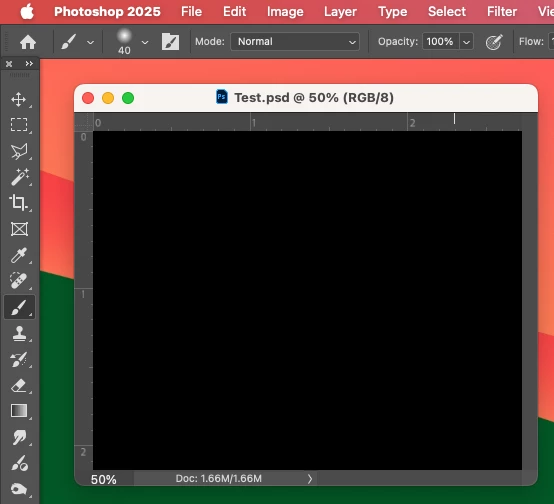


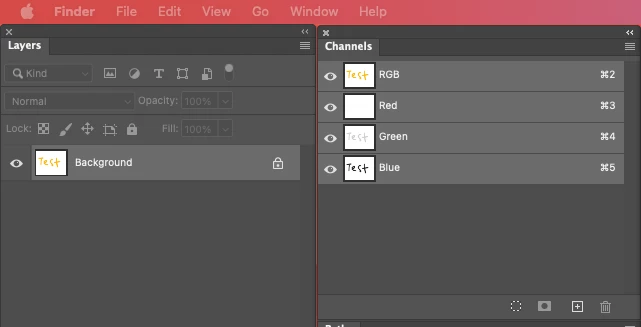
Even though the Layers and Channels palette preview thumbnails are showing what's in the document...


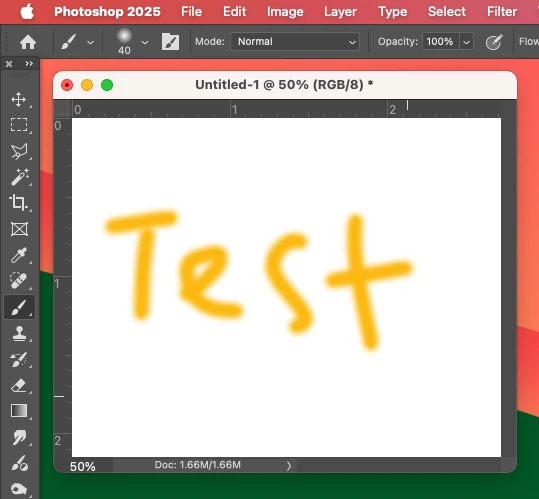
After digging around in Preferences, I tried turning off the "Use Graphics Processing" option and relaunching Photoshop afterwards, and it's working fine again...


I'm just wondering if this is a bug related to the M4 Mac Mini graphics driver compatibility with the version 26.6.0 release? And, if so, when can we expect a fix from Adobe. 


I've discovered the workaround for now, but obviously turning off the Graphics Processing setting will affect perfomance. Like I say, with this option switched on previously to the latest 26.6.0 release, it was working fine so it must be a new bug with 26.6.


I'm never updating this software ever again!!

179 replies

davidt3344986
Participant
April 29, 2025

I just upgraded to a new imac with Sequoia 15.4.1 and updated photoshop 26.6.0--black document. I switched the color mode to CYMK--it works!

Participating Frequently
April 29, 2025

I am getting this same bug in my M4 Mac mini so I'm pretty sure it is unique to the M4 graphics processor. Until Adobe works this out, I'm keeping the "graphics processor" unticked.

Participant
April 28, 2025

Following

Participant
April 28, 2025

I have the same issue with black documents using Adobe 26.6.0 on my 2019 Intel iMac with OS Ventura 13.4. I've tried opening PSD, CR2, and DNG files with the same result. I tried the workarounds of turning off "Use Graphics Processor" and switching to CMYK color mode. They both worked for now. "Precise Color Management for HDR Display" is already unchecked. I am sending a Dropbox link to @Srishti Bali containing my System Info. 

Participant
April 28, 2025

I have the same problem, macbook pro M1, after latest update to PS 26.6
the work around is to disable the GPU in performance settings 

Participant
April 28, 2025

Forget to mention (for those who don't know): press the OPTION key when clicking on the "go to" menu so that the Library folder appears in  the drop down and can be selected.

Participant
April 28, 2025

Thanks, worked for me as well (MacBook Air 2024, M3)!

Participant
April 28, 2025

Hello,

Yesterday (27 Apr 25) I have found that Jpeg files appear only as featureless black when I open them in Photoshop 2025 (v 26.6.0). This has happened in all of the following situations I have tried;

- Opening a previously created jpeg image stored in Finder on my Mac Mini (M4 Pro with 48gb RAM, running IOS Sequoia 15.4.1),

- Scanning a document as a JPeg from my HP Deskjet 2720 scanner/printer using /Import/Images from Device in Photoshop 2025,

- Opening a RAW (.NEF) Nikon Z8 image file as a jpeg in Photoshop 2025 from Adobe Camera Raw.

In the latter 2 cases above I note that if I save the jpeg file (which appears only black in Photoshop 2025) to my Mac, the actual image is viewable as normal when previewed in Finder, even though it was not visible in Finder.

I have had no such problems before at any time using Photoshop on my Mac and the last time I used Photoshop 2 weeks ago, I could view jpegs normally. I think that since then either my Mac OS, or Photoshop 2025, or both have updated, which leads me to suspect that a software update implemented on my machine in the last 2 weeks has caused this anomaly. This being the case, I would have thought that many users will be experiencing the same issue.

Grateful for an explanation/remedy for this issue, as at present I cannot fully use the software I am paying my subscription for. 

Many thanks


kglad
Community Expert
Community Expert
April 28, 2025

in the future, to find the best place to post your message, use the list here, https://community.adobe.com/

p.s. i don't think the adobe website, and forums in particular, are easy to navigate, so don't spend a lot of time searching that forum list. do your best and we'll move the post (like this one has already been moved) if it helps you get responses.


<"moved from cc desktop">
Participant
April 28, 2025

Bonjour,

j'ai actuellement le même problème que Steve Harrington depuis la nouvelle version : 26.6.0.

Sur Imac 27 pouces, Retina 5 k de 2017 et Ventura 13.7.5

Impossible de travailler mes images.

J'ai la suite Adobe Phographe.

Jean-Guy Couteau


jeffreyS1767173
Participating Frequently
April 28, 2025

Got it!  Thanks for the guidance.