
TenTin
Known Participant
February 17, 2025

P: PS 26.8.1 Segoe Emojis are darkened/degraded

  • February 17, 2025
  • 7 Antworten
  • 748 Ansichten

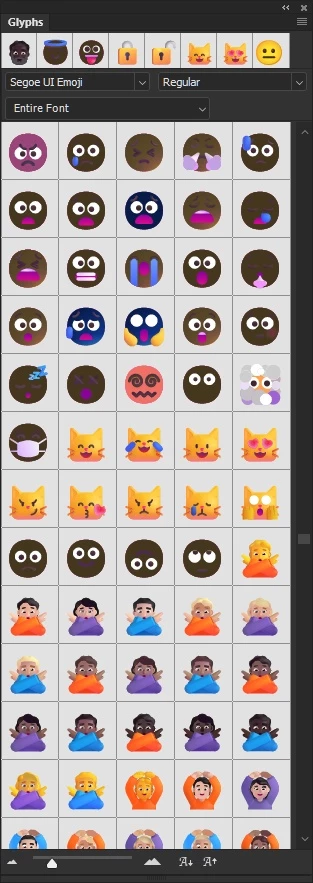
Why are the MS Fluent Emojis burned in the latest Photoshop update (the smileys and characters)?

I didn't have this problem before! 


Probably a new cake that Adobe has baked for us with garbage AI!
 

7 Antworten

TenTin
TenTinAutor
Known Participant
August 10, 2025

Photoshop 26.9 (official/stable) text engine is a massive mess! It has ruined the RTL fonts, and every time I select some RTL fonts (that I have paid for a lot), Photoshop crashes!!! Why is there no option to disable "Font Live Preview"?
 

All variable (RTL) font weights have the same weight!


It shows some emojis burned!


Seriously, Ps is going to make me nuts! I am thinking of changing my whole ecosystem, yet after many years!
I can't even design a simple poster with typography and emoji!!!! I can do this in MS Paint, but not in Photoshop version 26!!!

Bojan Živković11378569
Community Expert
Community Expert
July 21, 2025

Please include me on the list as well—I’ve noticed the same issue in version 26.8.1.

Sameer K
Community Manager
Community Manager
July 21, 2025

Thanks for the details @9883437 and @davescm, @Bojan Živković11378569 for the confirmations. I've shared this with the team for review. 
Best, 
Sameer K

TenTin
TenTinAutor
Known Participant
July 19, 2025

I have a habit of solving problems rather than ignoring them.


My GPU driver is up to date (Intel Arc Ultra Core Series).


In the latest version of Photoshop, the text engine started to ruin the RTL variable fonts again! When I select a Persian (right-to-left) font which is variable, all weights are the same! This was a problem in some previous version, apparently Adobe solved it, but it's back!

davescm
Community Expert
Community Expert
July 19, 2025

I see exactly the same as TenTin here, using v26.8.1 and the same Segoe UI Emoji Regular font.
The font itself is unchanged and renders correctly in v 25.12.3

Dave

barbara_a7746676
Community Expert
Community Expert
July 19, 2025

Also check if your GPU needs upgrading

barbara_a7746676
Community Expert
Community Expert
July 19, 2025

I'm not able to replicate this issue.

You might try some of the usual troubleshooting -- Delete prefences file or use the Adobe Cleaner Tool.

ThioJoe
Community Expert
Community Expert
February 17, 2025

When using certain emojis (seems like many of the face emojis are effected) with the built in Windows 11 "Segoe UI Emoji" font, certain parts of the emoji are wrong.


Below is an example of two that look wrong but in different ways, and another that appears correct, so it's not all of them:


How they should look (screenshotted from microsoft word):


You can see that for the turning head emoji, in Photoshop it looks much darker than it should. And for the thinking emoji the problem is obvious. I also notice how in the thinking emoji, the main face part has gradients, but the messed up version is all just one flat color - not sure the significance of that.


Looking in the Glyphs panel, it seems that many of the face icons specifically are affected, though there could be others and it's just more obvious with the faces:


--------------------


Here's some of my system info, I can provide the entire "System Information" contents if needed.


Adobe Photoshop Version: 26.3.0 20250122.r.156 bfca642 x64
Operating System: Windows 11 64-bit
Version: 11 Build 10.0.26100.3194 (Version 24H2)

CPU: Intel 13900KS

GPU: Nvidia 5090 - Driver 572.16


It does the same thing when I tried it in virtual machine also using Windows 11 24H2 with a fresh copy of Photoshop 26.3.0. 

It also does the same thing in the Photoshop beta (Version 26.5.0 20250212.m.2973 455b503 x64)

Bojan Živković11378569
Community Expert
Community Expert
August 17, 2025
